NoSQLBooster 11.0 Released! Embedded Mongosh Engine, Native Apple Silicon, and More

We are thrilled to announce the release of NoSQLBooster 11.0 — the most significant upgrade in the product's history. This major version embeds the latest mongosh engine (v2.8) directly into the IDE, delivering full MongoDB Shell compatibility with top-level await, modern ES6+ syntax, and all the latest aggregation operators. The data viewer has been completely rebuilt on AG-Grid for faster rendering and inline cell editing. On macOS, NoSQLBooster now ships native Apple Silicon builds for M1/M2/M3/M4 Macs, and the entire application has been upgraded to support MongoDB 3.6 through 8.0 with improved performance and security.

This release represents over 1,500 commits of engineering effort, delivering a faster, more secure, and more feature-rich MongoDB administration experience.

If you want to try NoSQLBooster 11.0 out now, you can get it from the following link.

NoSQLBooster 11.0 Download Link

The product will automatically enter the 30-day trial mode after a successful installation. At the end of the 30-day trial period, the product becomes a free edition. The free version is free for personal/commercial use but with limited functions.

The following figure shows the main interface of version 11.0.

Main interface

Let's dive in and get an overview of what's coming in NoSQLBooster 11.0!

Although we are showing screenshots of NoSQLBooster for Windows, all these new features are available for macOS and Linux as well.

What's new?

Embedded Mongosh Engine (v2.8)

The headline feature of NoSQLBooster 11.0 is a completely rewritten embedded MongoDB Shell engine. NoSQLBooster 11.0 adopts @mongosh/async-rewriter2 — the same technology that powers the official MongoDB Shell — effectively embedding the latest mongosh engine (CLI version 2.8.2) directly into the IDE. This gives you a first-class mongosh experience without leaving the graphical environment.

What this means for your daily work:

  • Full mongosh compatibility — any script written for the official mongosh works in NoSQLBooster without modification
  • Top-level await — your own async code (custom Promises, fetch, etc.) can use await directly at the top level; shell-api methods like find(), toArray() are auto-resolved as before
  • All MongoDB 8.0 operators — every new aggregation stage and operator from MongoDB 8.0 is available immediately
  • Better error messages — source-mapped stack traces point to the exact line in your script, not to internal engine code
  • Cross-platform consistency — identical behavior on Windows, macOS, and Linux
1
2
3
4
5
6
7
8
9
// Fluent cursor API — works without await, same as before
var recentOrders = db.orders.find({ status: "shipped" })
.sort({ orderDate: -1 })
.limit(20)
.toArray();

for (const order of recentOrders) {
print(`${order.customer} — $${order.total}`);
}
1
2
3
4
5
6
7
8
9
10
11
12
13
// Modern JavaScript + aggregation pipeline + top-level await
var topCustomers = db.orders.aggregate([
{ $match: { year: 2024 } },
{ $group: { _id: "$customerId", totalSpent: { $sum: "$amount" } } },
{ $sort: { totalSpent: -1 } },
{ $limit: 5 }
]).toArray();

// Your own async code works with top-level await
var response = await fetch("https://api.example.com/loyalty-tiers");
var tiers = await response.json();

topCustomers.forEach(c => print(`${c._id}: $${c.totalSpent}`));

Rebuilt Data Viewer with AG-Grid

The data viewer has been rebuilt from the ground up on AG-Grid, delivering a significantly improved experience for browsing and editing query results. Key improvements include:

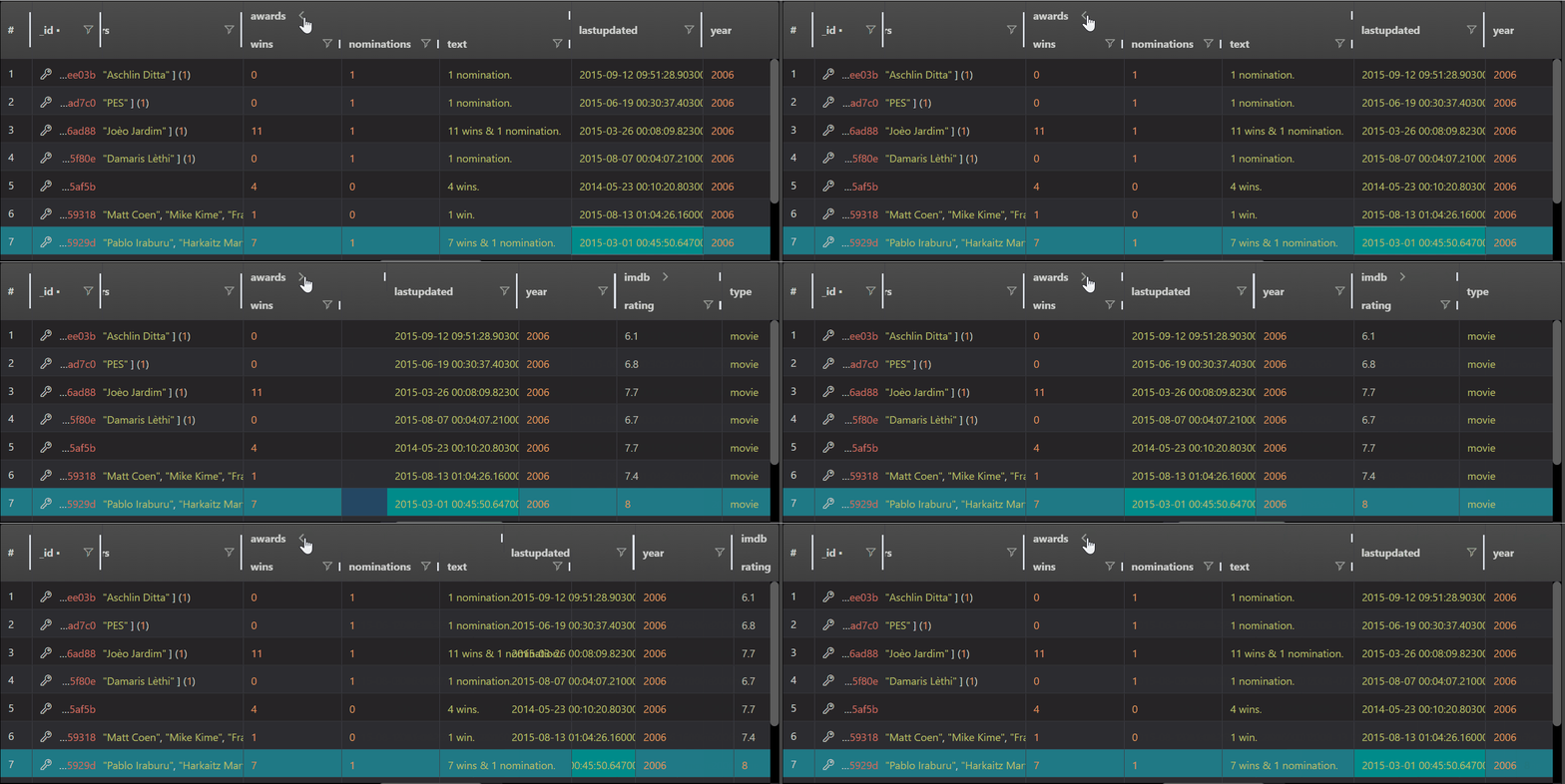
  • Nested field column groups — nested document fields are automatically organized into collapsible column groups (e.g., address.city, address.zip are grouped under address), making deeply structured MongoDB documents easy to navigate
  • WebGL-accelerated rendering — large datasets render with hardware acceleration; the application automatically detects WebGL support and prompts accordingly
  • Column state persistence — column widths, ordering, and visibility are remembered between sessions
  • JSON Viewer large content handling — when JSON output exceeds 2MB, the viewer initially shows the first 500KB for instant responsiveness, with a "Show All Content" button to load the full content on demand
  • Inline cell editing — press Enter on any editable cell to modify values directly in the table, no separate dialog needed
  • show dbs / show tables in table view — these common commands now display results in a clean table view automatically instead of plain text
  • Encrypted field detection — CSFLE/Queryable Encryption fields are identified via schemaMap, encryptedFieldsMap, and runtime BinData(6) detection, and clearly marked in the data view
  • DBRef follow reference — clicking a database reference opens the related document in a new shell tab for seamless navigation
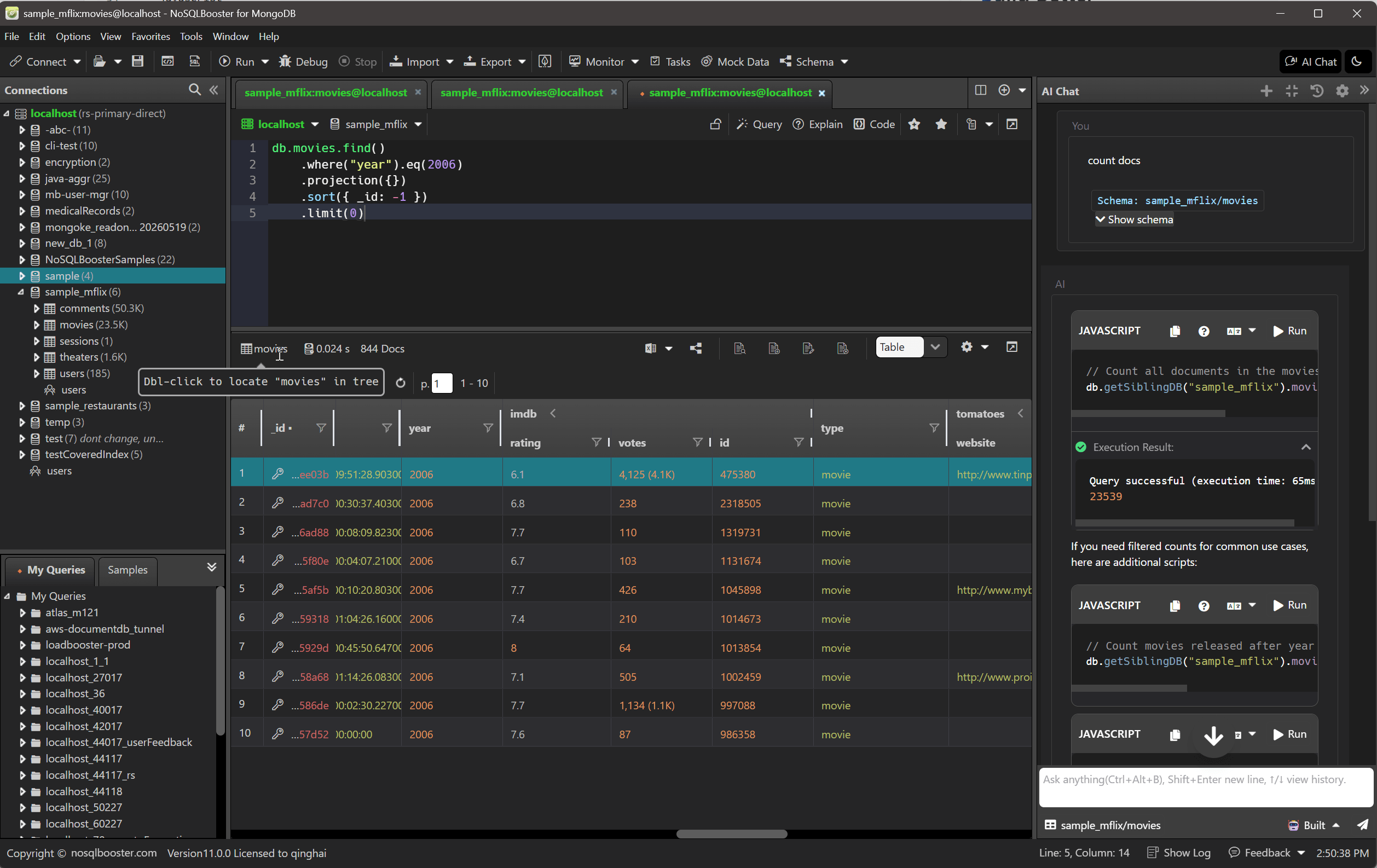
  • Double-click to locate in tree — double-click the collection icon in the data viewer toolbar to automatically expand and scroll to that collection in the object explorer tree
Nested Field Column Groups

Native Apple Silicon Support

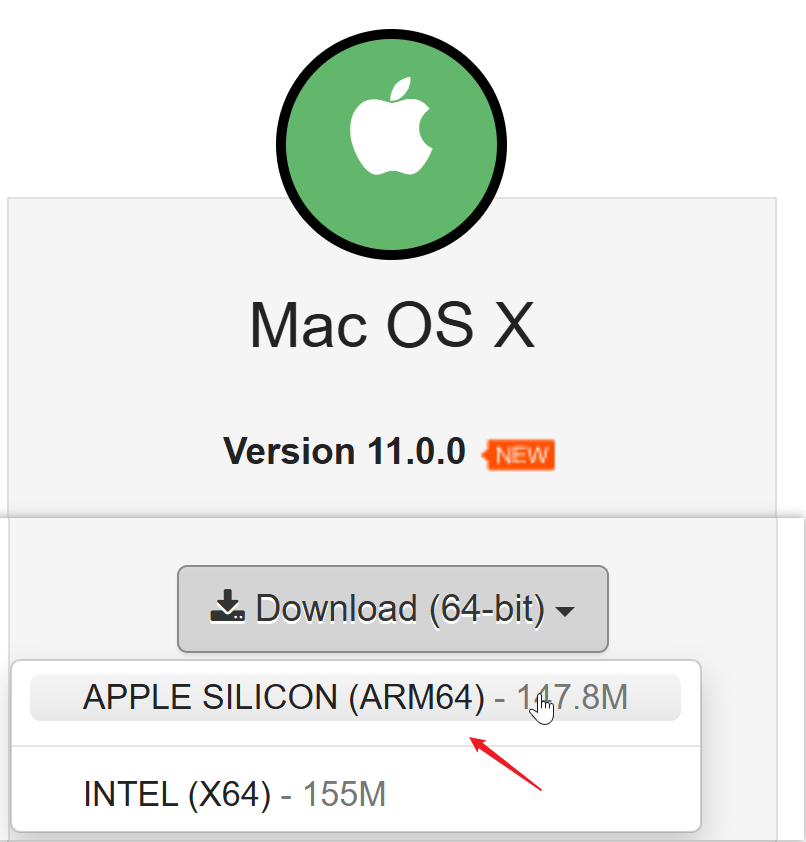
NoSQLBooster 11.0 now provides separate native builds for Intel (x64) and Apple Silicon (arm64) Macs. If you're using an M1, M2, M3, or M4 Mac, you can now run NoSQLBooster natively — no more Rosetta 2 translation overhead.

  • Native performance — the application runs directly on Apple Silicon, delivering faster query execution and smoother UI interactions
  • Faster startup and lower memory usage compared to the translated x64 build
  • Separate DMG installers for each architecture — download the one that matches your Mac

This release also resolves the macOS Tahoe (macOS 26) system-wide lag issue that affected Electron-based applications.

macOS Builds

Modernized Technology Stack

To support the new mongosh engine and deliver a better overall experience, NoSQLBooster 11.0 has been rebuilt on a modernized technology stack. While these changes are mostly under the hood, they provide the foundation for faster performance, improved stability, and future feature development.

Component Version 10.x Version 11.0
Electron 11.5 40.9
Chromium 87 134
Node.js 12.x 22.x
MongoDB Node.js Driver 6.9 7.2
BSON 6.7 7.0
Frontend Framework Vue 1.x Vue 3.5
Data Grid EasyUI AG-Grid 34.2

The modern Chromium engine delivers better rendering performance, improved security, and full support for modern web standards. The upgraded frontend framework brings significantly faster UI rendering, and the switch to AG-Grid enables inline editing, WebGL-accelerated large dataset rendering, and advanced column management in the data viewer.

Feature Highlights

Beyond the foundational platform changes, NoSQLBooster 11.0 delivers a wealth of functional improvements that enhance day-to-day productivity. Here are the most notable features organized by category.

Visual Query Builder

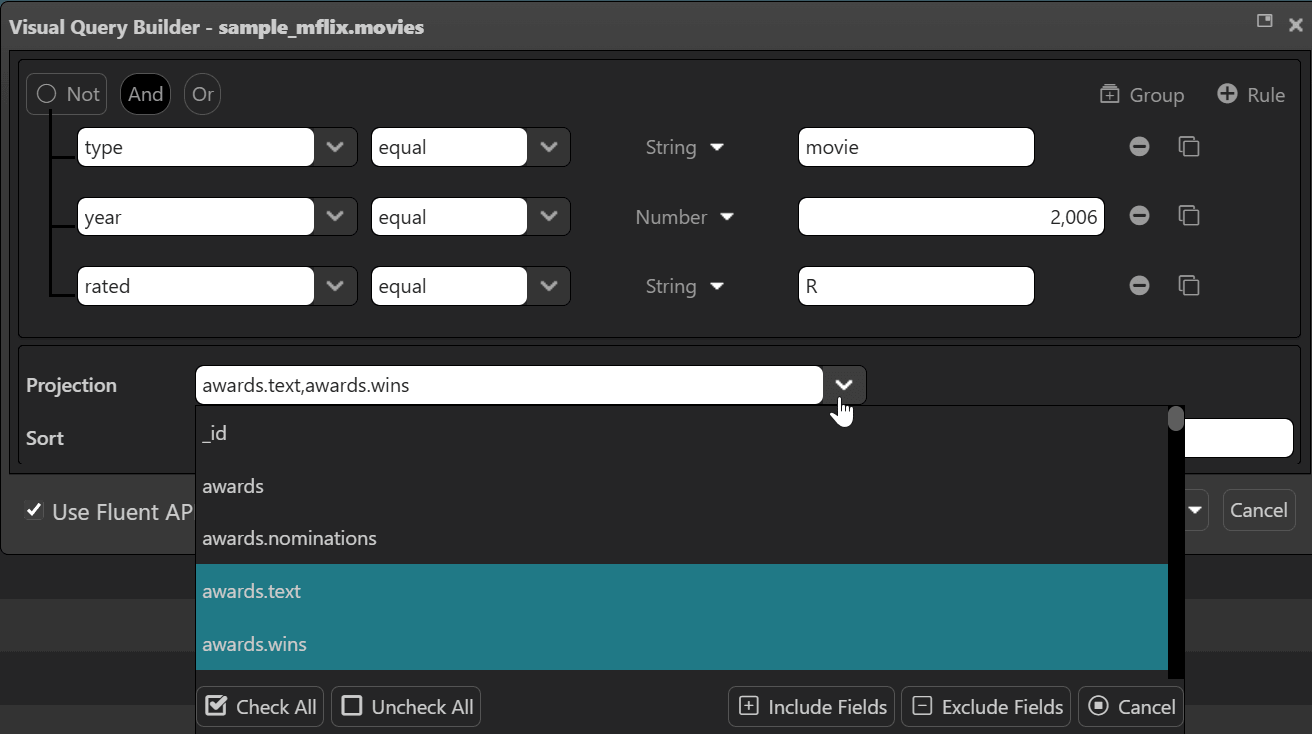
The Visual Query Builder has been completely rewritten for better responsiveness and a cleaner layout. Query construction is now faster and more intuitive, with improved drag-and-drop interactions and real-time preview of generated query conditions.

Visual Query Builder

Script Debugger

The built-in script debugger works reliably with the new mongosh engine:

  • Accurate source mapping — breakpoints map correctly to your original script code, even when the engine transforms it behind the scenes
  • Proper script termination — stopping at a breakpoint correctly terminates the script instead of letting it continue to completion
  • Sandboxed debugging — debugger operations are isolated from the main application for stability

Batch Copy Multiple Databases

You can now select multiple databases and copy them to a target server in a single operation, instead of copying them one by one. This is a great time-saver when migrating or consolidating databases across servers.

Additionally, the Rename Database script template has been significantly improved. Since MongoDB does not provide a native rename command, NoSQLBooster implements this by moving all collections and users to the new database, with smarter error handling and automatic cleanup of the empty source database.

Non-Intrusive Tree Node Tooltips

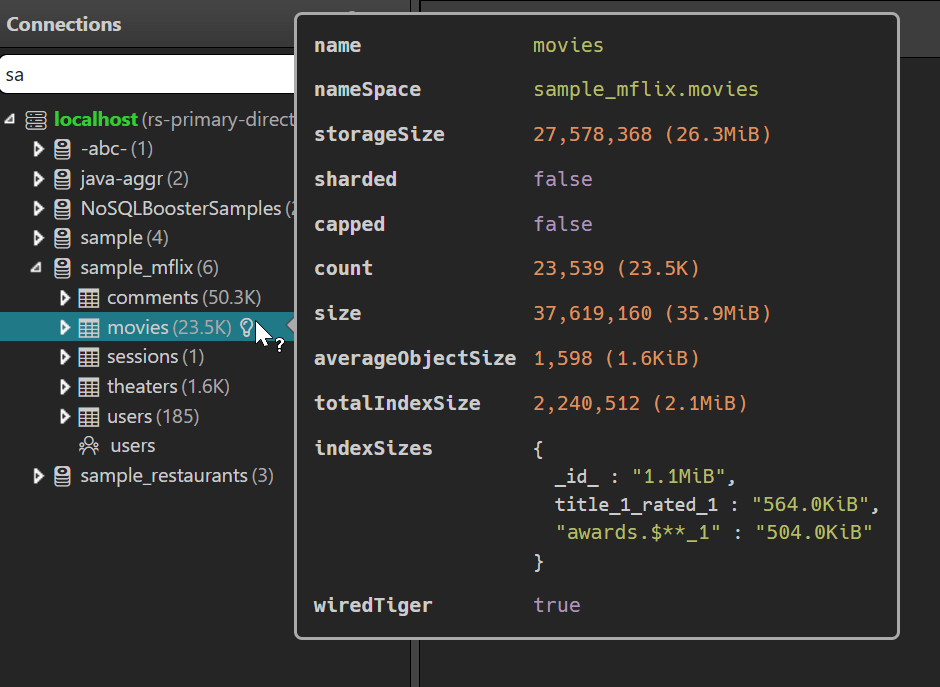
In previous versions, hovering over any node in the connection tree would immediately pop up a tooltip — often blocking the node name and surrounding information during normal browsing. Version 11.0 fixes this by adding a dedicated info icon to the right of each tree node (connections, databases, collections, indexes, and more). The tooltip now only appears when you hover over this icon, so it never interferes with reading the tree. Each node type shows its own contextual information — for example, index nodes display live indexStats (access counts, operation statistics), while collection nodes show document count and storage size.

Collection Tooltip

DBRef Follow Reference with One-Click SQL JOIN

The Follow Reference dialog now features a "SQL JOIN in shell" button that instantly generates an equivalent SQL JOIN ($lookup) statement based on the DBRef relationship. This is a great time-saver when you need to explore relationships between collections:

  • One-click generation — click the button and NoSQLBooster opens a new shell tab with the SQL JOIN query, pre-filled and auto-executed
  • Cross-database awareness — if the referenced collection is in a different database, a warning comment is added to the script since $lookup requires both collections in the same database
  • Smart field mapping — the generated query automatically maps the source field (e.g. orders.userId) to the target collection's _id
1
2
3
4
// Generated SQL JOIN from a DBRef field "userId" referencing "users" collection
mb.runSQLQuery(`
SELECT orders.*, users.* FROM orders JOIN users ON "orders.userId" = "users._id";
`)

The equivalent native mongosh statement uses the $lookup aggregation operator:

1
2
3
4
5
6
7
8
db.orders.aggregate([{
$lookup: {
from: "users",
localField: "userId",
foreignField: "_id",
as: "userDetails"
}
}])

Intelligent Document Preview

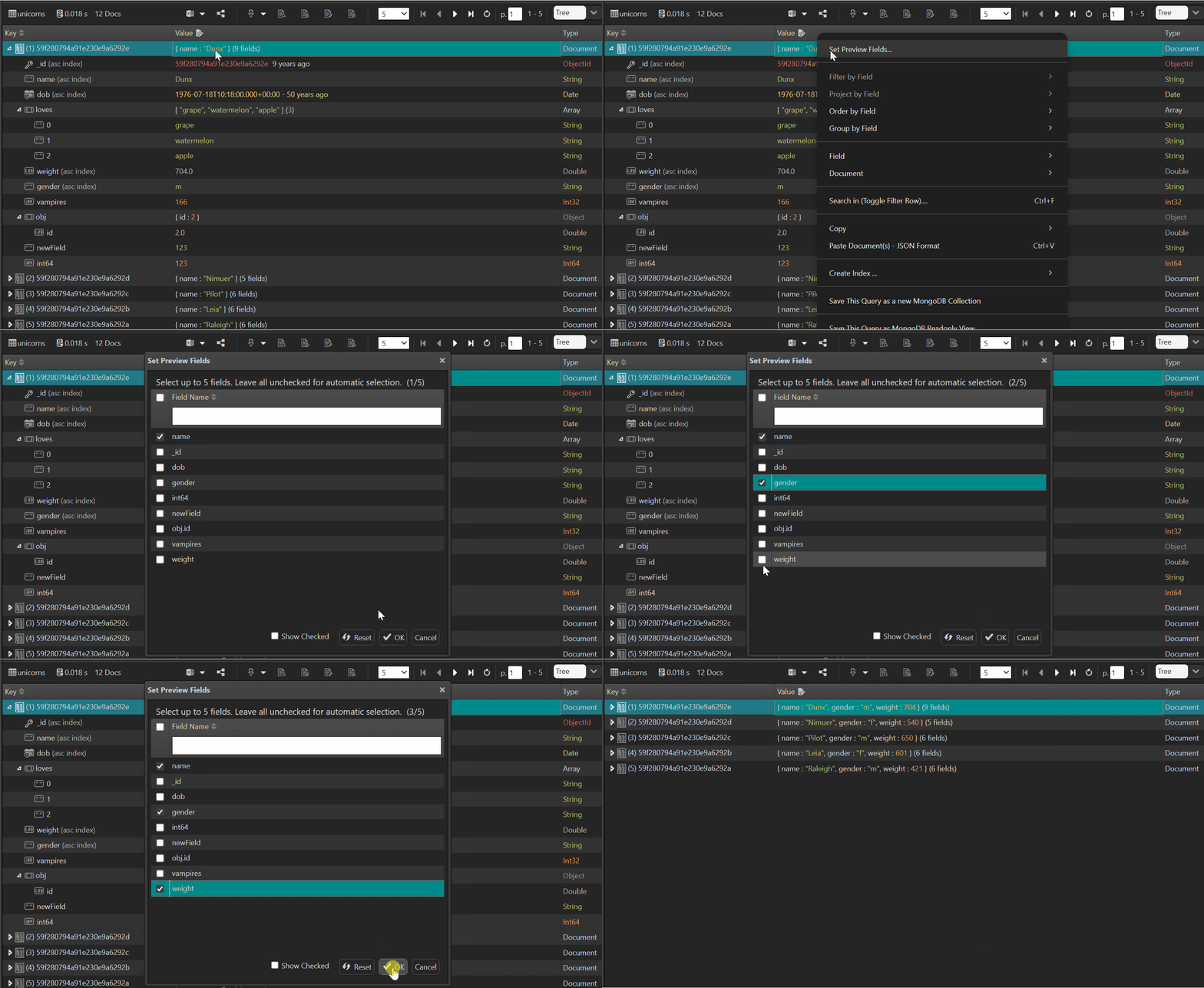
The document preview in the tree/table view has been enhanced with intelligent field selection that picks the most meaningful fields to display:

  • Multi-language field name matching — recognizes common field names across 8 languages (English, Chinese, Japanese, Korean, Spanish, French, German, Portuguese) using deburred snake-case normalization
  • Smart identifier filtering — automatically skips GUID/ObjectId/UUID/MD5 values that carry no semantic meaning for preview purposes
  • Priority-ordered display — fields are shown by importance priority rather than raw document key order, so the most informative fields appear first

For example, a document with {_id: ObjectId("..."), nombre: "Carlos", apellido: "García", email: "[email protected]"} will intelligently prioritize nombre and email in the preview rather than starting with the _id.

Enhanced Connection Tree

The database object explorer has received substantial improvements for navigating large connection trees:

Smart Node Filtering

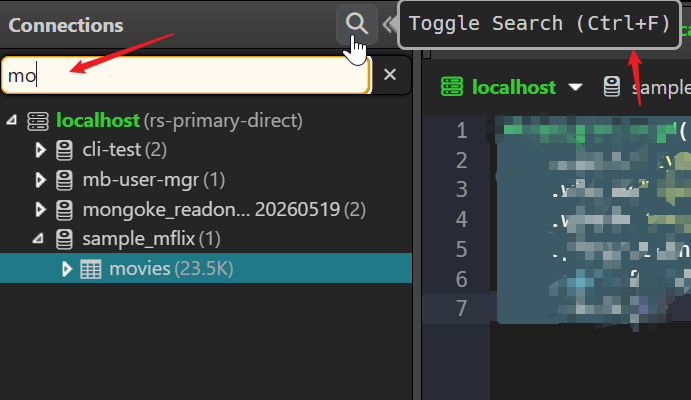
The tree search now supports namespace-format filtering — you can type patterns like db.collection to precisely locate nodes deep in the hierarchy. The filter logic matches against both the node's own name and its ancestor chain, so sales.orders will match the orders collection under the sales database.

  • Word-level matching — type partial words to match nodes and their ancestors
  • Namespace format — use database.collection syntax for precise filtering
  • Flexible partial matching — empty parts are allowed for maximum flexibility
Connection Tree Search

Large Connection Search Confirmation

When searching in a connection tree that contains a large number of databases/collections, NoSQLBooster now detects the scale and prompts for confirmation before proceeding, preventing accidental performance impacts. A loading indicator is shown during the search, and you can cancel the operation at any time to stop the backend query.

Text Truncation with Full Tooltip

Long node names in the connection tree are now truncated in the middle (e.g., very_long_collection...suffix) rather than being clipped at the end, preserving both the beginning and ending of the name. The full name is displayed in a tooltip on hover.

Auto TypeScript Mode Detection

The script editor can now automatically detect whether a script file should be opened in TypeScript mode based on its content. If the editor detects TypeScript-specific syntax (type annotations, interfaces, etc.), it will switch to TypeScript parsing without requiring manual mode selection.

Query Profiler Enhancement

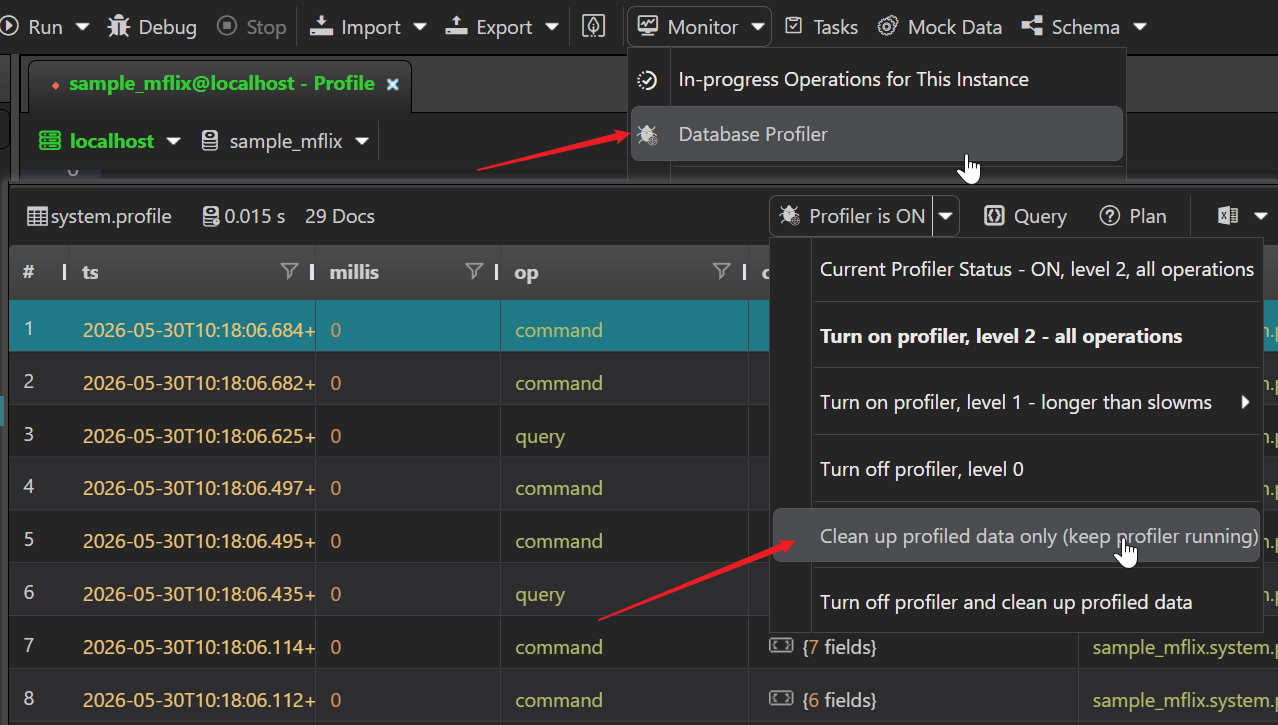
A new "Clean Profiled Data" option allows you to clear all collected profiler data while keeping the profiler running. Previously, you had to turn off the profiler to clean up its data. This is useful when you want to start a fresh profiling session without interrupting the monitoring workflow.

Clean Profiled Data

Toolbar and UI Improvements

  • Text selection enabled globally — all UI elements now allow text selection (user-select: auto), making it easy to copy values, error messages, and other text from the interface; previous versions blocked text selection by default
  • Clear recent files — a new toolbar action to clear the recent files list with one click
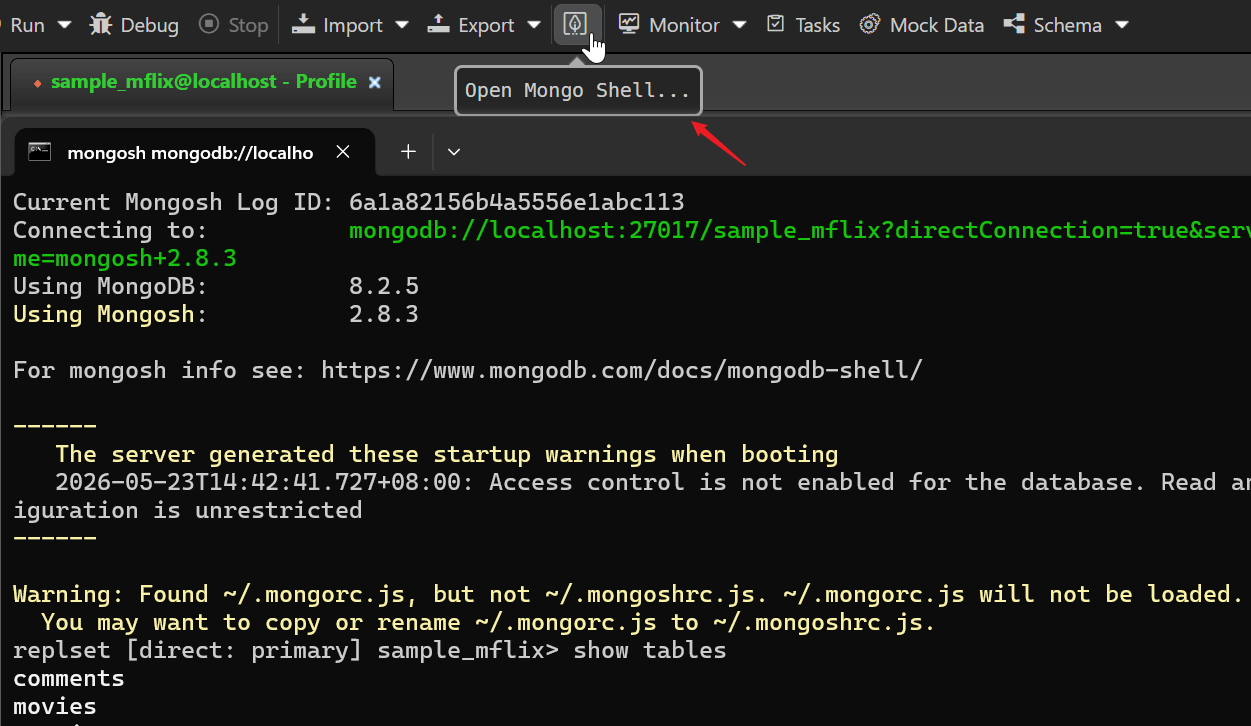
  • MongoShell icon — the toolbar now features a dedicated MongoShell icon for quick shell access
MongoShell icon

Connection Editor

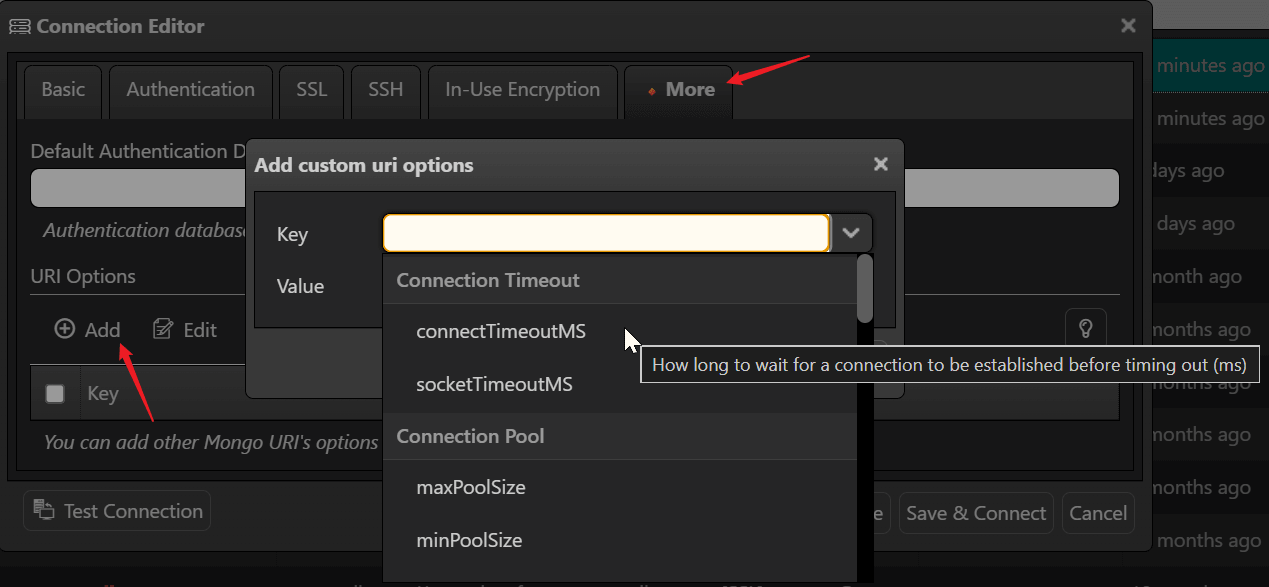
The "More" tab in the connection editor has been enhanced with a comprehensive set of MongoDB URI options:

  • Complete URI option catalog — all standard MongoDB URI options are now available in the "Add URI Option" dialog, no need to remember option names
  • Categorized display — options are grouped by function: Connection Timeout, Connection Pool, Write Concern, Read Concern, Read Preferences, Server, Compression, and Miscellaneous
  • Inline tooltips — hovering over an option shows a clear description of what it does (e.g., connectTimeoutMS: "How long to wait for a connection to be established before timing out")
  • Default value pre-fill — selecting an option automatically fills in its recommended default value
URI option catalog

Security and Authentication

Enhanced Authentication

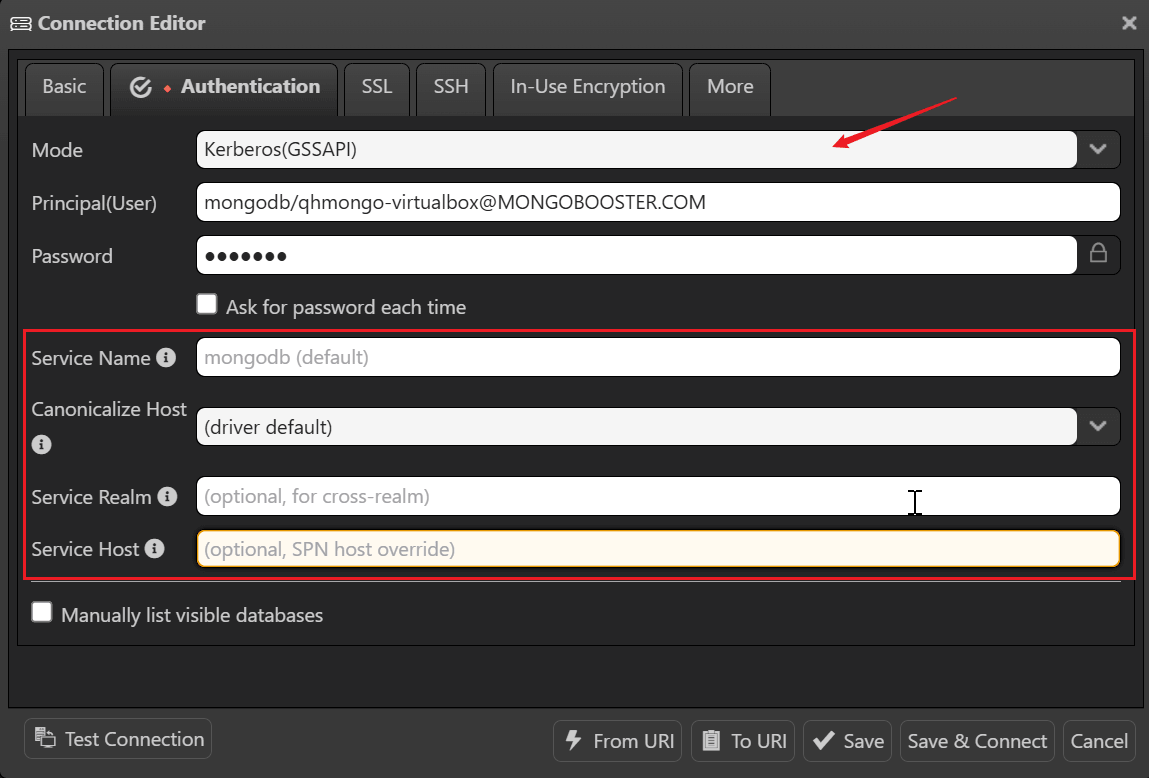
  • Kerberos (GSSAPI) connection options — selecting Kerberos as the authentication mode now reveals a dedicated set of form fields for easy configuration: Service Name (SPN), Canonicalize Host, Service Realm (for cross-realm authentication), and Service Host (SPN host override); these were previously unavailable and required manual URI string editing
  • OIDC self-hosted endpoints — connect to your organization's own OIDC provider with a new "Consider Target Endpoint Trusted" tri-state option
  • Auth mode validation unified across frontend and backend for consistent security policy enforcement
Kerberos connection options

Application Security

  • Dynamic Content Security Policy — CSP is now injected at runtime, enabling support for custom AI API endpoints while maintaining security
  • Reduced attack surface — Electron Fuses lock down security-critical features at build time; unused Chromium features are disabled
  • HTTPS enforcement — all external resource loading upgraded from HTTP to HTTPS

Faster Startup

NoSQLBooster 11.0 launches noticeably faster thanks to several optimizations:

  • V8 compile cache — JavaScript code is cached after first compilation, reducing subsequent startup time
  • Deferred initialization — non-essential features load on demand rather than at launch
  • Non-blocking file dialogs — opening and saving files no longer freezes the UI

Data Import and Export

Export with Global Date Format Settings

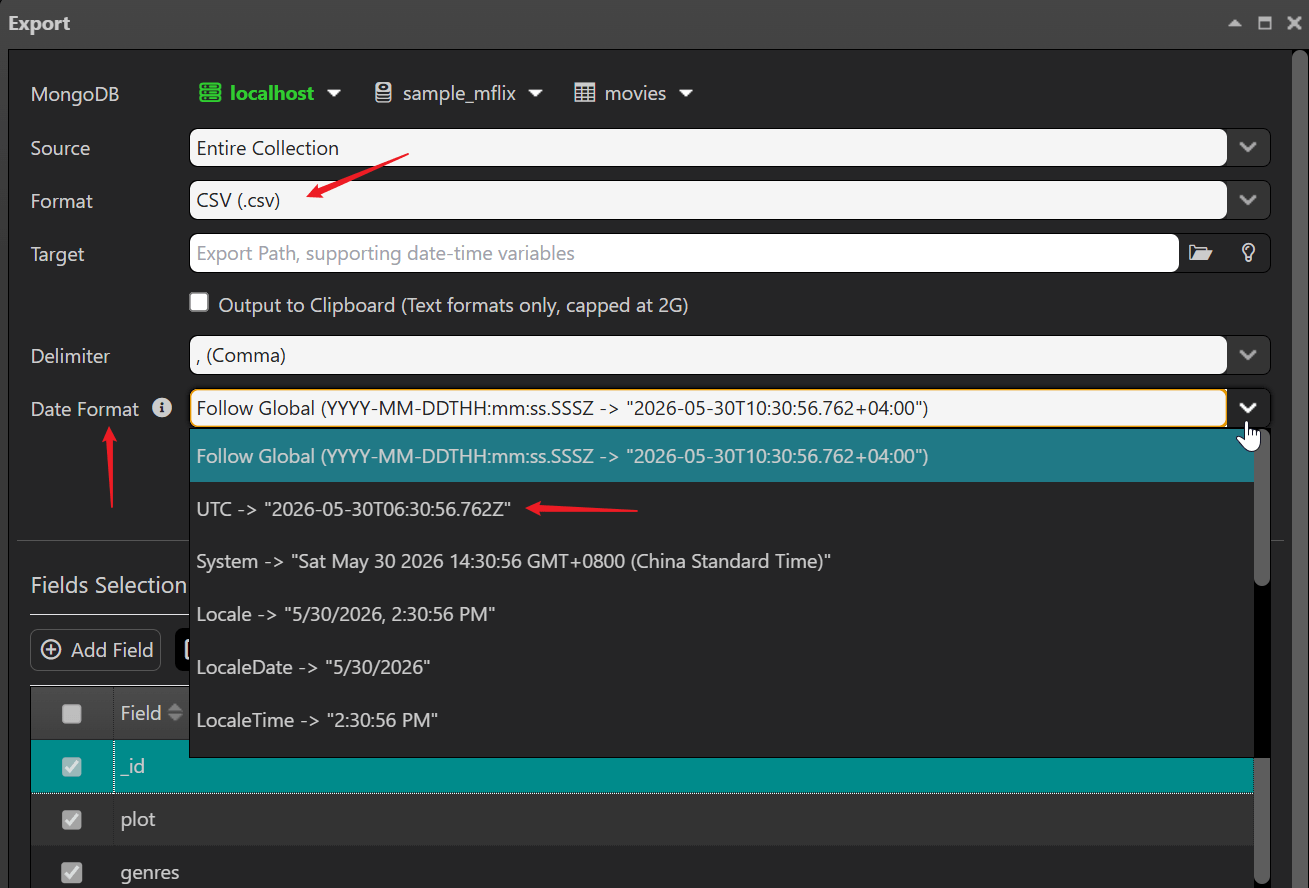
When exporting query results to CSV or Excel, the export now respects the global dateFormat and utcOffset settings configured in the application. This ensures date/time values in exported files are consistent with your display preferences, eliminating the need for post-export formatting.

  • Follow Global selection — the export dialog automatically follows the global date format setting
  • Progress feedback — XLSX, HTML, and TXT exports now report progress to the frontend via sandbox console, so you always know how far along the operation is
Export Date Format

Improved MongoDB Tools Path Configuration

The configuration for external MongoDB tools (mongodump, mongoexport, mongoimport) has been refactored with a caching mechanism for faster access. Path handling has been improved to correctly support spaces and UNC paths on Windows.

SQL Import and MongoDB Tools

SQL Import Enhancement

The SQL Import feature has been significantly improved with smarter table/view handling and safer name mapping:

  • Table vs View recognition — SQL tables and views are now distinguished automatically via INFORMATION_SCHEMA (MySQL/MSSQL) or pg_catalog (PostgreSQL); views are marked with a (view) label in the import list
  • Views unchecked by default — since views contain derived data, they are not selected for import by default, preventing redundant data duplication
  • Automatic name sanitization — source table names and column names containing characters unsafe for MongoDB (., $, whitespace, /, \, \0) are automatically converted to safe identifiers (e.g., dbo.usersdbo_users, first namefirst_name)
  • Field mapping auto-suggestions — when choosing which fields to import, columns with unsafe characters automatically show a sanitized destination field name
  • Editable connection combobox — easily switch between SQL database connections
  • Tree refresh with focus — tree view automatically refreshes and focuses on newly imported collections
  • Northwind sample URI — includes a sample connection string for quick testing

MongoDB Tools Integration

  • Refactored MongoDB Tools (mongodump, mongoexport, mongoimport) path configuration with caching
  • Fixed export path component handling for spaces and UNC paths on Windows
  • Increased execAsync buffer size for large operations

Mock Data Generator

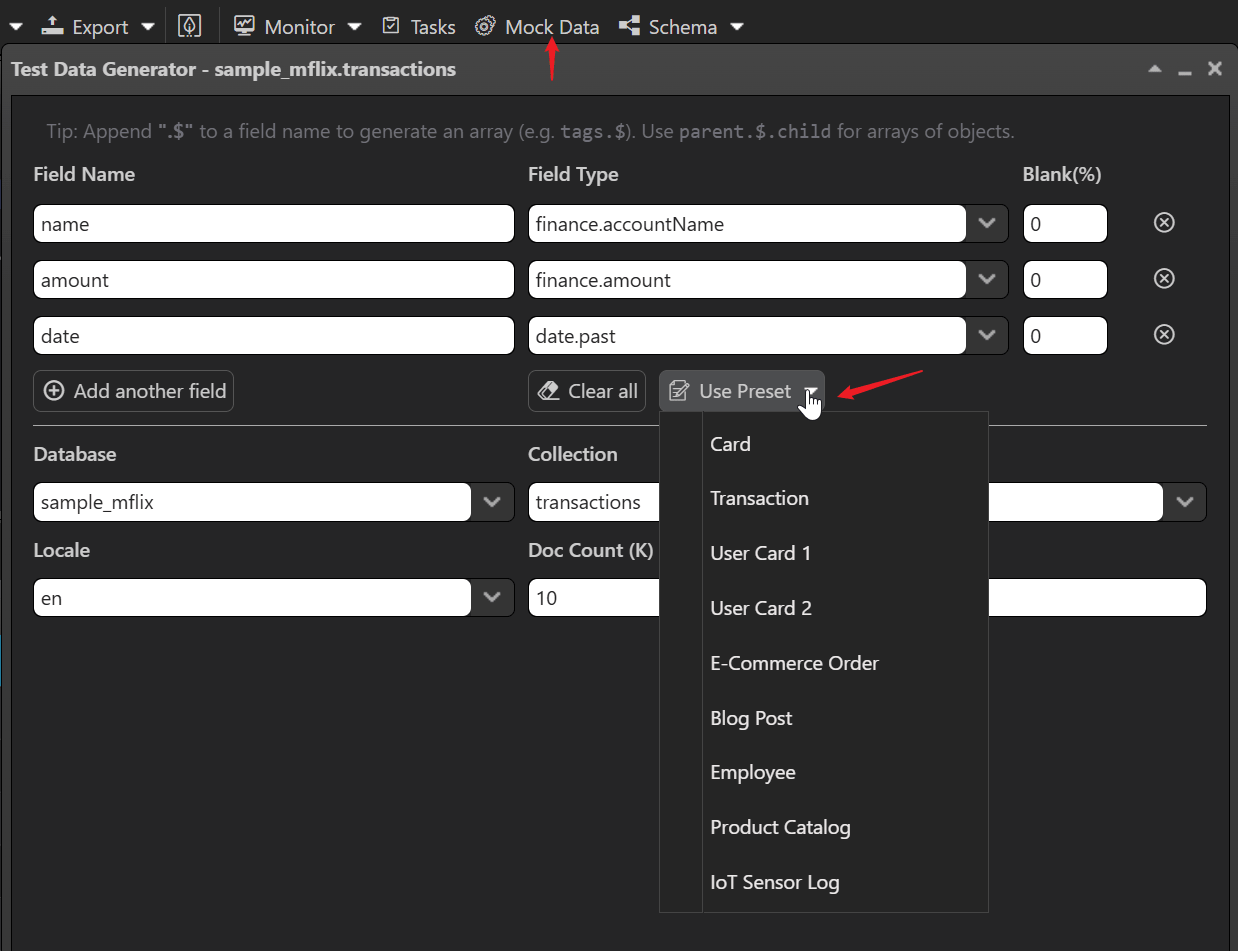
The Test Data Generator has been renamed to Mock Data and received significant usability improvements:

  • Renamed to "Mock Data" — the toolbar button now displays "Mock Data" for a clearer, more concise name
  • Array field hint ($) — a tip banner at the top of the dialog explains how to generate arrays: append .$ to a field name (e.g., tags.$ generates an array of values; items.$.productName generates an array of objects)
  • Preset templates — 9 built-in templates for common data patterns: Card, User Card 1/2, E-Commerce Order, Blog Post, Employee, Product Catalog, Transaction, and IoT Sensor Log; each pre-fills field names, types, and collection names
  • Refactored field type list — field types are now dynamically fetched with virtual-scroll support, showing inline examples on hover for easier selection
  • Robust error handling — field-type errors are surfaced clearly, and null-connection scenarios are handled gracefully
Mock Data Generator

AI Helper

The built-in AI Assistant has been upgraded with an improved backend model and smarter prompts:

  • Upgraded backend LLM — the AI Helper now uses a more capable language model on the backend, delivering higher-quality responses and better code generation
  • Smarter MongoDB prompts — system prompts have been refined to generate more accurate MongoDB shell statements that can be directly copied and executed in NoSQLBooster
  • Collapsible panel — the AI chat panel can now be fully hidden when collapsed (previously it remained visible as a narrow sidebar), reclaiming valuable screen real estate for the data viewer and script editor
  • Custom AI endpoint support — users can configure their own AI API endpoints; dynamic CSP (Content Security Policy) automatically adjusts to allow custom endpoints while maintaining security

Other Notable Improvements

Task Management

  • Copy command line for multiple shells (Windows) — the "Copy Command Line" menu now offers three shell formats: CMD, PowerShell, and Git Bash, each generating the correct syntax for that shell (e.g., PowerShell uses $env:Path and & operator; Git Bash uses export PATH=...); previously only CMD format was available
  • Enhanced task connection status checking with color marking for quick visual identification
  • Improved Linux headless mode and CLI compatibility (AppImage command fix, X Server crash fix)
  • Cron task environment compatibility improvements for Linux

Schema Explorer

  • Optimized Schema Analyzer connection management and error handling
  • Fixed async collection statistics retrieval
  • Improved toolbar styling and button spacing

Miscellaneous

  • Upgrade MongoDB Node.js driver to 7.2
  • Upgrade BSON to 7.0
  • Upgrade embedded mongosh to CLI version 2.8.2
  • Remove Google Analytics integration for improved privacy
  • GridFS contentType storage and edit dialog display restored
  • Cross-platform multi-cell selection fix for macOS/Linux
  • Logger window toolbar optimization and pause state synchronization

Read More

NoSQLBooster 11.0 Breaking Changes: Migration Guide

NoSQLBooster 11.0 introduces a completely rewritten MongoDB Shell engine and several architectural changes that may affect your existing scripts and configurations. This guide walks you through each breaking change and provides migration examples.

MongoDB Shell Engine: Fibers → Mongosh Async-Rewriter

What Changed

NoSQLBooster versions prior to 11.0 used a Fibers-based execution engine. Fibers is a native Node.js add-on that allows writing asynchronous code in a synchronous style. This approach required the fibers and deasync native add-ons, and used a custom qh-asyncawait wrapper to bridge async MongoDB operations.

Version 11.0 replaces this with @mongosh/async-rewriter2 — the same technology used by the official MongoDB Shell (mongosh). This means your scripts now run inside the actual mongosh engine (CLI version 2.8.2), with full top-level await support.

Good News: Most Shell-API Scripts Work Without Changes

Mongosh's async-rewriter automatically resolves shell-api promises at the top level. Methods like find(), toArray(), countDocuments(), insertOne(), aggregate(), bulkWrite() etc. work without explicit await, just as they did in the old Fibers-based engine:

1
2
3
4
5
6
7
8
9
// ✅ v11.0 — shell-api methods work without await, same as v10.x
var cursor = db.users.find({ status: "active" });
var count = db.users.countDocuments({ status: "active" });
var docs = cursor.toArray();

print("Active users: " + count);
docs.forEach(function(doc) {
print(doc.name);
});

This is identical to how you would write the same code in v10.x with Fibers. The async-rewriter transparently handles the promise resolution behind the scenes.

What Actually Breaks: Real Behavioral Differences

1. .forEach(async () => {}) Must Be Converted to for...of (Critical)

This is the most common and impactful migration issue. The async-rewriter cannot transform async callbacks inside .forEach(), .map(), or other array iteration methods. The Fibers engine could block at any call stack depth, but the async-rewriter only transforms the top-level script and properly structured control flow.

1
2
3
4
5
6
7
8
9
10
11
12
13
14
15
16
17
18
19
20
21
// ❌ v10.x — async callback in forEach worked via Fibers, WILL FAIL in v11.0
db.users.find({ status: "active" }).forEach(async function(user) {
await db.logs.insertOne({ userId: user._id, action: "audit" });
});

// ❌ This also fails — async arrow function in forEach
var docs = db.users.find({ status: "active" }).toArray();
docs.forEach(async (user) => {
await db.logs.insertOne({ userId: user._id, action: "audit" });
});

// ✅ v11.0 — use for...of so the async-rewriter can handle it properly
for (const user of db.users.find({ status: "active" }).toArray()) {
db.logs.insertOne({ userId: user._id, action: "audit" });
}

// ✅ Or use a plain for loop
var docs = db.users.find({ status: "active" }).toArray();
for (var i = 0; i < docs.length; i++) {
db.logs.insertOne({ userId: docs[i]._id, action: "audit" });
}

Why does this happen? The async-rewriter transforms your script by inserting hidden await calls at the top level. When you pass an async function as a callback, the rewriter cannot see into that function's body — the await inside it is handled by JavaScript's native async machinery, which returns a Promise that .forEach() silently discards. The result is that your database operations fire-and-forget without completing.

Rule of thumb: If you have any loop that performs database operations, always use for...of or a plain for loop instead of .forEach().

2. Deprecated Methods

cursor.count() is deprecated since MongoDB 4.0. Use collection.countDocuments() or collection.estimatedDocumentCount() instead:

1
2
3
4
5
6
7
8
// ❌ v10.x — cursor.count() (deprecated since MongoDB 4.0)
var count = db.users.find({ status: "active" }).count();

// ✅ v11.0 — use countDocuments()
var count = db.users.countDocuments({ status: "active" });

// ✅ or estimatedDocumentCount() for fast approximate count
var total = db.users.estimatedDocumentCount();

3. cursor.map() Returns Cursor Instead of Array

1
2
3
4
5
6
7
// ❌ v10.x — map() returned an Array
var names = db.users.find().map(function(u) { return u.name; });
names.length; // worked

// ✅ v11.0 — map() returns a Cursor, call .toArray() first
var names = db.users.find().map(function(u) { return u.name; }).toArray();
names.length; // works

4. User-Defined Async Code Requires Explicit await

Shell-api methods are auto-resolved, but your own async code (custom Promises, fetch(), setTimeout, etc.) requires explicit await:

1
2
3
4
5
6
7
// ❌ This will NOT work without await
const response = fetch("https://api.example.com/data");
const json = response.json(); // TypeError: response.json is not a function

// ✅ User-defined async code needs explicit await
const response = await fetch("https://api.example.com/data");
const json = await response.json();

5. getQueryPlan() Removed

The cursor.getQueryPlan() extension method has been completely removed. Use the standard explain() method instead:

1
2
3
4
5
6
// ❌ v10.x — getQueryPlan() (removed)
cursor.getQueryPlan();

// ✅ v11.0 — use explain()
db.collection.find(query).explain();
db.collection.find(query).explain("executionStats");

The following extension methods remain available on multiple interfaces and require no changes to existing scripts:

  • getShellScript() — available on IAggregateCursor and internal query cursors
  • getAggregationPipeline() — available on IAggregateCursor and internal query cursors
  • runSQLQuery() — available on IAggregateCursor and mb namespace
  • saveAsView() — available on both ICursor (find cursors) and IAggregateCursor

Side-by-Side Comparison

Pattern v10.x (Fibers) v11.0 (Mongosh)
Loop with db ops docs.forEach(async fn) for (const doc of docs) { fn(doc) } — must change
Find + iterate db.col.find().forEach(fn) db.col.find().forEach(fn) — same (non-async callback)
Find + toArray db.col.find().toArray() db.col.find().toArray() — same
Count db.col.find(q).count() db.col.countDocuments(q) — method changed
Aggregate db.col.aggregate(p).toArray() db.col.aggregate(p).toArray() — same
Bulk write db.col.bulkWrite(ops) db.col.bulkWrite(ops) — same
Insert many db.col.insertMany(docs) db.col.insertMany(docs) — same
Cursor map db.col.find().map(fn) returns Array db.col.find().map(fn) returns Cursor, add .toArray()
Custom async auto-resolved by Fibers requires explicit await
getShellScript on ICursor (find) on IAggregateCursor + internal query cursors — still available
getAggregationPipeline on ICursor (find) on IAggregateCursor + internal query cursors — still available
runSQLQuery on ICursor (find) on IAggregateCursor + mb namespace — still available
saveAsView on ICursor (find) on both ICursor and IAggregateCursor — same
getQueryPlan on ICursor (find) removed — use .explain()

Shell API Type Definition Changes (mongo-shell.d.ts)

The TypeScript type definitions for the MongoDB Shell API have been significantly updated (445 insertions, 225 deletions) to align with the official mongosh shell-api.

Extension Method Status

The following table summarizes the availability of NoSQLBooster extension methods in v11.0. Methods marked "still available" are accessible on multiple interfaces and require no script changes:

Method v10.x Location v11.0 Location
getShellScript() ICursor (find) IAggregateCursor + internal query cursors — still available
getAggregationPipeline() ICursor (find) IAggregateCursor + internal query cursors — still available
runSQLQuery(sql) ICursor (find) IAggregateCursor + mb namespace — still available
saveAsView(name, options) ICursor (find) Both ICursor and IAggregateCursor — no change
getQueryPlan() ICursor (find) Removed — use db.col.find(q).explain()
returnKey() (no param) ICursor Use cursor.returnKey(true) with boolean parameter

BSON Constructor Changes

Several BSON type constructors have been updated to align with mongosh conventions:

UUID / BinData / HexData

1
2
3
4
5
6
7
8
9
10
// ❌ v10.x — "new" keyword was accepted
var id = new BinData(4, "base64string");
var hex = new HexData(4, "hexstring");

// ✅ v11.0 — use as function call (no "new" keyword)
var id = BinData(4, "base64string");
var hex = HexData(4, "hexstring");

// UUID constructors now have proper interface definitions
var uuid = UUID("550e8400-e29b-41d4-a716-446655440000");

MinKey / MaxKey

1
2
3
4
// The MinKey/MaxKey constructors are now properly typed
// with both function-call and new-constructor patterns
var min = MinKey(); // ✅ works
var max = new MaxKey(); // ✅ also works

Code / BSONSymbol

1
2
3
4
5
6
// Code constructor interface updated
var code = Code("function() { return 1; }", { x: 1 });

// objectIdFromDate return type updated from IObjectId to ObjectId
var oid = objectIdFromDate(new Date("2024-01-01"));
var date = dateFromObjectId(oid);

New Methods and Types Added

The type definitions now include methods that are part of the official mongosh API:

  • cursor.oplogReplay() — marks cursor to replay oplog entries (MongoDB 3.2+)
  • cursor.comment() — adds a comment to the query
  • history() — declared for type completeness (throws descriptive error in GUI)
  • mb.runSQLQuery() now accepts verbose option to print equivalent MongoDB script
  • Proper UUIDConstructor, LUUIDConstructor, JUUIDConstructor, CSUUIDConstructor, PYUUIDConstructor, MD5Constructor interfaces

Deprecated Methods (Still Available)

The following methods are still available but now carry explicit @deprecated annotations matching the official MongoDB documentation:

  • cursor.count() — deprecated since MongoDB 4.0; use collection.countDocuments() or collection.estimatedDocumentCount()
  • db.setSlaveOk() — deprecated; use readPref() instead

In-Use Encryption (CSFLE / Queryable Encryption) Breaking Changes

Configuration Storage Format Change

What Changed

In v10.x, the autoEncryptionOptions were stored as a plain JSON object in the connection configuration. This caused a critical issue: when the configuration was serialized to JSON and deserialized back, BSON type prototypes (such as UUID and BinData) were lost. This triggered libmongocrypt error 51088 ("keyId array elements must be BinData") when using UUID-typed key IDs.

New Storage Format

Version 11.0 introduces a new field autoEncryptionOptionsJs that stores the configuration as a JavaScript expression string. The original autoEncryptionOptions field is preserved for backward compatibility.

1
2
3
4
5
6
7
8
9
10
11
12
13
14
15
16
17
18
19
20
21
22
23
24
// v11.0 — autoEncryptionOptionsJs stores the config as a JS expression
// BSON prototypes like UUID() and BinData() survive serialization
({
keyVaultNamespace: "encryption.__keyVault",
kmsProviders: {
local: {
key: process.env.LOCAL_KMS_KEY // env vars supported
}
},
schemaMap: {
"mydb.users": {
bsonType: "object",
properties: {
ssn: {
encrypt: {
keyId: [UUID("550e8400-e29b-41d4-a716-446655440000")],
bsonType: "string",
algorithm: "AEAD_AES_256_CBC_HMAC_SHA_512-Deterministic"
}
}
}
}
}
})

Migration Steps

  1. Open your connection in the Connection Editor
  2. Navigate to the In-Use Encryption tab
  3. If your existing configuration contains UUID() or BinData() values in keyId arrays, re-save the connection — the new format will be applied automatically
  4. The old autoEncryptionOptions field remains as a fallback; no manual migration is required for simple configurations

Environment Variable Support

The new JS expression format supports process.env.XXX references, allowing you to avoid storing KMS keys directly in the connection configuration:

1
2
3
4
5
6
7
8
9
// Use environment variables for sensitive KMS credentials
({
kmsProviders: {
aws: {
accessKeyId: process.env.AWS_ACCESS_KEY_ID,
secretAccessKey: process.env.AWS_SECRET_ACCESS_KEY
}
}
})

Stricter Validation

Version 11.0 enforces validation rules that were previously advisory:

  • keyVaultNamespace is required — connections with empty or missing keyVaultNamespace will fail with a clear error message
  • kmsProviders must be non-empty — at least one KMS provider must be configured
  • These validations apply to all connection paths: GUI, CLI, script, and IPC

Named KMS Providers

Version 11.0 supports named KMS providers (introduced in MongoDB driver 6.x), such as "aws:account1" or "local:keyA". The validation logic now correctly handles the "provider:name" format when checking KMS provider configurations.

1
2
3
4
5
6
7
8
9
10
11
12
13
// Named KMS providers are now supported
({
kmsProviders: {
"aws:production": {
accessKeyId: process.env.PROD_AWS_KEY,
secretAccessKey: process.env.PROD_AWS_SECRET
},
"aws:staging": {
accessKeyId: process.env.STAGING_AWS_KEY,
secretAccessKey: process.env.STAGING_AWS_SECRET
}
}
})

Crypt Shared Library Path

If you use the cryptSharedLibPath option, note that MongoDB driver 7.x enforces strict filepath validation. The library file must retain its default name:

  • Windows: mongo_crypt_v1.dll
  • macOS: mongo_crypt_v1.dylib
  • Linux: mongo_crypt_v1.so

System Requirements Changes

Requirement v10.x v11.0
Windows Windows 7+ Windows 10+ (64-bit only)
macOS macOS 10.13+ macOS 10.15+ (Catalina)
Linux Ubuntu 18.04+ Ubuntu 20.04+ / Debian 11+ / Fedora 36+
Node.js (embedded) 12.x 22.x

The minimum system requirements have been raised due to the Electron 40 upgrade. Users on older operating systems will need to remain on NoSQLBooster 10.x.

Compatibility Mode

NoSQLBooster 11.0 loads the mongocompat mongosh-snippets by default, which provides legacy mongo shell compatibility APIs. This helps bridge the gap for scripts that use older API patterns.

For a complete list of compatibility changes between the legacy mongo shell and mongosh, see the official MongoDB compatibility documentation.

Thank you!

Please visit our feedback page or click the “Feedback” button in the app. Feel free to suggest improvements to our product or service. Users can discuss your suggestion and vote for and against it. We’ll look at it too.

NoSQLBooster 10.1 Released! Custom AI Model Support, Enhanced ObjectId Display, Optimized Dark Theme

We are pleased to announce the release of NoSQLBooster 10.1. This new version introduces support for custom AI models, enhanced command execution features, improved ObjectId field display with humanized timestamps, and an optimized dark theme. These updates aim to provide users with greater flexibility and a better overall user experience.

If you want to try NoSQLBooster 10.1 out now, you can get it from the following link.

NoSQLBooster 10.1 Download Link

The product will automatically enter the 30-day trial mode after a successful installation. At the end of the 30-day trial period, the product becomes a free edition. The free version is free for personal/commercial use but with limited functions.

Let's dive in and get an overview of what's coming in NoSQLBooster 10.1!

Although we are showing screenshots of NoSQLBooster for Windows, all these new features are available for Mac OS X and Linux as well.

What's new?

Custom AI Model Support

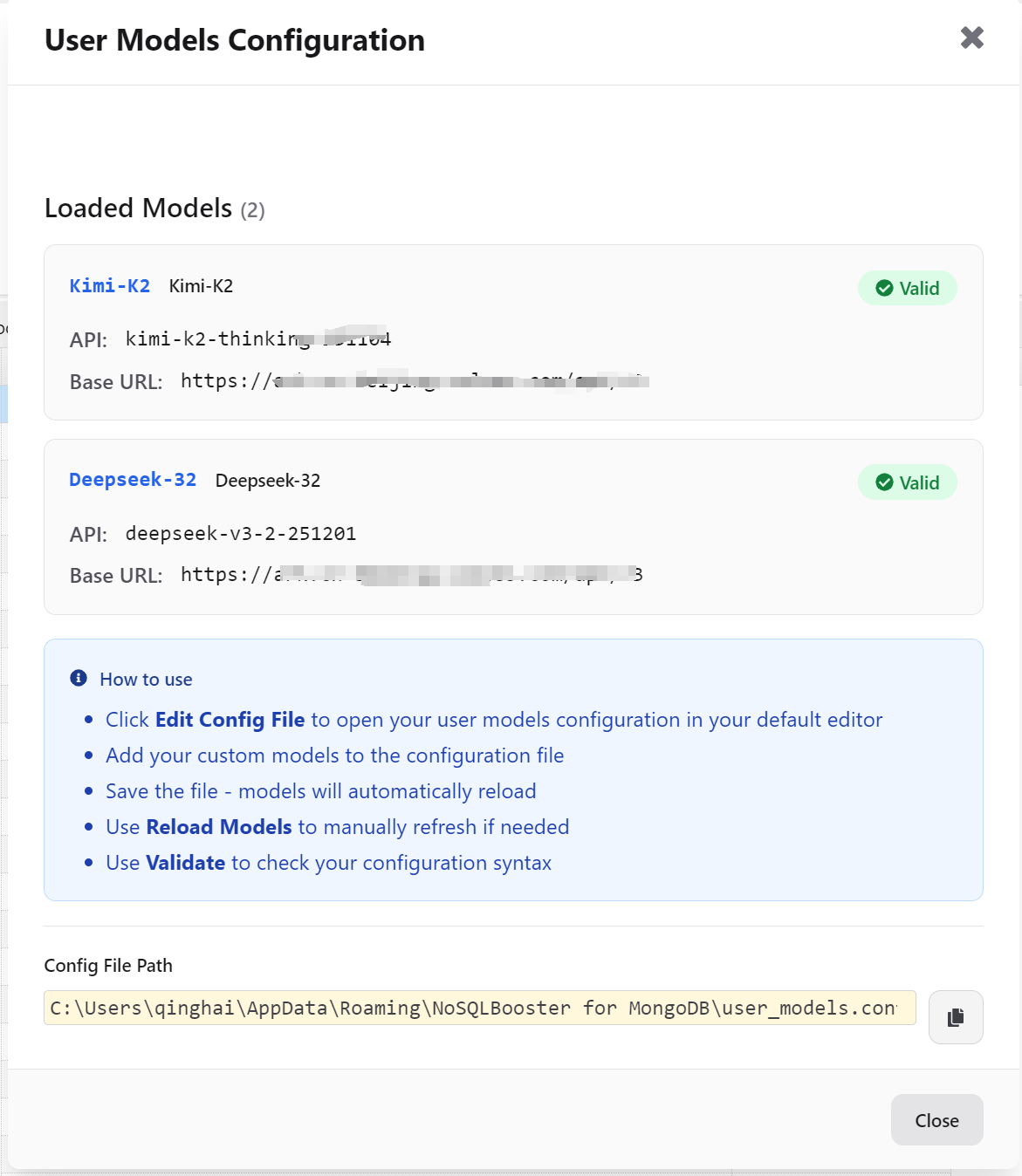
NoSQLBooster 10.1 empowers users to integrate their own AI models into the AI Helper feature. This enhancement provides greater flexibility for organizations that want to use their preferred AI providers or custom-trained models.

Adding Your Own AI Model

Users can now configure custom AI models through the application settings. This allows you to:

  • Connect to alternative AI model providers
  • Use organization-specific models
  • Leverage private or custom-trained AI models for enhanced security and customization
  • Maintain full control over your data and AI processing

To add a custom AI model, navigate to Menu -> Options -> AI Settings -> Edit/Add Models... and configure your model endpoint and API key.

Configuration File: user_model.config.js

Custom AI models are configured through the user_model.config.js file, which defines your custom model endpoints and parameters. Here's the configuration structure:

1
2
3
4
5
6
7
8
9
10
11
12
13
14
15
16
17
18
19
20
21
22
23
24
25
/**
* user_model.config.js - User-defined model configuration file
*
* Define custom API endpoints and model configurations.
* These configurations are loaded client-side for direct API connection.
*/

module.exports = {
models: [
{
key: string, // Unique identifier (required)
name: string, // Display name in AI Helper (required)
description?: string, // Optional model description
baseURL: string, // API base URL (required)
endpoint?: string, // API endpoint path, defaults to /chat/completions
modelName?: string, // Model name to send to API, defaults to key
apiKey?: string, // API key (optional)
headers?: object, // Custom request headers (optional)
maxTokens?: number, // Maximum tokens to generate (optional)
temperature?: number, // Temperature parameter (optional)
requestTransformer?: function, // Custom request transformation (optional)
responseTransformer?: function // Custom response transformation (optional)
}
]
};

This feature is particularly valuable for enterprises that require:

  • Data privacy and security
  • Integration with proprietary AI systems
  • Custom model fine-tuning based on domain-specific knowledge

User AI Models

Enhanced Command Execution (Ctrl+F6 / Cmd+F6)

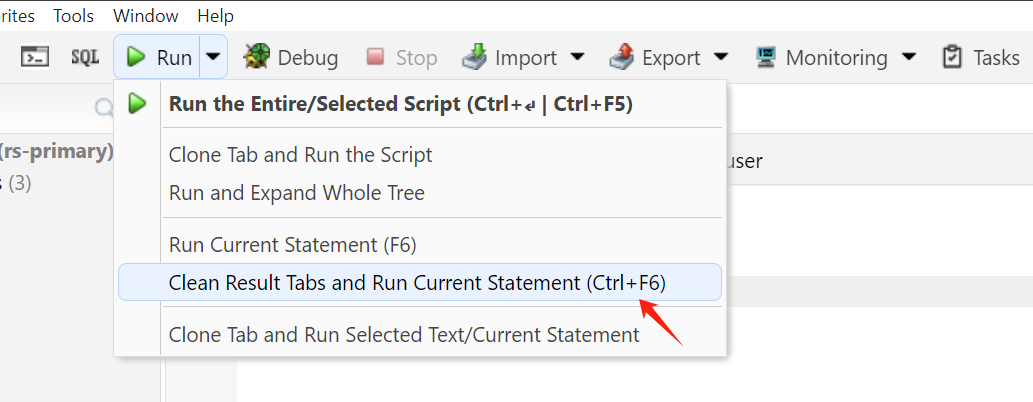
NoSQLBooster 10.1 introduces a new keyboard shortcut for executing scripts with automatic tab management. This command provides a streamlined workflow for developers on all platforms:

How It Works

  • Windows/Linux: Press Ctrl+F6
  • macOS: Press Cmd+F6 (or Mod+F6)

These shortcuts will:

  1. Close all currently open tabs
  2. Execute the current statement in the editor
  3. Display the results in a clean, focused environment

This feature is ideal for:

  • Running complex statements without distraction
  • Testing isolated queries in a clean workspace
  • Improving focus during intensive development sessions
  • Automating repetitive testing workflows

Enhanced Command Execution

Usage Example

Simply position your cursor on the statement you want to execute and press the appropriate shortcut for your platform. The editor will close other tabs and run your statement immediately.

Enhanced ObjectId Field Display with Humanized Timestamps

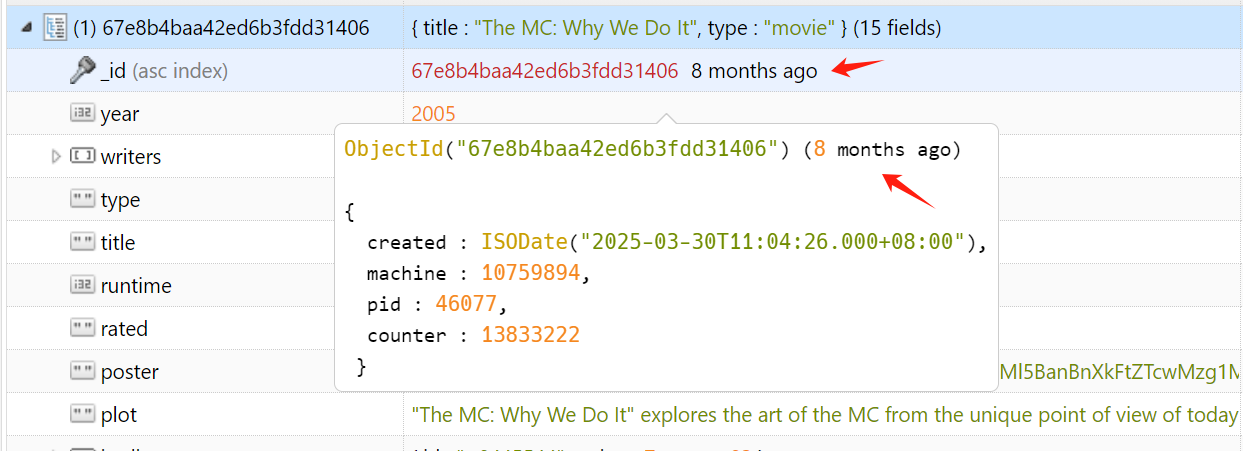
NoSQLBooster 10.1 improves how ObjectId fields are displayed in the treegrid and document viewers. ObjectIds now show both the formatted value and a human-readable relative timestamp.

New Display Format

ObjectId fields are now displayed as:

1
ObjectId("507f1f77bcf86cd799439011") (a year ago)

The relative time portion uses "humanized" formatting, making it easy to understand when documents were created at a glance. For example:

  • ObjectId("...") (a few seconds ago)
  • ObjectId("...") (5 minutes ago)
  • ObjectId("...") (2 hours ago)

This enhancement makes it much easier to quickly assess document age without needing to manually calculate timestamps, especially useful when reviewing historical data or debugging time-sensitive issues.

ObjectId New Display Format

Optimized Dark Theme

The dark theme has been completely redesigned and optimized in version 10.1 for better visual comfort and reduced eye strain during extended work sessions. Improvements include:

  • Better contrast ratios for improved readability
  • Refined color palette for reduced visual fatigue
  • Optimized highlighting for syntax elements
  • Improved visibility for UI controls and buttons
  • Enhanced styling for data grid and tree views

Users can enable the dark theme through Menu -> Options -> Change Theme.

Read More

NoSQLBooster 10.0 Released! AI Helper, Natural Language Query, Code Translation, Script Explanation

We are pleased to announce the release of NoSQLBooster 10.0. This new version introduces AI Helper, a feature designed to enhance how developers work with MongoDB. With AI Helper, NoSQLBooster now supports natural language queries, cross-language code translation, and step-by-step script explanations - features that aim to make MongoDB development more intuitive and efficient.

If you want to try NoSQLBooster 10.0 out now, you can get it from the following link.

NoSQLBooster 10.0 Download Link

The product will automatically enter the 30-day trial mode after a successful installation. At the end of the 30-day trial period, the product becomes a free edition. The free version is free for personal/commercial use but with limited functions.

Note: Advanced AI features including auto-running generated scripts in IDE, code translation, and script explanation are exclusively available for Active Software Assurance users. Please check feature matrix for more information.

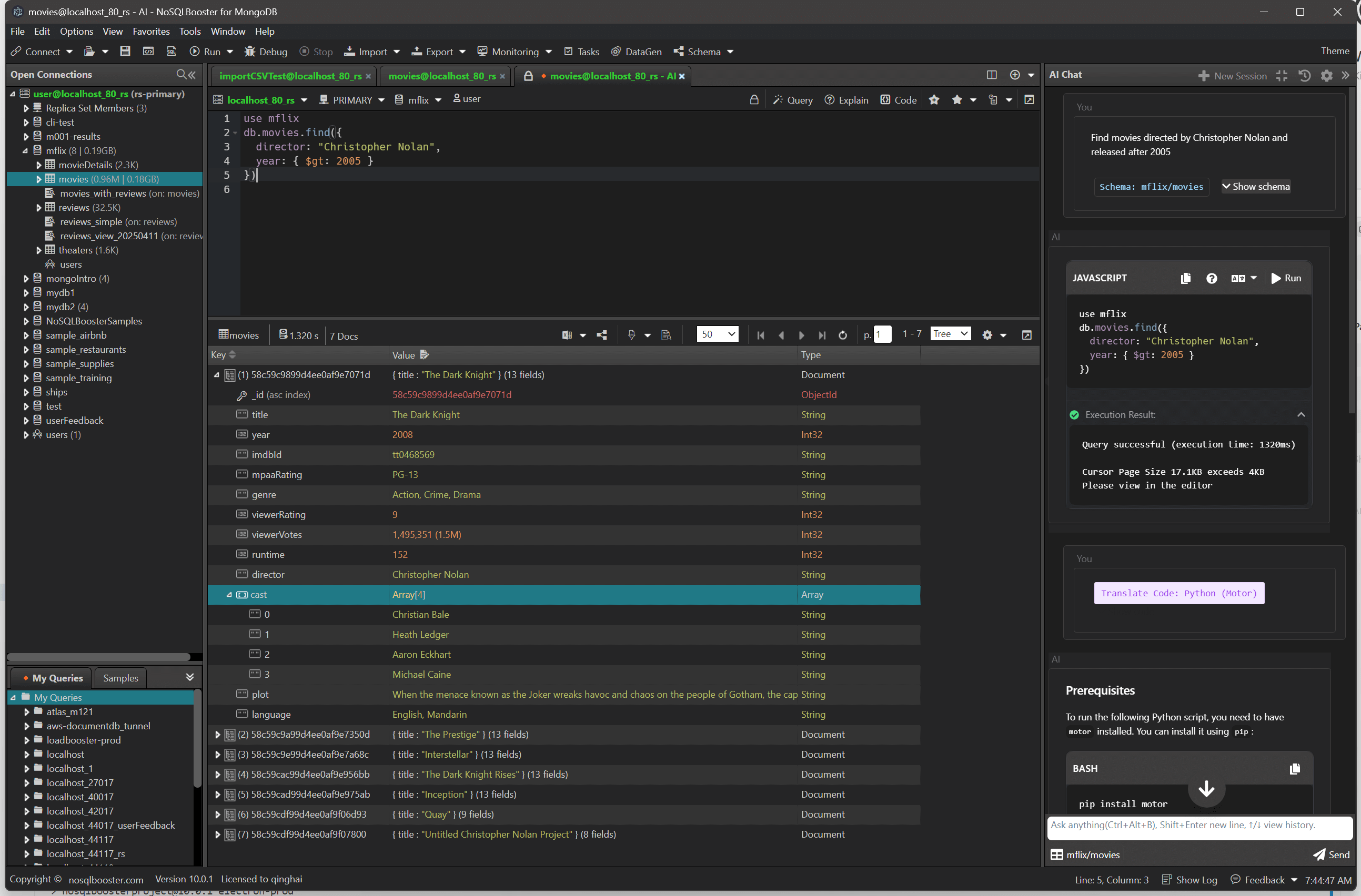
The following figure shows the main interface of version 10.0 with the new AI Helper panel.

Main interface with AI Helper

Let's dive in and get an overview of what's coming in NoSQLBooster 10.0!

Although we are showing screenshots of NoSQLBooster for Windows, all these new features are available for Mac OS X and Linux as well.

What's new?

AI Helper

NoSQLBooster 10.0 introduces AI Helper, a new integrated component that enhances MongoDB development workflows. The AI Helper is fully built-in and requires no configuration from users - it works out of the box with no external API keys or setup required. This tool provides three main capabilities to improve database operations:

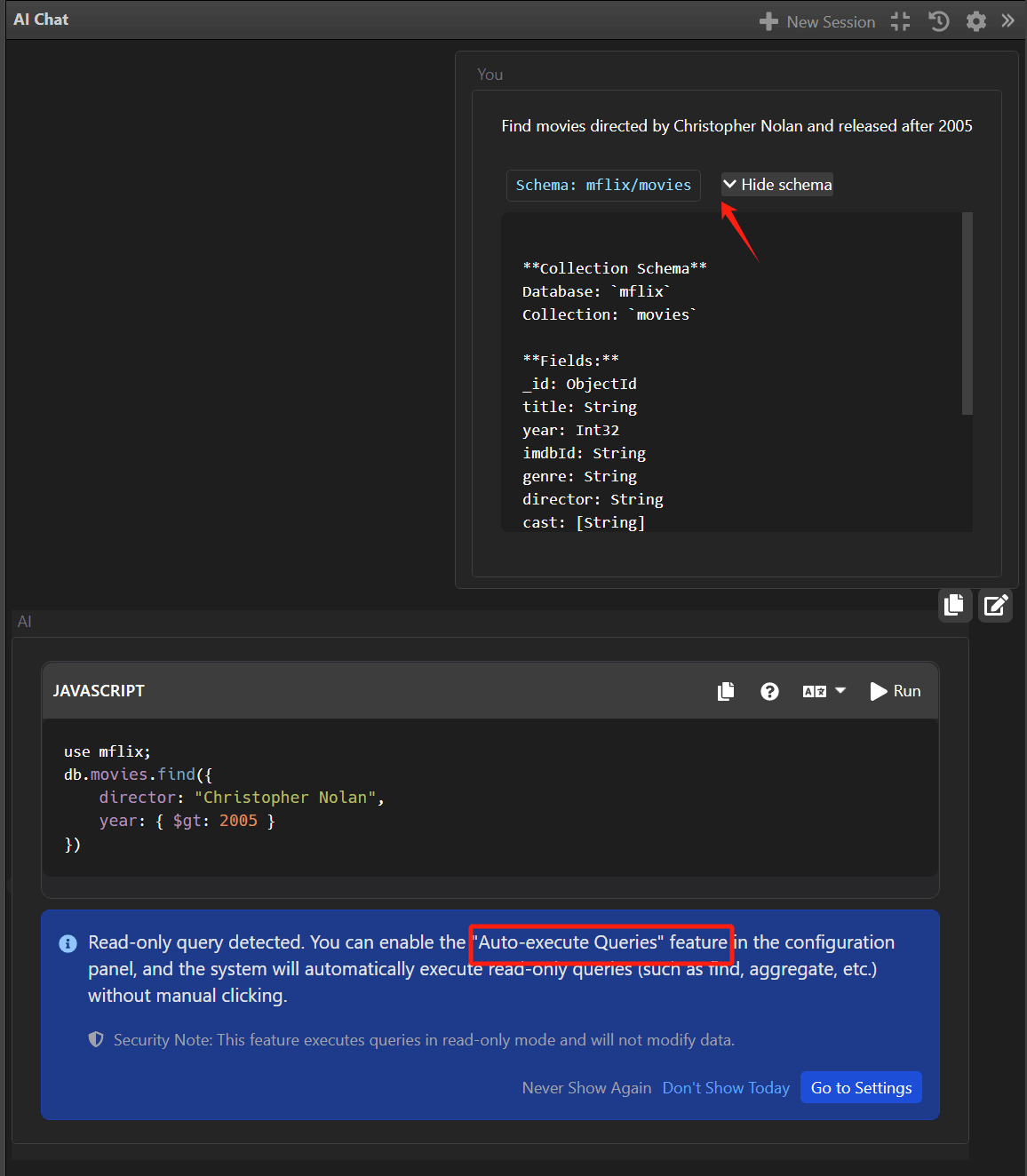
1. Natural Language Queries

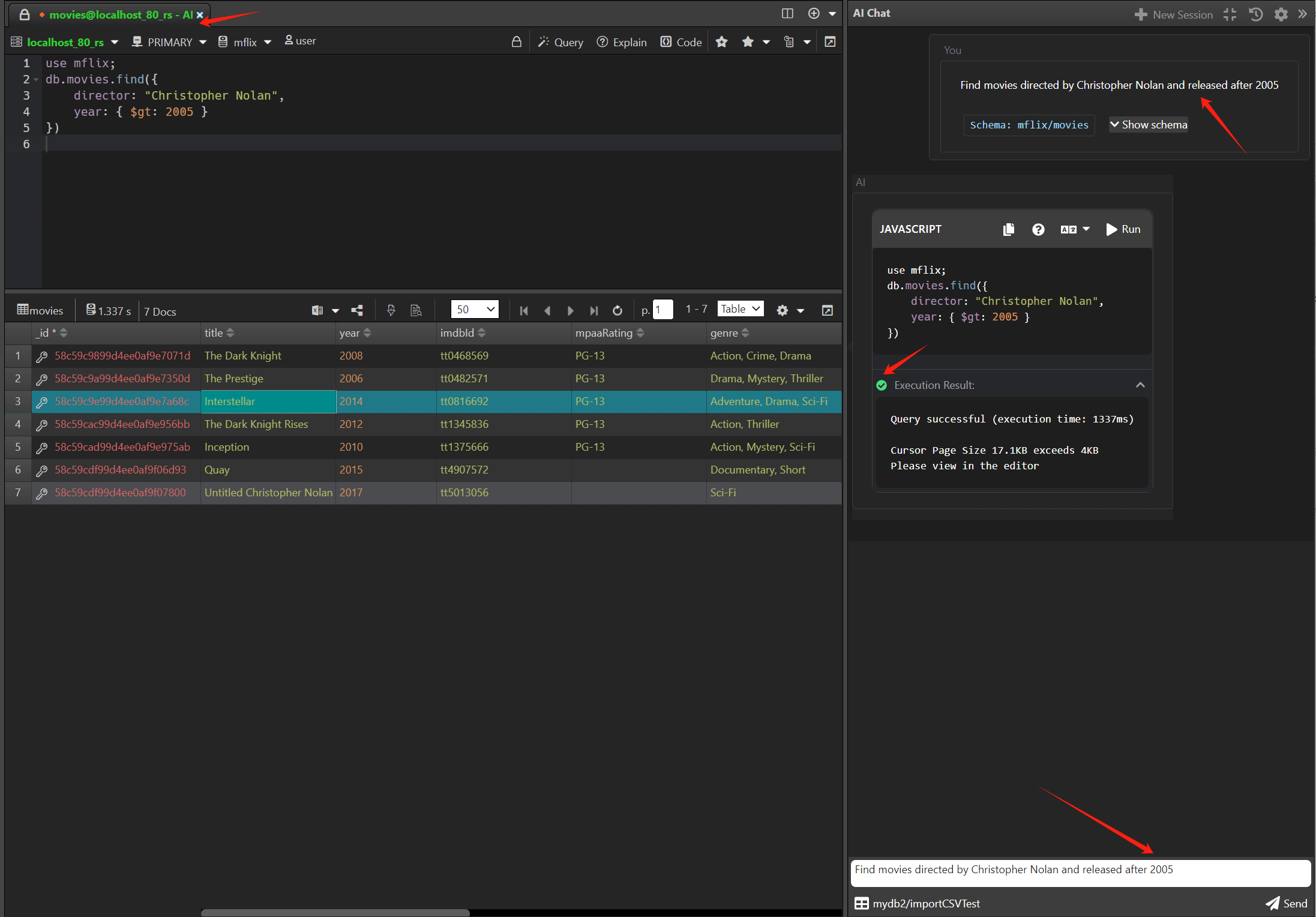
With the power of generative AI, users can now describe their query requirements in natural language, and AI Helper automatically converts these descriptions into standard MongoDB query syntax.

For example, a user might enter:

1
2
Find movies directed by Christopher Nolan and released after 2005

And AI Helper generates the corresponding MongoDB query:

1
2
3
4
5
6
7

use mflix;
db.movies.find({
director: "Christopher Nolan",
year: { $gt: 2005 }
})

Natural Language Query

This feature dramatically reduces the learning curve for MongoDB query syntax, making database operations accessible to developers of all skill levels. The generated find queries can be further refined using NoSQLBooster's existing Visual Query Builder.

Schema-Aware AI Queries

A standout capability of NoSQLBooster 10.0's AI Helper is its ability to selectively send database schema information to the AI model, significantly enhancing query generation quality. Users can configure exactly what schema information to include:

  • Database names
  • Collection names
  • Field names and data types
  • Index information

By providing this contextual information to the AI, NoSQLBooster generates more accurate, efficient, and schema-compliant queries. This is especially valuable for complex databases where understanding field types and indexes is crucial for performance.

Auto-run query statements

When enabled, read-only mongosh queries will be automatically executed and the results will be displayed in the result window.

Auto run queries

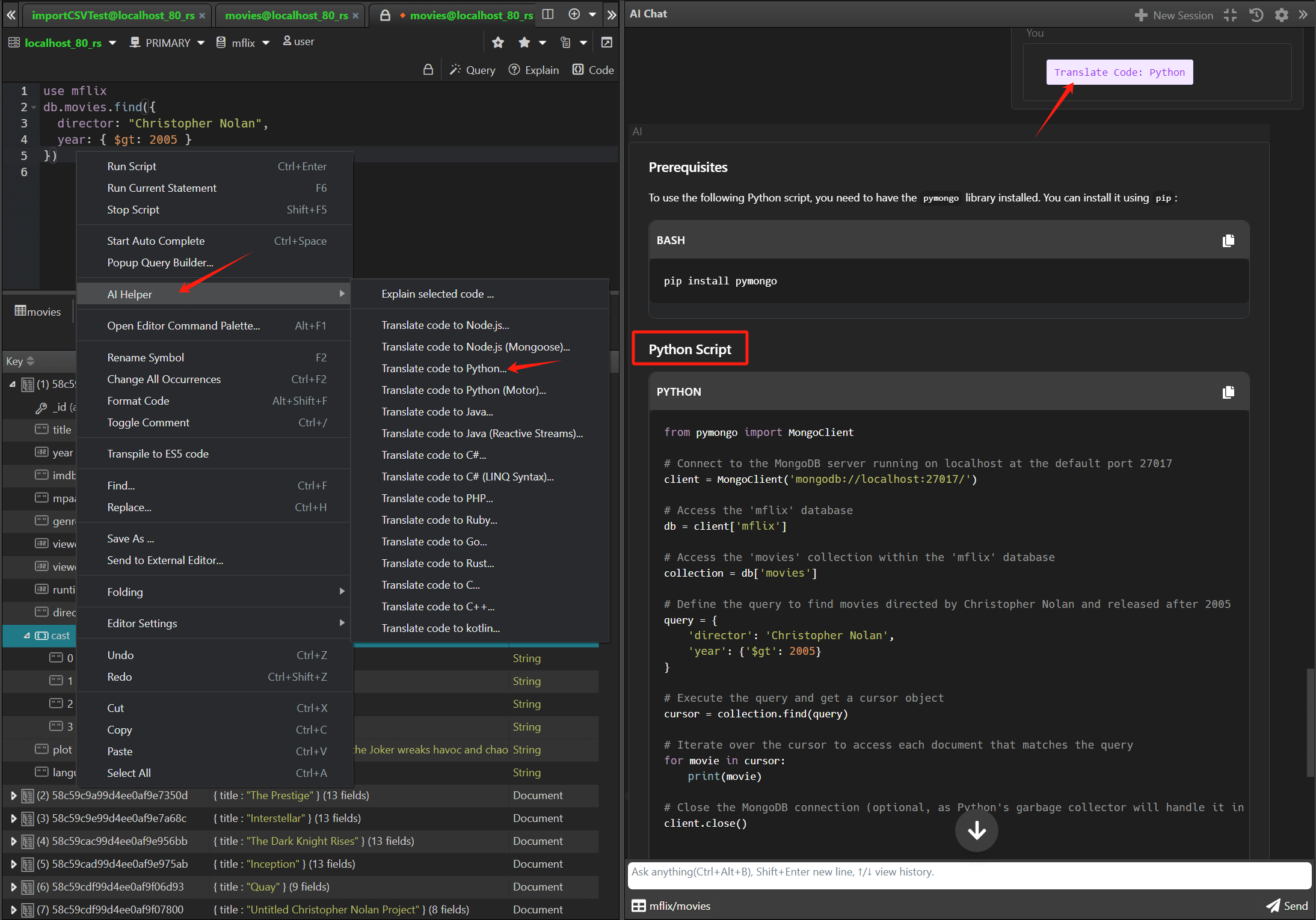
2. Cross-Language Code Translation

AI Helper can translate MongoDB Shell scripts (mongosh) into equivalent code for multiple programming languages, including:

  • Node.js
  • Node.js (Mongoose)
  • Python
  • Python (Motor)
  • Java
  • Java (Reactive Streams)
  • C# / .NET
  • C# (LINQ Syntax)
  • Kotlin
  • PHP
  • Ruby
  • C
  • C++
  • Golang
  • Rust
  • Kotlin

This feature is particularly valuable for full-stack development teams working with different technologies. For example, a complex aggregation pipeline written in the MongoDB shell can be instantly translated to Python:

Original MongoDB Shell:

1
2
3
4
5
6
use mflix
db.movies.find({
director: "Christopher Nolan",
year: { $gt: 2005 }
})

AI-generated Python equivalent:

Code Translation

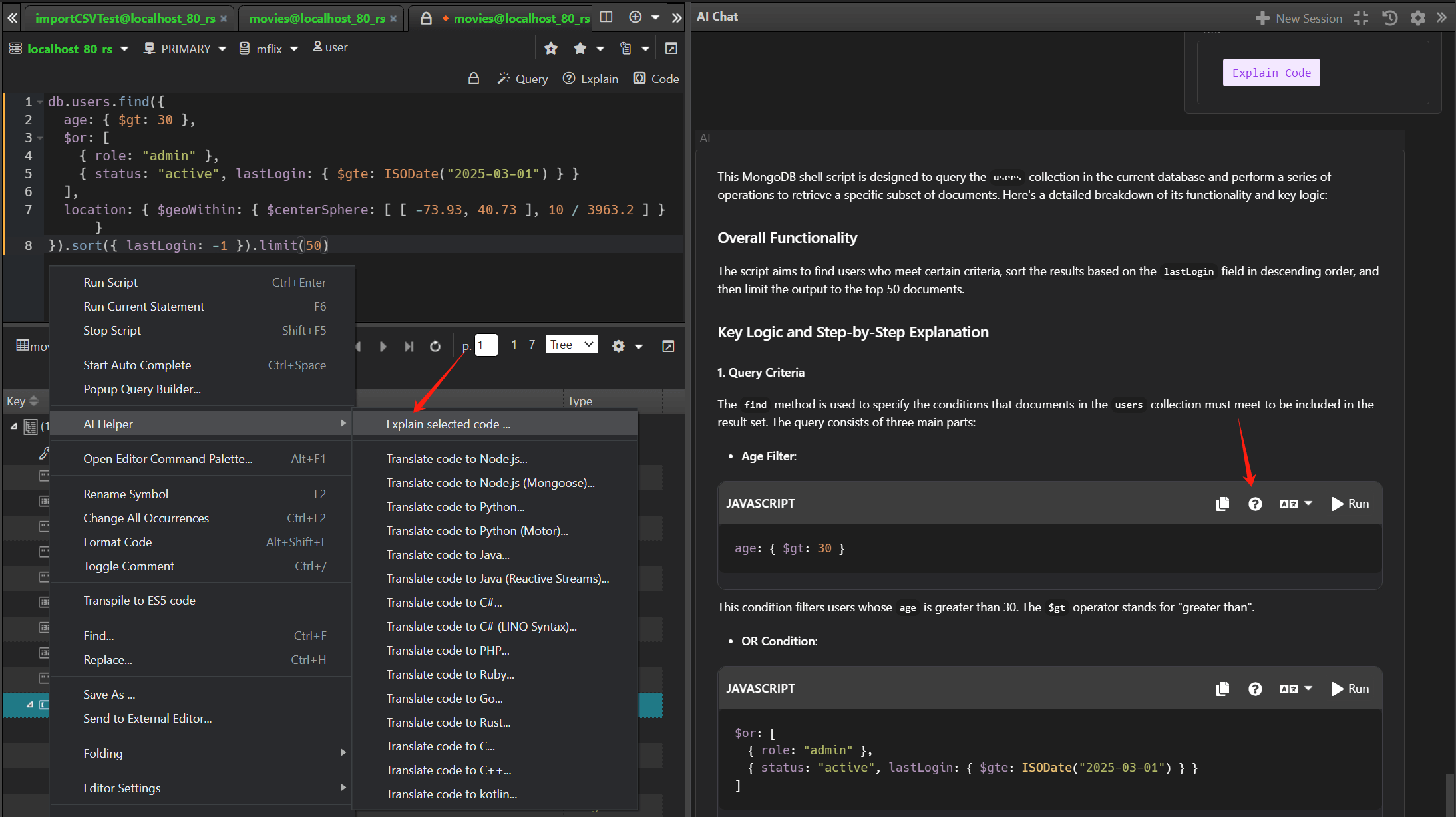
3. Step-by-Step Script Explanation

For complex MongoDB scripts, AI Helper can generate detailed step-by-step explanations that help developers understand query logic and improve performance.

For example, given a complex query:

1
2
3
4
5
6
7
8
db.users.find({
age: { $gt: 30 },
$or: [
{ role: "admin" },
{ status: "active", lastLogin: { $gte: ISODate("2025-03-01") } }
],
location: { $geoWithin: { $centerSphere: [ [ -73.93, 40.73 ], 10 / 3963.2 ] } }
}).sort({ lastLogin: -1 }).limit(50)

AI Helper provides a clear explanation:

1
2
3
4
5
6
7
8
9
10
11
12
13
14
15
16
17
This query performs the following operations:

1. Searches the "users" collection for documents where:
- The "age" field is greater than 30
- AND one of the following conditions is true:
a. The "role" field equals "admin"
b. The "status" field equals "active" AND the "lastLogin" field is greater than or equal to March 1, 2025

2. Additionally, the document's "location" field must be within 10 miles of the geographic coordinates [-73.93, 40.73] (near New York City)

3. Results are sorted by "lastLogin" field in descending order (most recent first)

4. Only the first 50 matching documents are returned

PERFORMANCE CONSIDERATIONS:
- For optimal performance, ensure you have indexes on "age", "role", "status", "lastLogin", and a geospatial index on "location"
- The $or operator may prevent the use of some indexes; consider monitoring query performance

This feature is especially valuable for:

  • Onboarding new team members
  • Reviewing and understanding legacy code
  • Optimizing queries for better performance
  • Documenting complex database operations

Script Explanation

Compatibility and Requirements

  • Compatible with MongoDB 3.6 through 8.0
  • Supported on Windows, macOS, and Linux

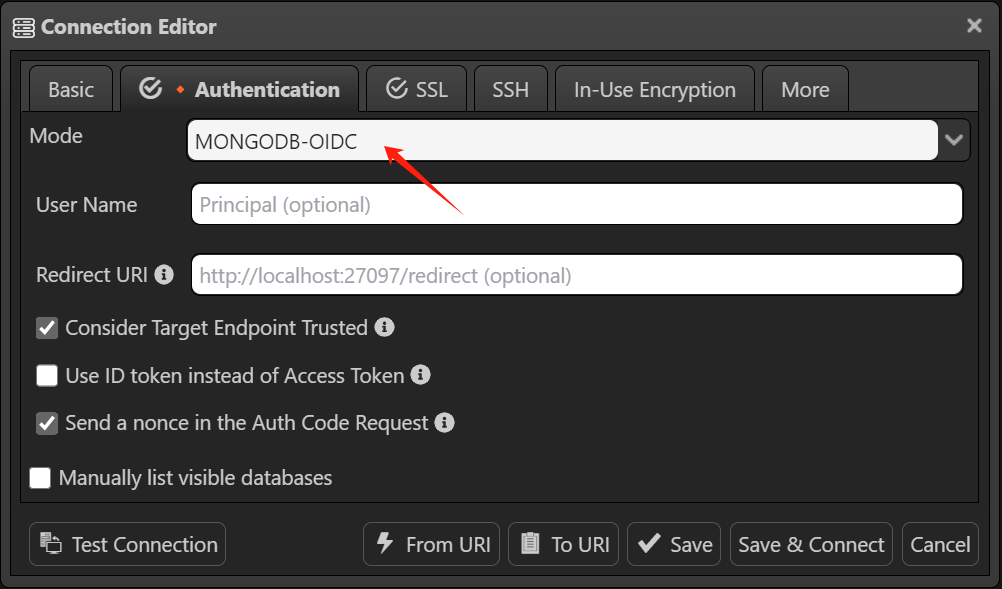
OIDC Authentication

NoSQLBooster 10.0 supports MongoDB OIDC authentication, an authentication method that allows users to log in to MongoDB Enterprise server or MongoDB Atlas using their organization's OIDC provider. This feature is particularly useful for teams that use OIDC for authentication and authorization.

About MongoDB OIDC Authentication, please refer to the official MongoDB documentation for more information.

OIDC Authentication Options

Patch Releases

Version 10.0.1

  • Fixed, a bug that prevented the app from closing normally on macOS sonoma.

Version 10.0.2

  • Added, support MongoDB oidc authentication.
  • Improved, after tabsize is changed, indentsize should be changed in the same step.

Version 10.0.3

  • fixed, a bug when double clicking the element in the tree, and this element is the first in the document (or in the contained document) - The view is automatically scrolled down .
  • Improved, add "0s no timeout" operation timeout option for "RS Member" switcher in the script editor.

Version 10.0.4

  • fixed, an [Object object] display bug when using the prompt input dialog in the database selector.

Version 10.0.5

  • fixed, Restore the default "find" snippet (code template) to v9.
1
2
3
4
db.%%collection%%.find({$1})
.projection({})
.sort({_id: -1})
.limit(%%limit%%)
  • fixed, a AWS SSO authentication "module not found" bug.

Version 10.0.6

  • Fixed, the function to disconnect all connections does not work.

Version 10.0.7

  • Fixed: Added protective code when retrieving field and index information.
  • Fixed: Table view- sorting errors that occurred when copying multiple rows of data.

Version 10.0.8

  • Fixed: Added a workaround solution for the issue where Electron-based apps cause significant system-wide lag on macOS 26 Tahoe.

Read More

NoSQLBooster 9.1 Released! official support for MongoDB 8.0

We're so proud to release NoSQLBooster for MongoDB 9.1 today. This version includes official support for MongoDB 8.0. For more information on MongoDB Server 8.0 , see Release Notes for MongoDB 8.0.

MongoDB 8.0 support

NoSQLBooster for MongoDB 8.1 added support for all the new mongosh methods, aggregation stages and operators of MongoDB 7.1-8.0. Aggregation Pipeline (db.xxx.aggregate().xxxx()) and Operator helper ($.) also add these helper methods.

New Aggregation Operators

MongoDB 8.0 introduces the following aggregation operators:

Name Description NoSQLBooster Helper method
$toUUID Converts a string value to a UUID. If the input value is not a string, $toUUID errors. $.toUUID()

New MongoDB 8.0 mongosh Methods

Name Description
sh.abortMoveCollection() Stops an in-progress moveCollection operation.
sh.abortUnshardCollection() Stops an in-progress unshardCollection operation.
sh.moveCollection() Moves a single unsharded collection to a different shard. Run sh.moveCollection() with a mongos instance while using the admin database.
sh.shardAndDistributeCollection() Shards a collection and immediately redistributes the data using the provided shard key.
sh.unshardCollection() Unshards an existing sharded collection and moves the collection data onto a single shard.

New MongoDB 8.0 Aggregation Stages.

Name Description NoSQLBooster Helper Method
$queryStats Returns runtime statistics for recorded queries. db.getSiblingDB("admin").aggregate().queryStats({})

Patch Releases

Version 9.1.1

  • Fixed, an operation timeout issue when exporting large collection to Excel with one click.
  • Improved, add a progress bar to show the progress of the operation when exporting collection to Excel.
  • Improved, add guard code when getting user's "My Documents" path fails.

Version 9.1.2

  • Fixed, SSH tunnel does not work with some encrypted private Keys.
  • Fixed, a bug where the line numbers of history scripts were not displayed in the drop-down menu items

Version 9.1.3

  • Fixed, a bug where heap out of memory occurred when exporting large record set to XSLX files.
  • Improved, significantly improved efficiency in exporting query result sets to XSLX, TXT and HTML files

Version 9.1.4

  • Fixed, a bug that reported "TypeError: Cannot read property 'read' of undefined" when opening mongostat GUI with MongoDB server 8.0.4.

Version 9.1.5

  • Fixed, a MongoMissingDependencyError when use compressors zstp and snappy in the connection.
  • Fixed, Ctrl-tab should cycle through collections tabs in most recently used order, reordering the list to place the most recently used tab on top.

Version 9.1.6

  • Fixed, a bug with x.509 authentication introduced in version 9.1.5.
  • Fixed, a bug where the test connection in the import MongoDB uri dialog always connects to localhost.

Thank you!

Please visit our feedback page or click the “Feedback” button in the app. Feel free to suggest improvements to our product or service. Users can discuss your suggestion and vote for and against it. We’ll look at it too.

NoSQLBooster 9.0 Released!

Today, we are incredibly pleased to announce the release of NoSQLBooster 9.0. It brings many new features to improve the productivity of MongoDB'ers, CRUD Operations supports EJSON as parameters, send MongoDB commands to multiple replica nodes, in-use encryption connection, split an editor window, greatly improved table view and visual query builder, improved import and export functionality and more.
If you want to try NoSQLBooster 9.0 out now, you can get it from the following link.

NoSQLBooster 9.0 Download Link

The product will automatically enter the 30-day trial mode after a successful installation. At the end of the 30-day trial period, the product becomes a free edition. The free version is free for personal/commercial use but with limited functions.

The following figure shows the main interface of version 9.0.
Main interface

Let's dive in and get an overview of what's coming in NoSQLBooster 9.0!

Although we are showing screenshots of NoSQLBooster for Windows, all these new features are available for Mac OS X and Linux as well.

What's new?

MongoDB commands supports EJSON as parameters

The Extended JSON format defines a reserved set of keys prefixed with "$" to represent field type information that directly corresponds to each type in BSON, the format that MongoDB uses to store data. The MongoDB shell usually uses JavaScript functions to represent MongoDB BSON types. The mongosh's CRUD methods can only use javascript BSON functions as parameters, and do not support EJSON formats, which requires conversion in order to use EJSON in queries. In V9, we have extended the mongosh shell methods to directly support EJSON as method parameters. Both canonical and relaxed formats are supported.

The following three queries are equivalent and can be used directly in V9.

EJSON Relaxed Mode

1
2
3
4
5
6
7
8
9
10
11
db.collection.find({
"_id": {
"$oid": "6368556b5dfec6090e3e4b6a"
},
"int32": 63480,
"int64": 4127753986432186,
"double": 33.99535545410777,
"date": {
"$date": "2021-11-19T03:16:06.652Z"
}
})

EJSON Extended (canonical format)

1
2
3
4
5
6
7
8
9
10
11
12
13
14
15
16
17
18
19
db.collection.find({
"_id": {
"$oid": "6368556b5dfec6090e3e4b6a"
},
"int32": {
"$numberInt": "63480"
},
"int64": {
"$numberLong": "4127753986432186"
},
"double": {
"$numberDouble": "33.99535545410777"
},
"date": {
"$date": {
"$numberLong": "1637291766652"
}
}
})

MongoDB Shell BSON Functions

1
2
3
4
5
6
7
db.collection.find({
oid: ObjectId("6368556b5dfec6090e3e4b6a"),
int32: 63480,
int64: NumberLong("4127753986432186"),
double: Double("33.99535545410777"),
date: ISODate("2021-11-19T11:16:06.652+08:00"),
})

We also added two editor commands for interchanging EJSON and mongo shell methods.
Press Command+Shift+P to open command palette and enter "EJSON".

  • Editor: Convert EJSON to mongosh Javascript Object
  • Editor: Convert mongosh Javascript Object to EJSON

Send MongoDB commands to multiple replica nodes

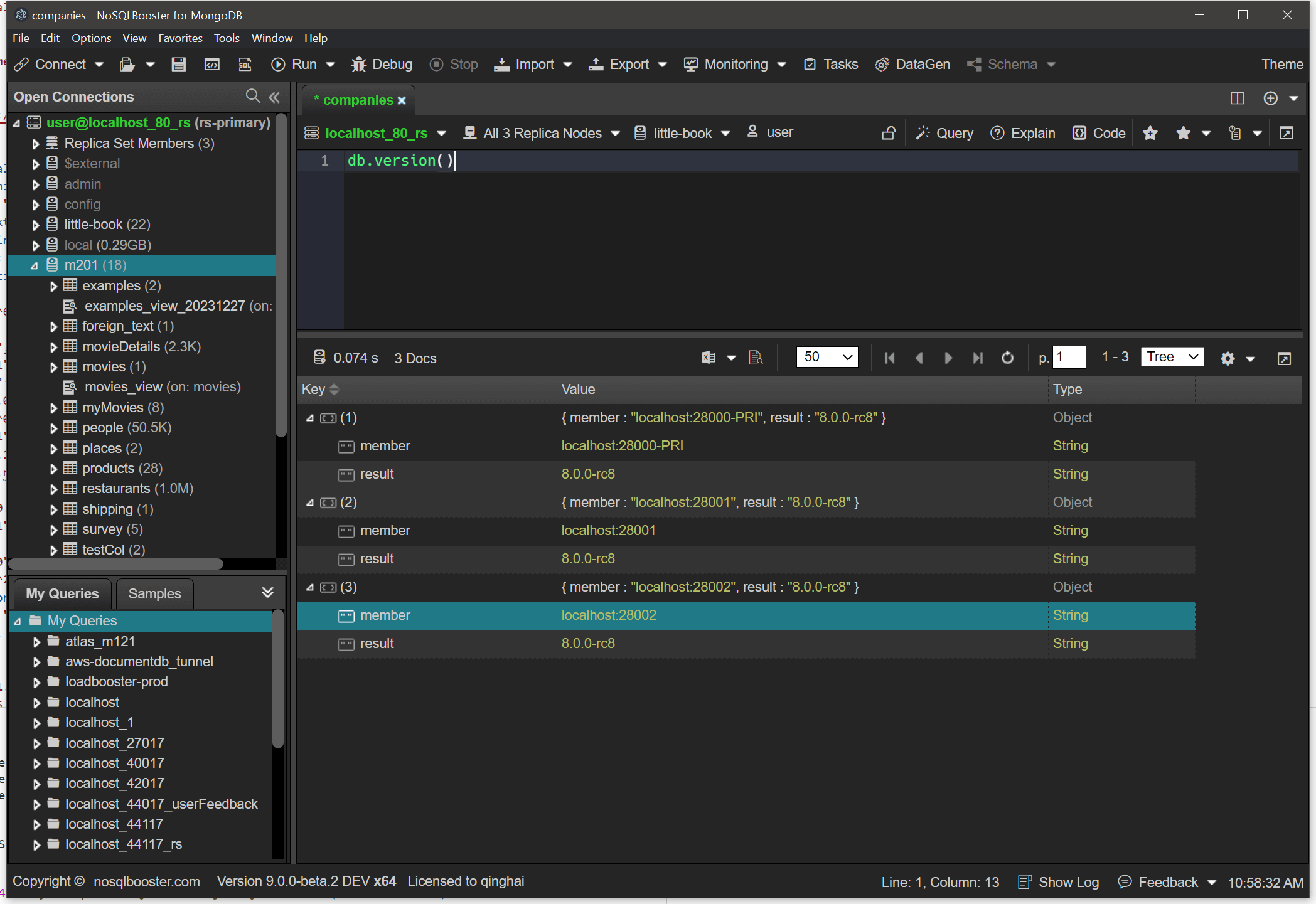
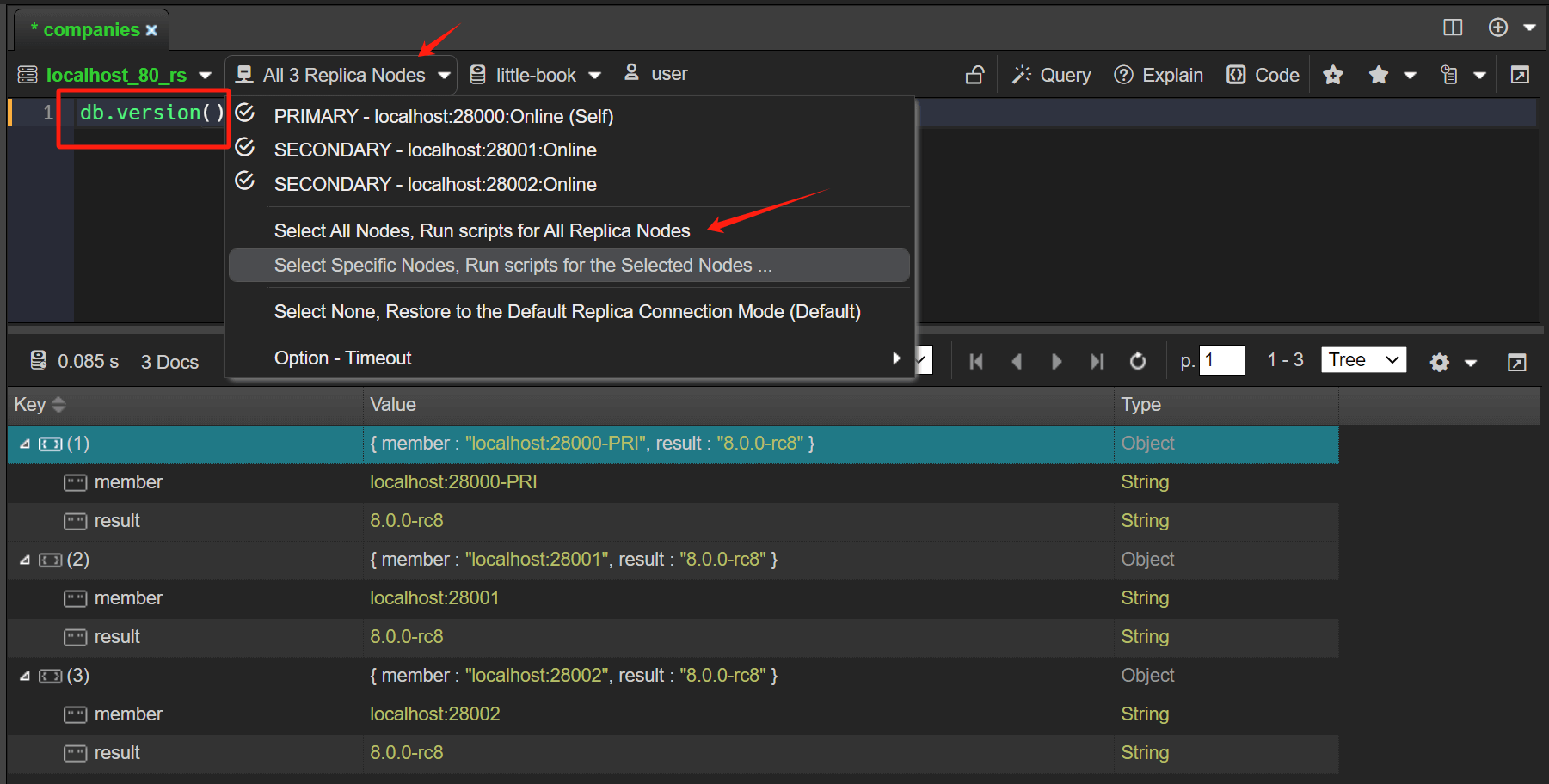
The replica member switcher now allows you to select multiple/all replica set nodes and send Mongo Shell commands to those nodes at the same time. The following example allows you to quickly view version information for MongoDB instances on all nodes in a replica set.

db.version in all nodes

The commands executed are as follows

1
db.version()

The result of the execution is aggregated into a JSON document, the member field indicates the node of the replica set, the primary node will add a PRI indication, if the node has a tag it will also be shown additionally,
The result field is the result of the execution of the command on the node.

1
2
3
4
5
6
7
8
9
10
11
12
13
[{
"member": "localhost:28000-PRI",
"result": "8.0.0-rc8"
},
{
"member": "localhost:28001",
"result": "8.0.0-rc8"
},
{
"member": "localhost:28002",
"result": "8.0.0-rc8"
}
]

As you can see, the replica set is a primary node and two secondary nodes, all of which have MongoDB version 8.0 rc.

In-use encryption connection

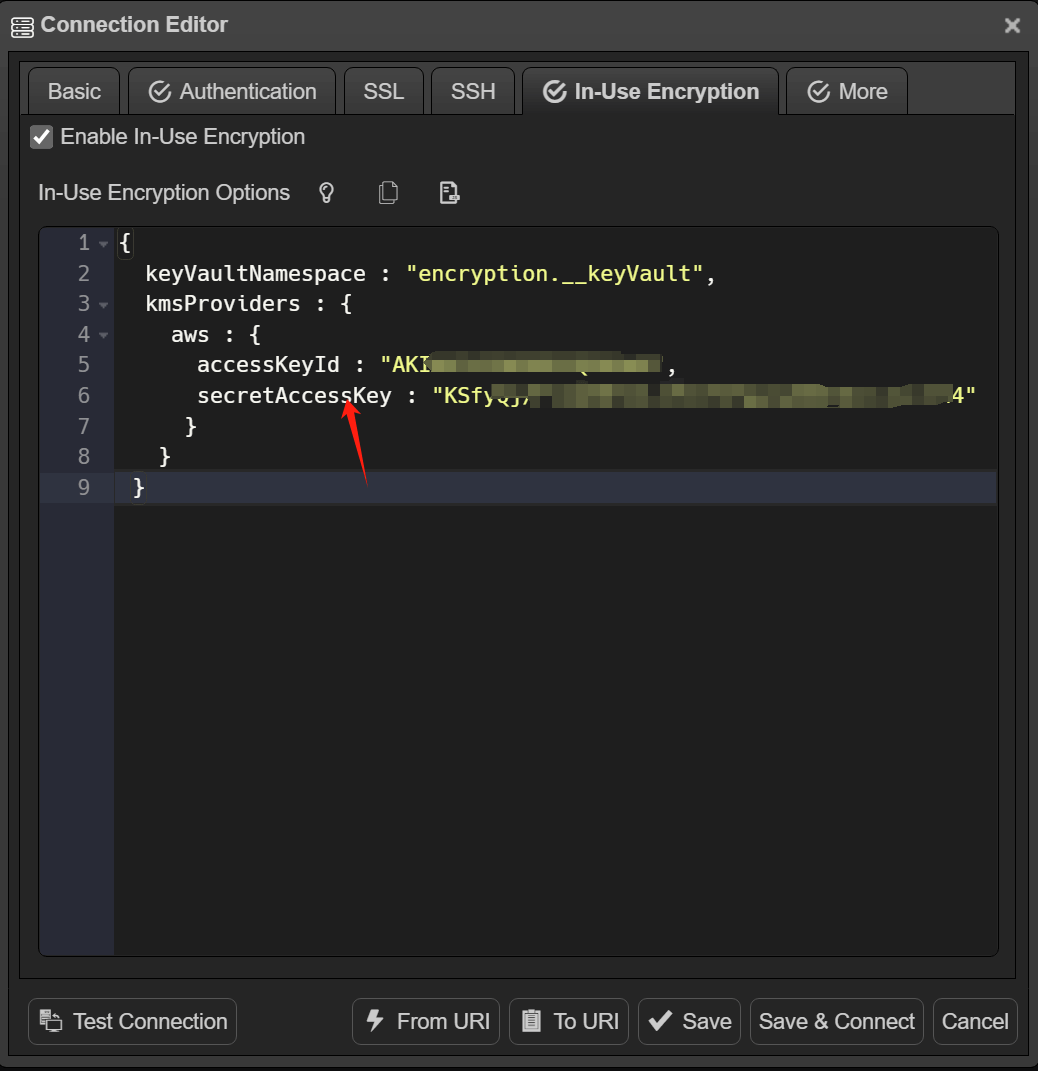
The new In-Use Encryption connection tab allows you to connect your deployments with Queryable Encryption. Since there are so many options that it would be tedious to set them up one by one using a graphical interface, NoSQLBooster uses javascript objects directly for configuration. Click here to view auto encryption options

Please noted, In-Use Encryption is an Enterprise/Atlas only feature.

For this to work, you need to provide a key vault namespace and the Key Management Service(KMS) provider. Here is a simple example.

In-use encryption tab

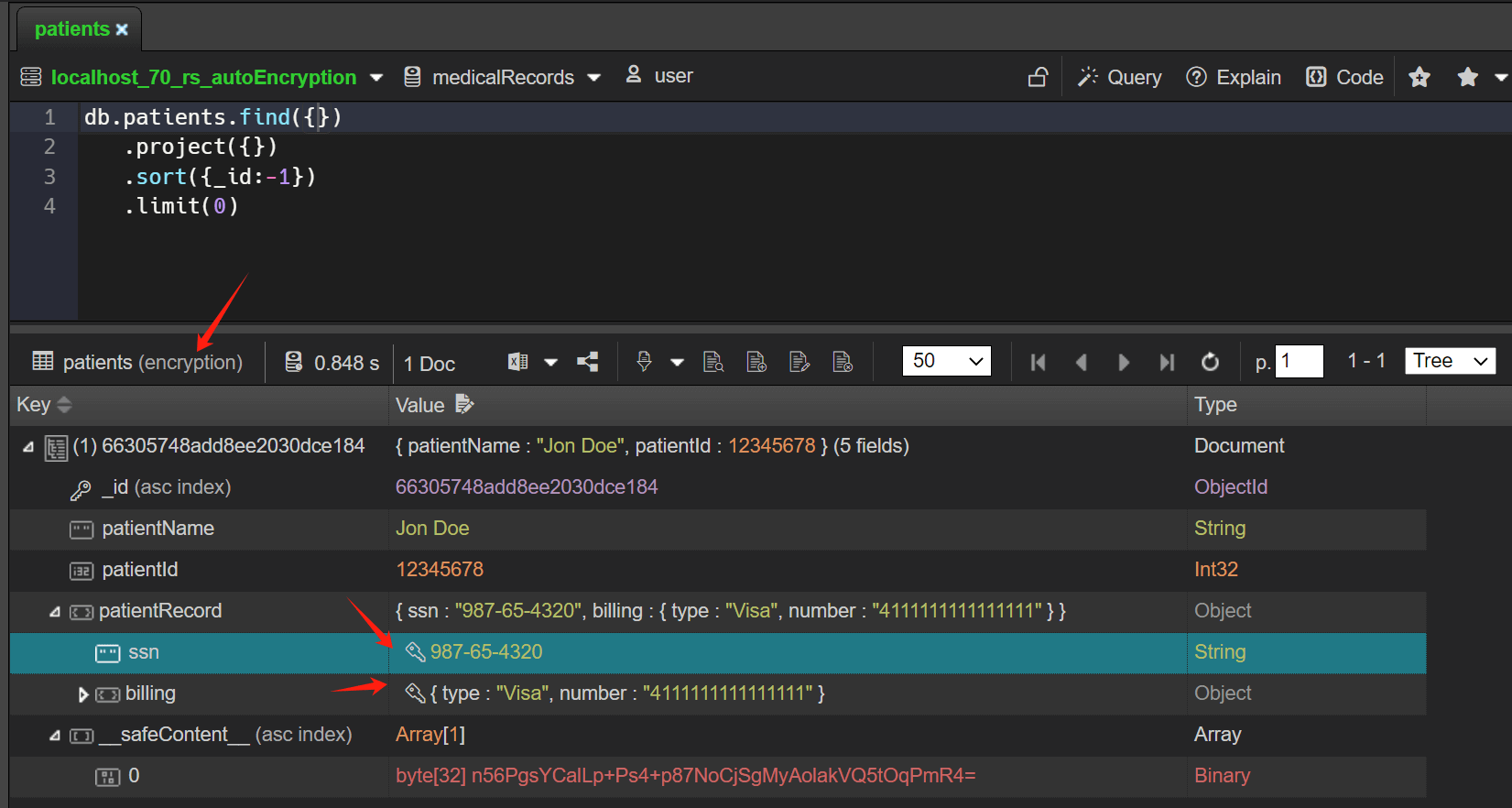
When you open a collection containing encrypted fields using the find/aggregate statement, the encrypted fields are automatically displayed. You can modify encrypted values and can insert documents and specified fields will be encrypted.
When in-use encryption is disabled, you cannot modify encrypted values. NoSQLBooster displays the values of these fields as a series of asterisks and inserted documents can not encrypt fields.

Encrypted Fields

Script editor improvements

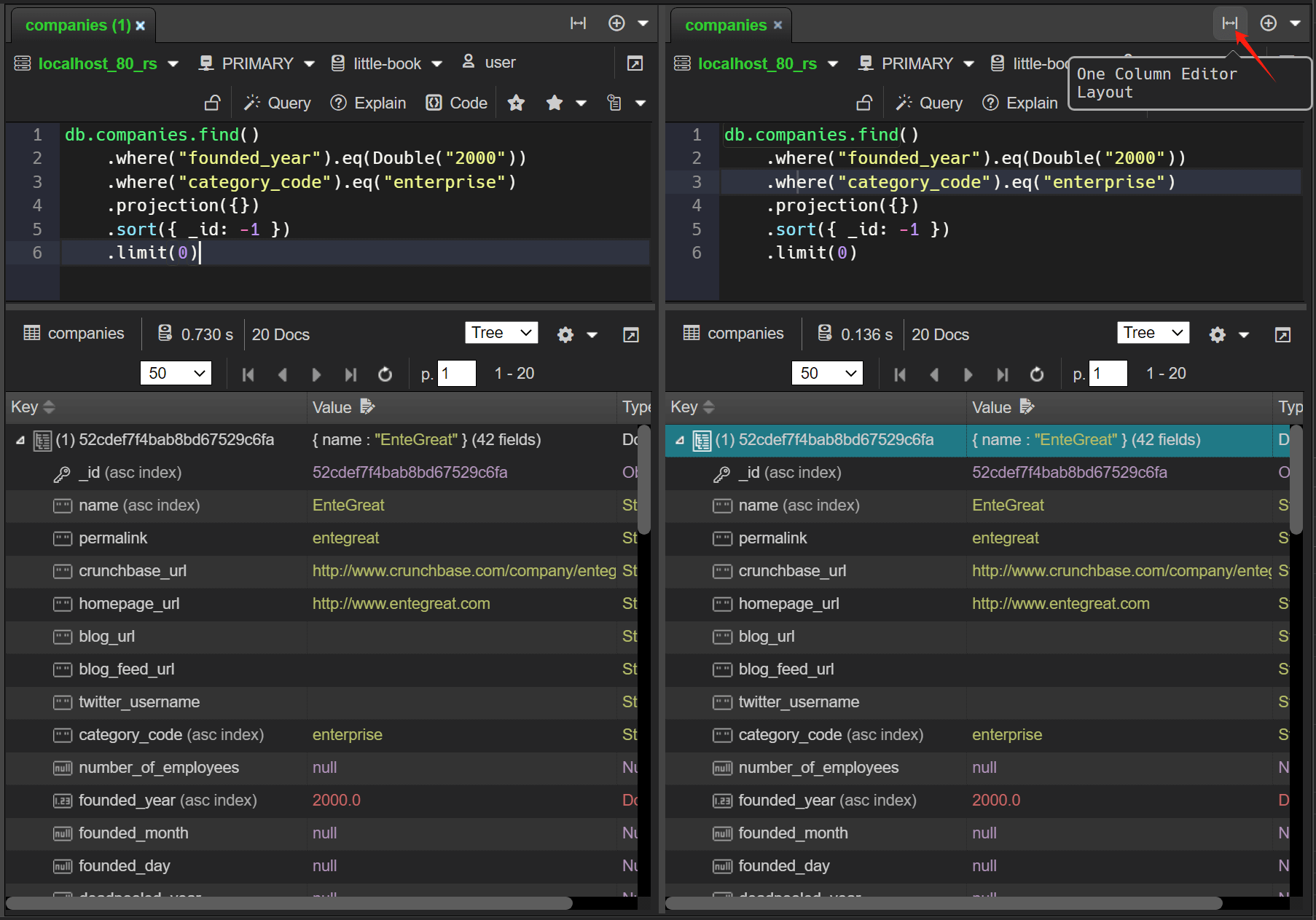
Split an editor window

An instance of the editor window can be split into two separate views for easy editing and comparative viewing of query results.

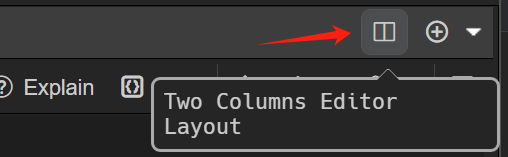
To split a editor, Click within the editor window to give it focus and click Two Columns Editor Layout button.

Split editor Button

Two Columns Layout

Rename symbol

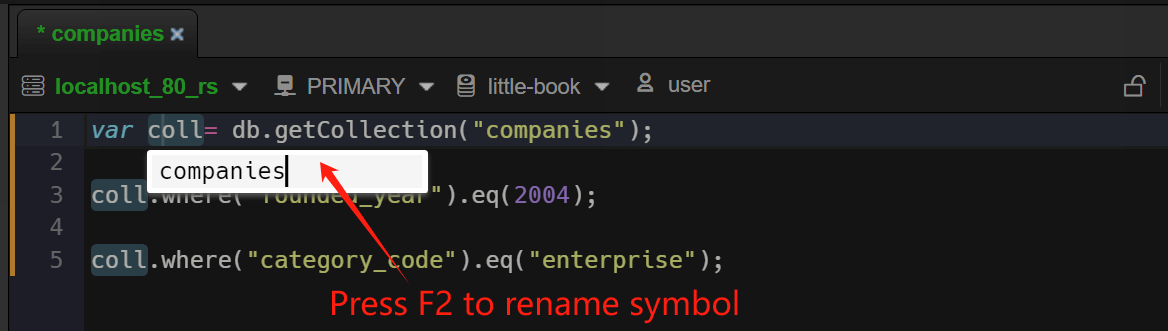
Renaming is a common operation associated with refactoring source code, and NoSQLBooster has added the Rename Symbol command (F2). Press F2, type the desired new name, and press Enter. All instances of symbols in this tab will be renamed.

Rename Symbol

Change all occurrences

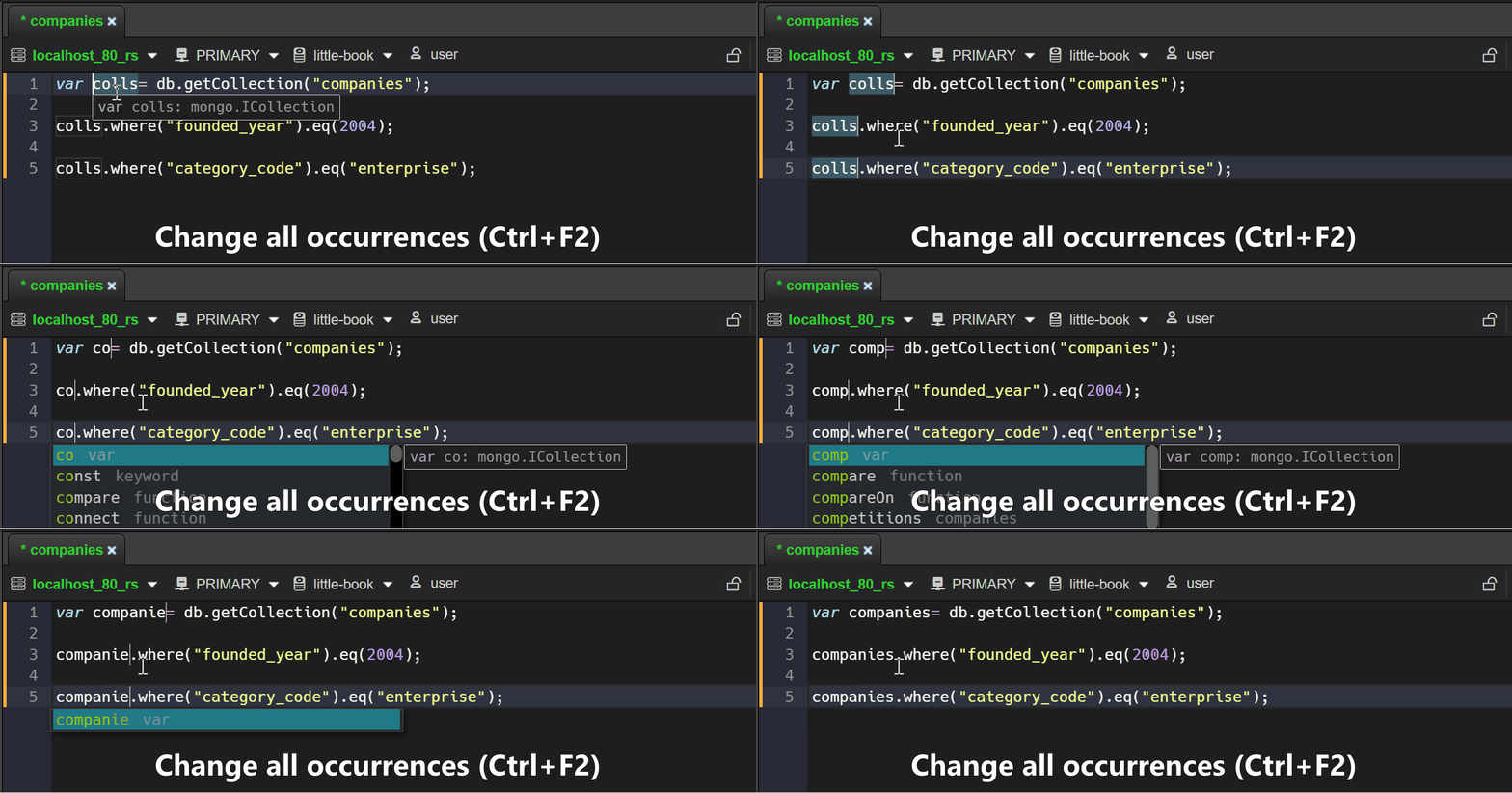
Let's say you've selected a word in your code and you want to find all its occurrences in the current file. You can do this by using the new Change All Occurrences command Ctrl+F2 keyboard shortcut. This will highlight all instances of the selected word, allowing you to edit them simultaneously.

Change all occurrences

Text transformations

A new group of text transform commands has been added to the Editor Commands palette.
For text conversion,select the text you want to convert, press Command+Shift+P to pop up the command palette, enter the conversion command (e.g. title case), then execute it.

  • Transform to camel case
  • Transform to kebab case
  • Transform to snake case
  • Transform to start case
  • Transform to words
  • Transform to title case
  • Encode Base64
  • Decode Base64
  • Decode MongoDB URI
  • Convert EJSON to mongosh Javascript Object
  • Convert mongosh Javascript Object to EJSON

No duplicate tabs

Some users complained that there are too many tabs open in NoSQLBooster and it looks a bit messy. In V9, we have enhanced the double-click to open tabs logic appropriately. When you double-click on a collection of open tabs and the find script is unchanged, do not open a new tab. Just focus on the existing tabs.

Enhanced data view

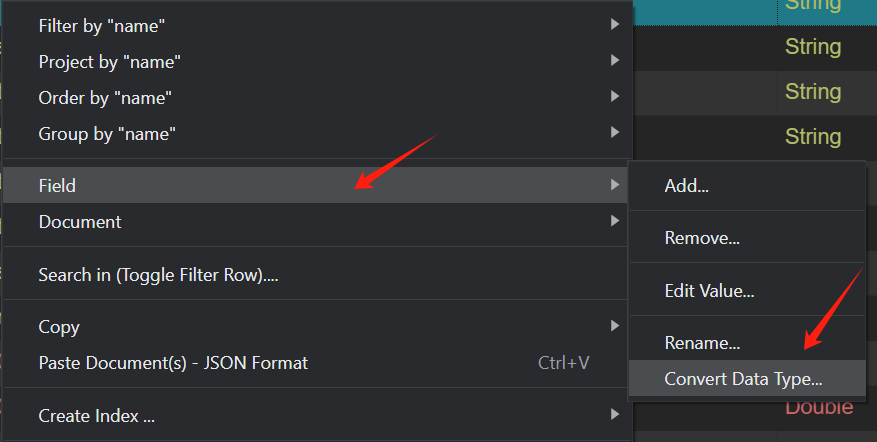
Field CRUD Operations

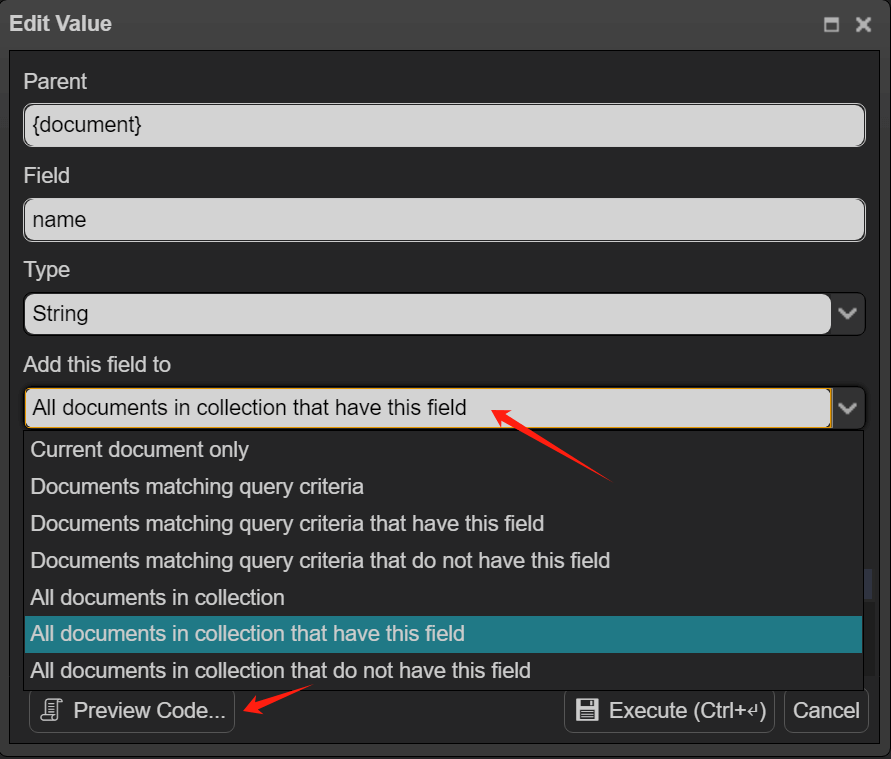
You can now perform "Add/Delete/Edit/Rename/Convert Type" field operations on individual documents, documents returned by a specific query, or all documents in a collection.

Moving to the Preview Code button displays the code that will be executed, and clicking on it allows you to customize the script.

Field Right-click Menu

Field CRUD

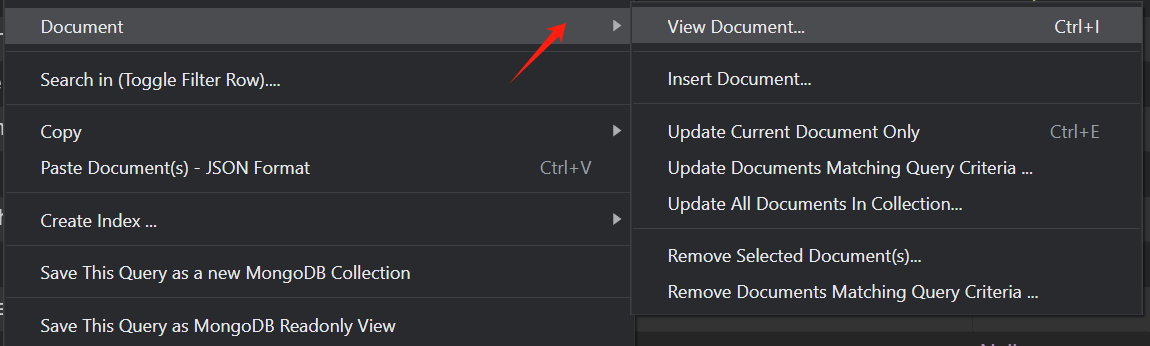
Document CRUD Operations

You can perform "update/remove" documents operations on individual documents, selected documents, documents returned by a specific query, or all documents in a collection.

Document Right-click Menu

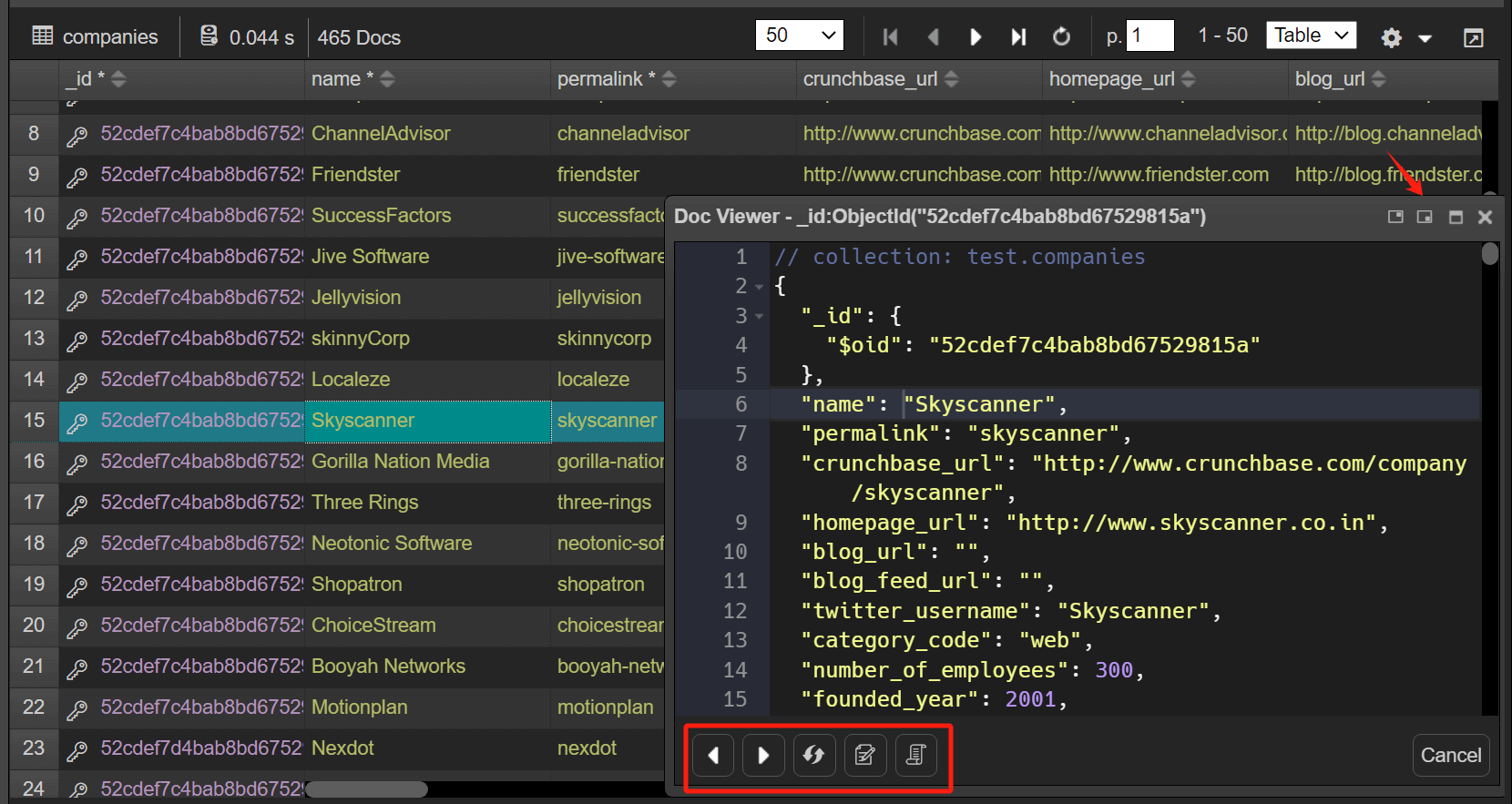
Non-modal Doc/Object Viewer

Document/Object viewer improved to non-modal window. The window being active does not prevent the rest of the application from continuing. When the selected objects in the tree/table view are changed, the object viewer will be updated synchronously.

Press Ctrl+I or double-click _id field to open the document viewer.

Non-modal document viewer

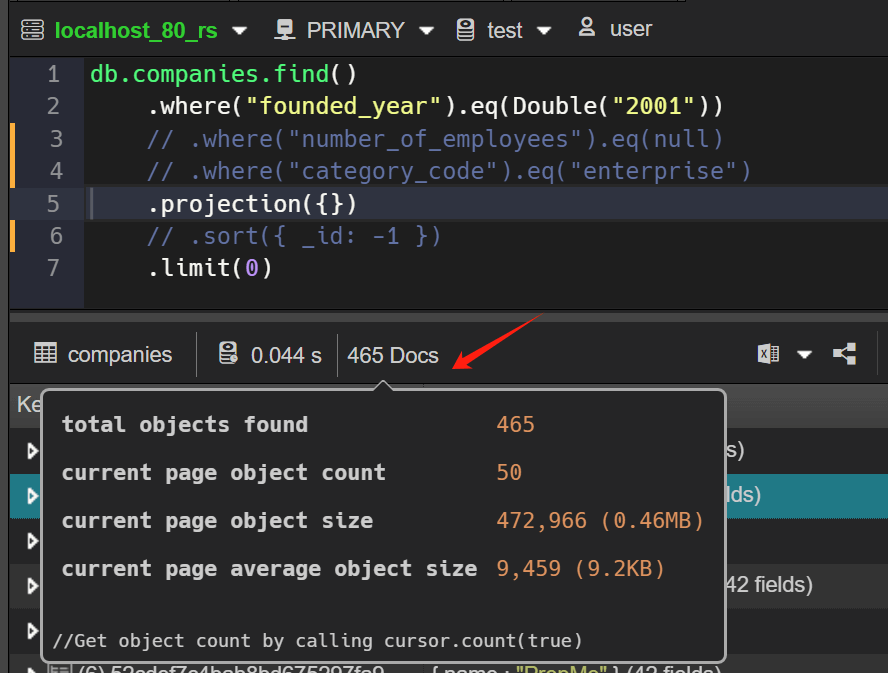
Indicate query result size, avg size

Sometimes a query may be (or seem) fast, but have some deeply nested results or individual items containing a large number of embedded items. The V9 added a indicator to show the (average) size of the query/aggregate results. This way, developers can get a rough estimate of how much traffic the query will generate and take it into account, e.g. by adding a prediction, limiting the date, or other methods.

Tooltip for query result

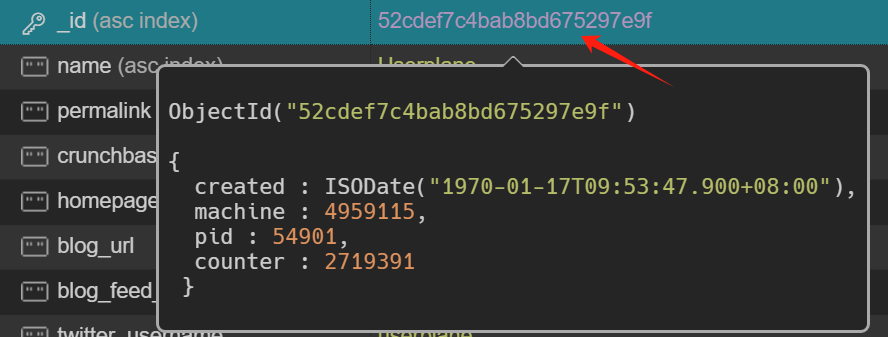
Tooltips for the ObjectId

Add more information to the tooltip for objectId. It is possible to display the _id as a timestamp via generation_time.

Tooltip for objectId

Data import and export

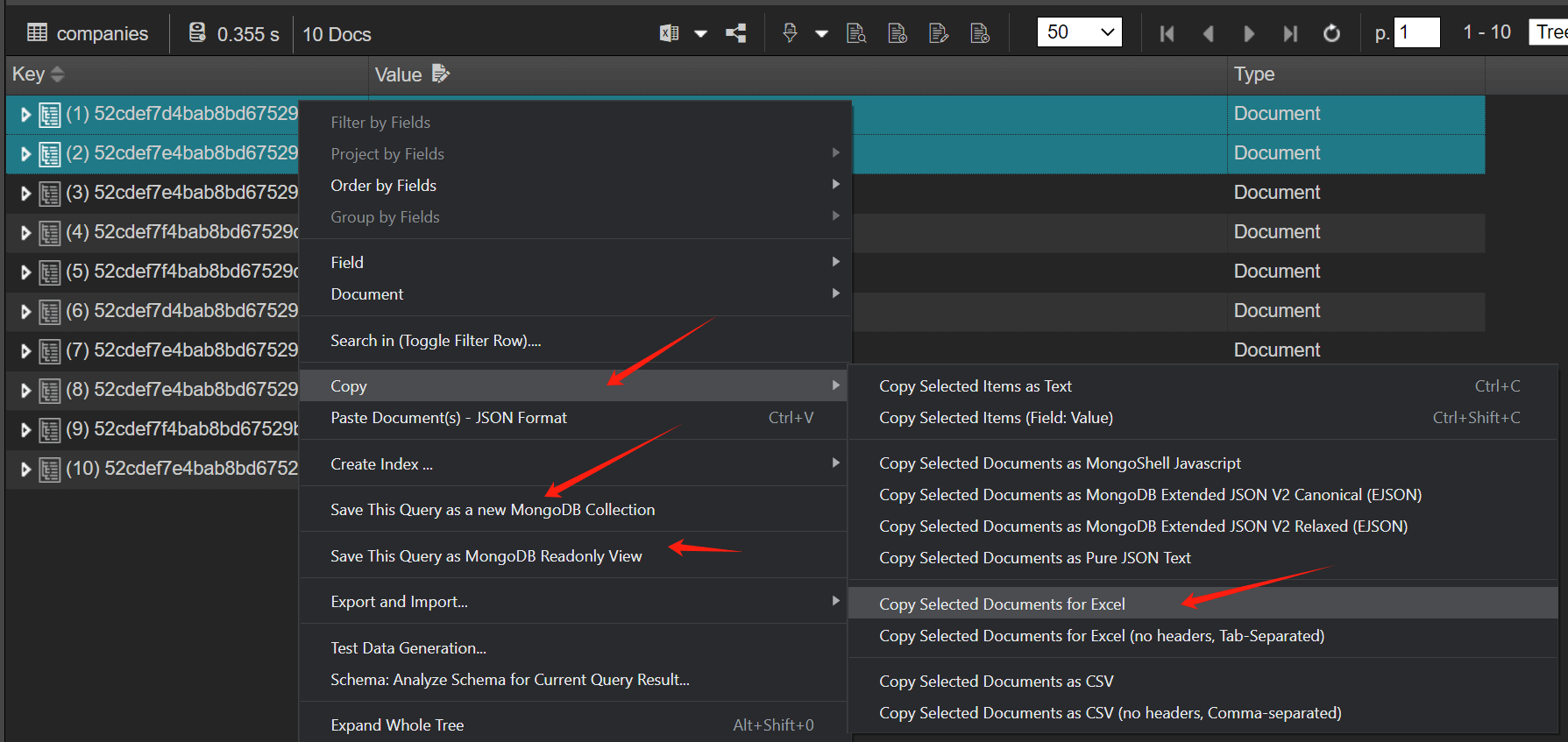
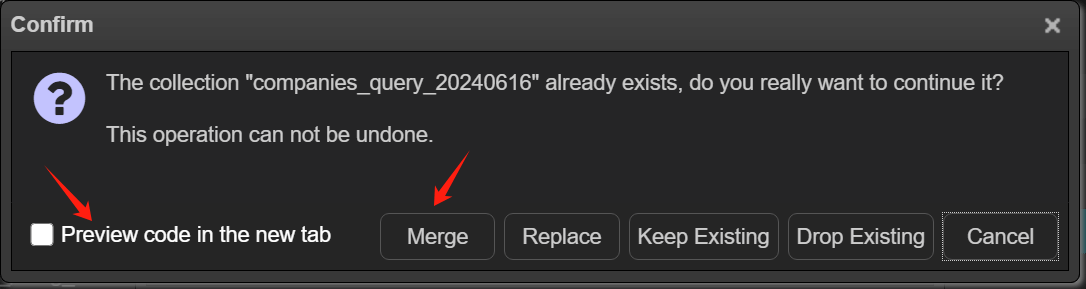
Save collection/query as a new collection

The results of the query can now be exported to another collection. If the target collection does not exist, the function invokes the $out stage to write to the collection. If the destination collection exists, $merge is used to incorporate results (insert new documents, merge documents, replace documents, keep existing documents, fail the operation, process documents with a custom update pipeline) into the existing collection.

To access this function, right-click the data grid in the "tree/table" view, pop up context menu and click Save This Query as a new MongoDB Collection menu item.

Save to a new collection

Copy/Paste to Excel

The right-click menu of the data view has been greatly enhanced. In addition to saving the results to a new collection, the copy/paste function also adds more options, export to EJSON, export to Excel (csv/tsv)...

Copy/paste to excel

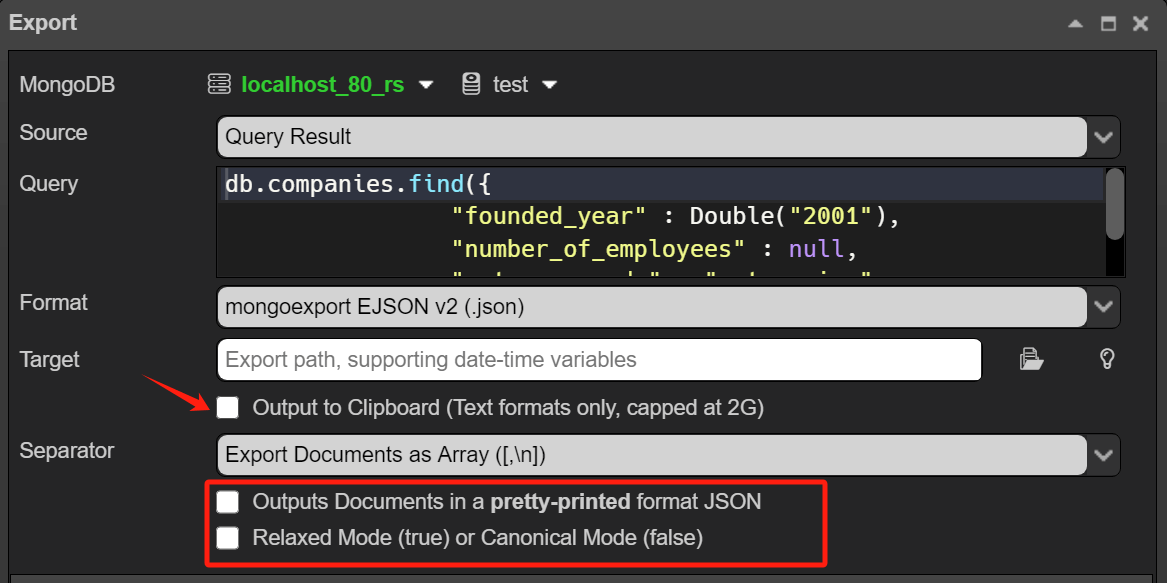
Export data to the clipboard

It is now also possible to export the entire collection/query results to the clipboard.

Export to clipboard

MongoDB Connection

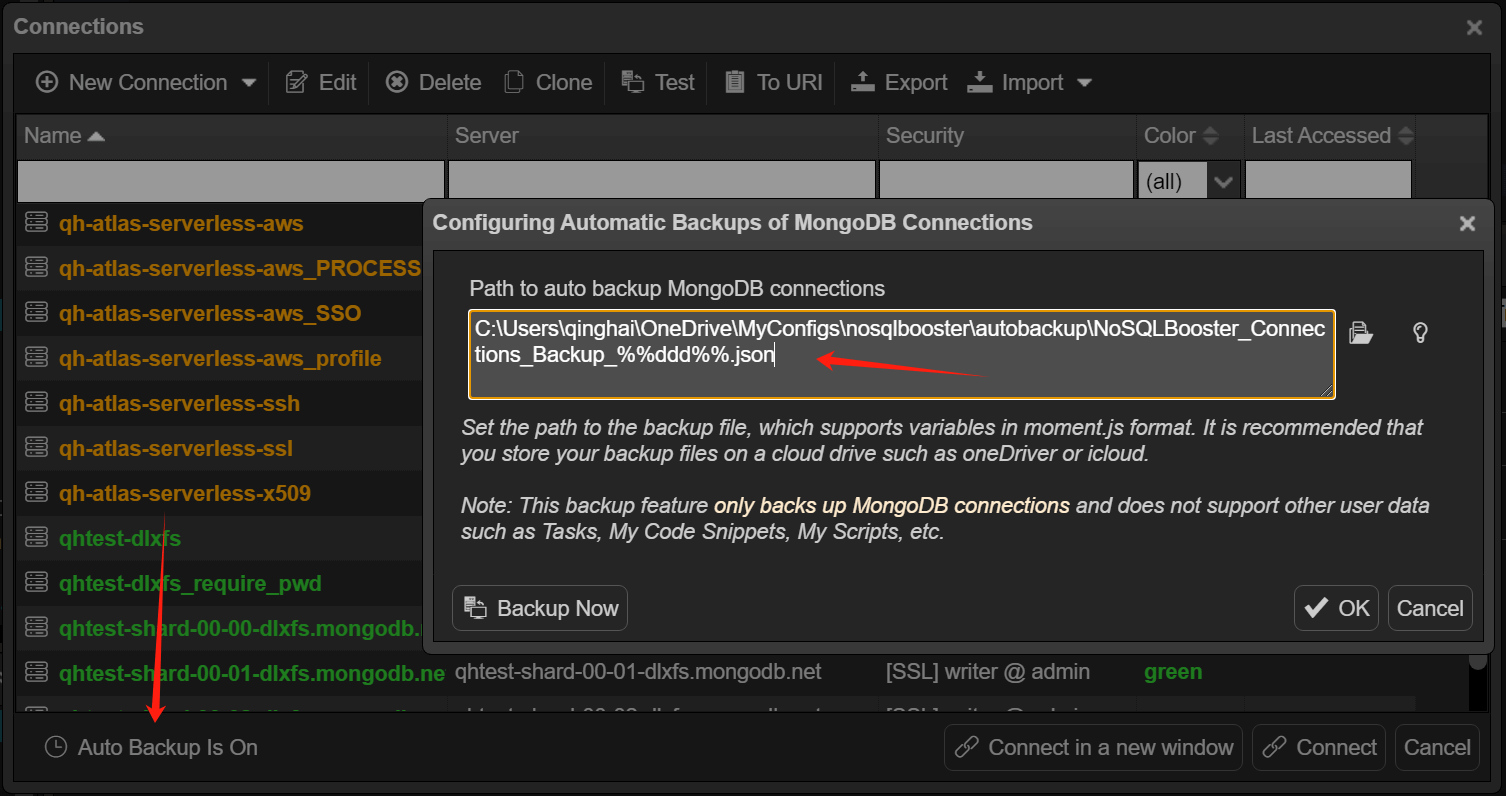
Backup connections regularly

It is now possible to automatically back up the database connections on a regular basis, and you can configure the backup directory to be a cloud drive or a specified remote shared directory. This way, you can import and use the backed up database connections on another machine.

Backup Connections

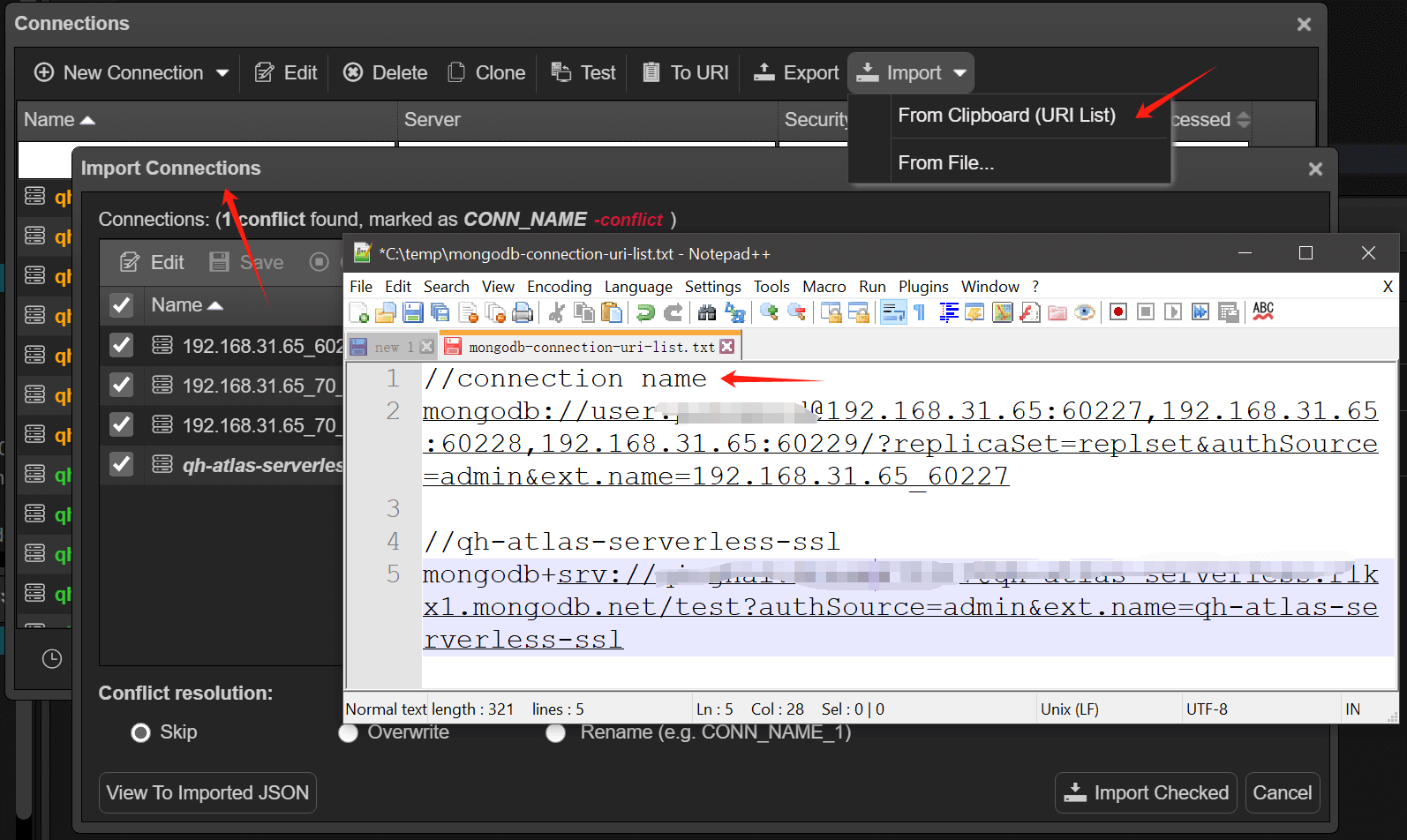
Import connections from URI list

In addition to importing the backup database connection JSON file. Importing/exporting Connection String URI list is now also supported. With this feature, you can import multiple MongoDB database connections at once. Each line of the file starting with mongodb:// represents a MongoDB connection, or you can add a comment at the beginning of the line to simply name the connection.

Import MongoDB URI List

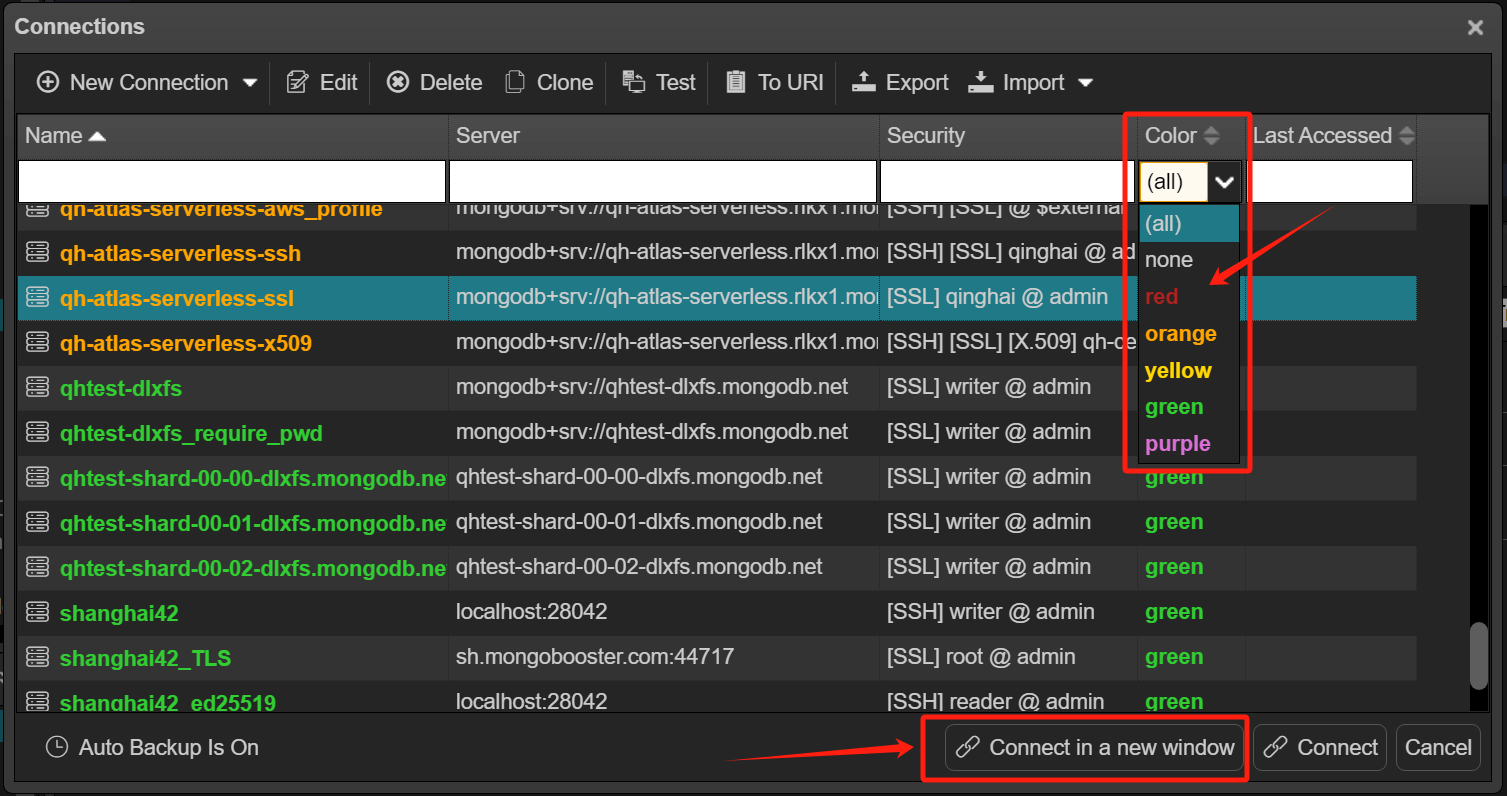
Open a connection in a new window

NoSQLBooster's object explorer supports multiple connections being displayed in the same object tree. And NoSQLBooster also supports multi-window mode, where you can assign a separate window to each connection.
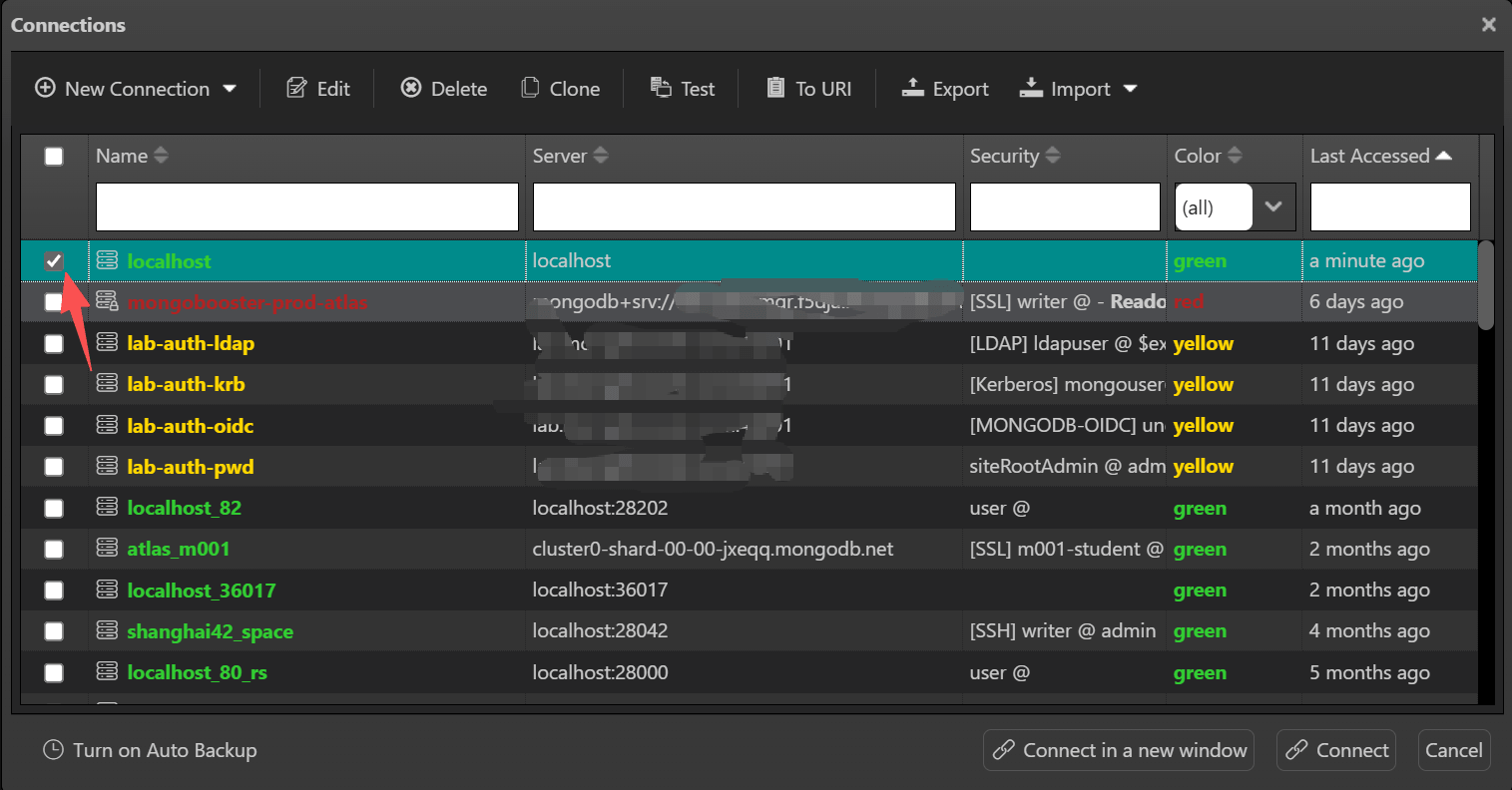
And, the color field has also been added to the connection's data grid so you can filter connections by color.

Connect in a new window

Database indexing related

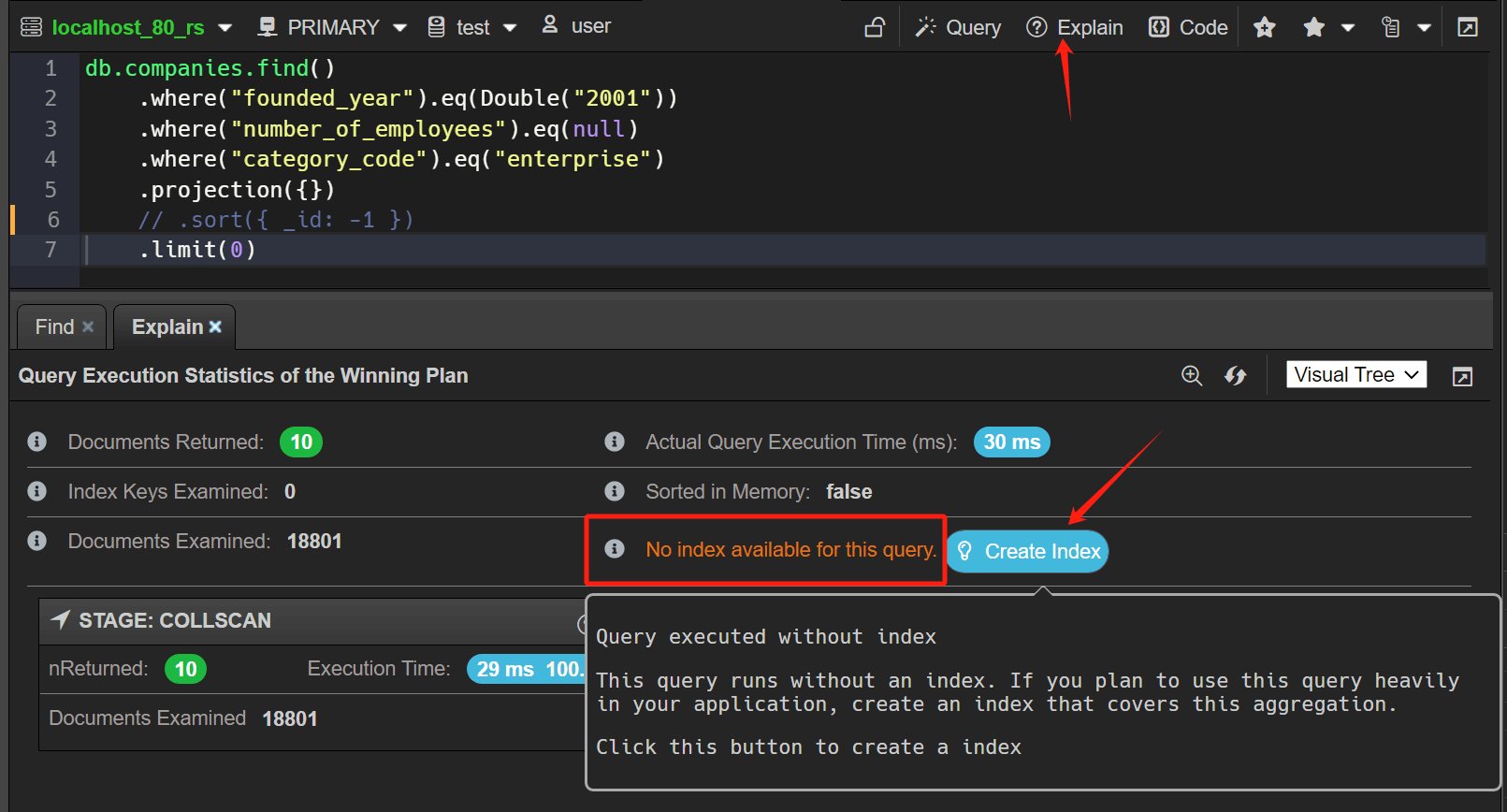
Suggest index

If the explain plan report query is run without an index, it will suggest that you create an index that covers the aggregation. The best indexes for your application must take a number of factors into account, including the kinds of queries you expect, the ratio of reads to writes, and the amount of free memory on your system. It is recommended to check the official documentation of MongoDB.

Suggest Index

Create index from query

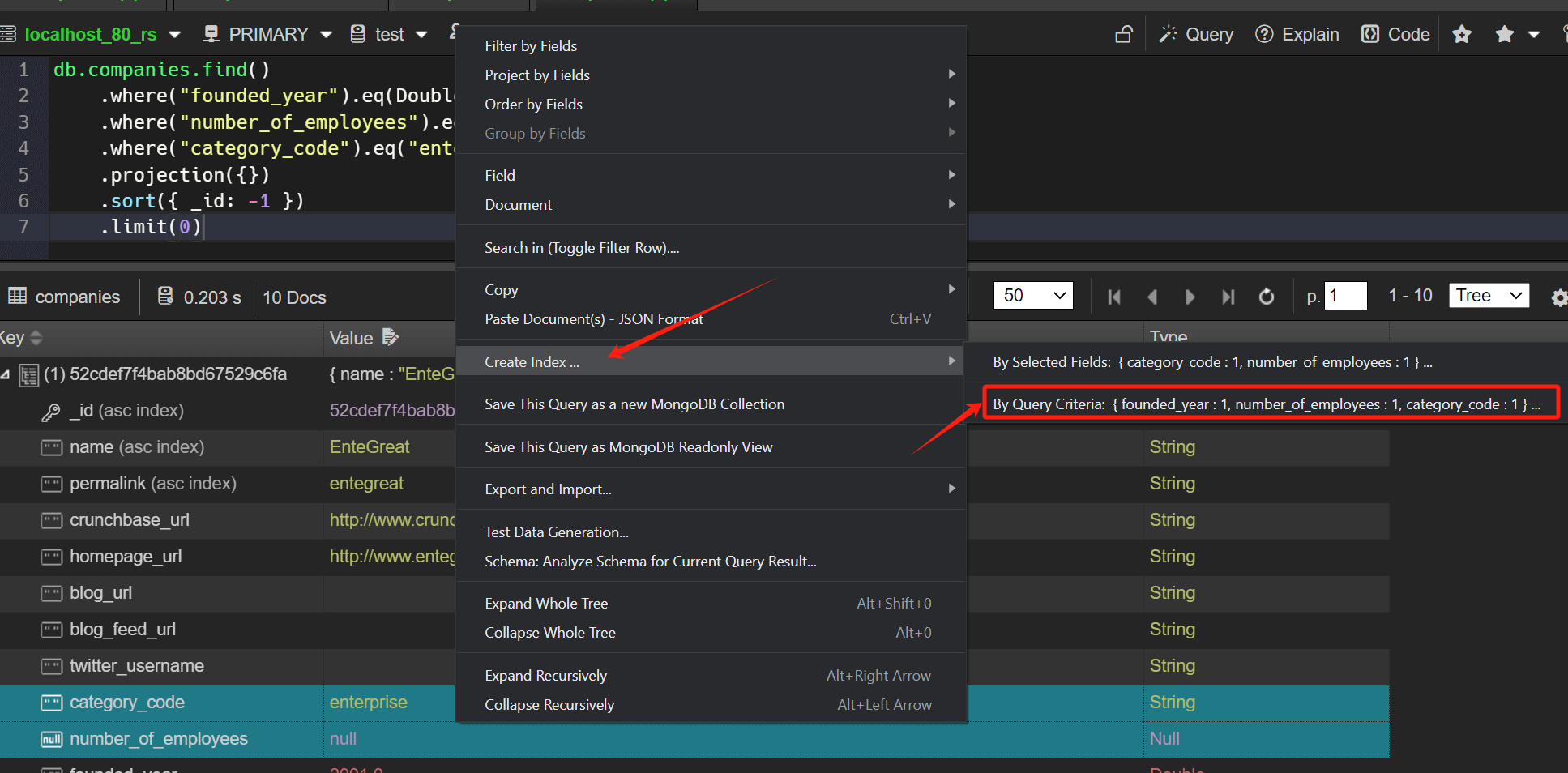
The version 9 provides a convenient feature to create a compound indexes directly based on the query criteria.
To access this function, right-click the data grid in the "tree/table" view, pop up context menu and click Create Index... menu item.

Create Index by the query criteria

Monitoring tools

Query Profiler - Query Code and Explain Plan

NoSQLBooster V9 enhances the original query analyzer. You can use the new visual explain plan to analyze slow queries, check for missing indexes, and use "query code" to view and re-execute MongoDB query code.

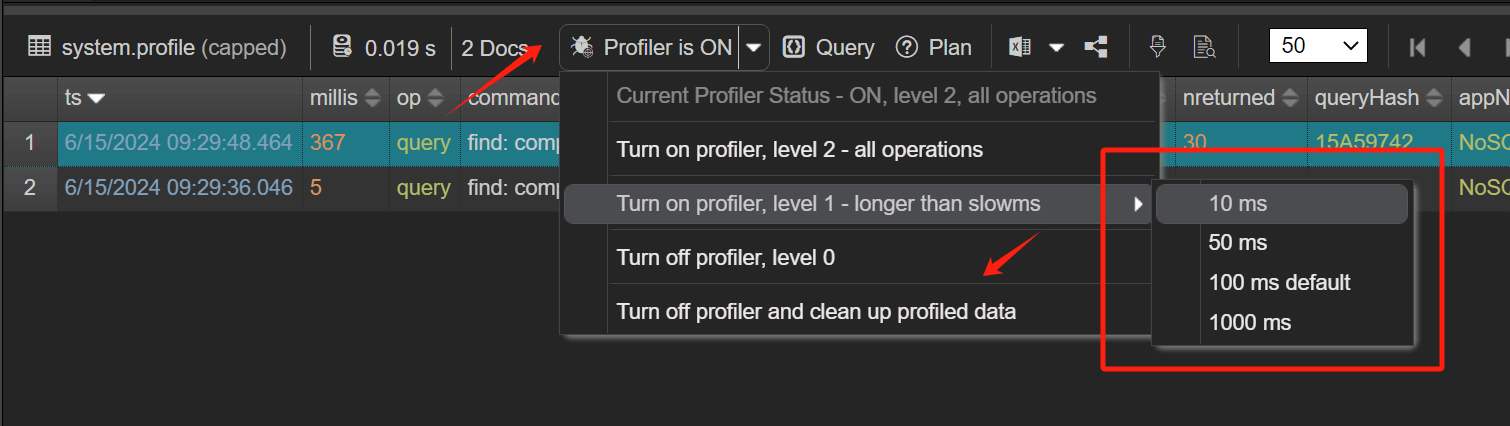
Profiler switcher

To switch off/on the profiler, click the Profiler switcher in the toolbar. When the profiler is closed, you can still view the profiling data that has been collected. If you don't need the data anymore, you can click the Turn off profiler and clean up profiled data to erase the data with one click.

Profiler Switcher

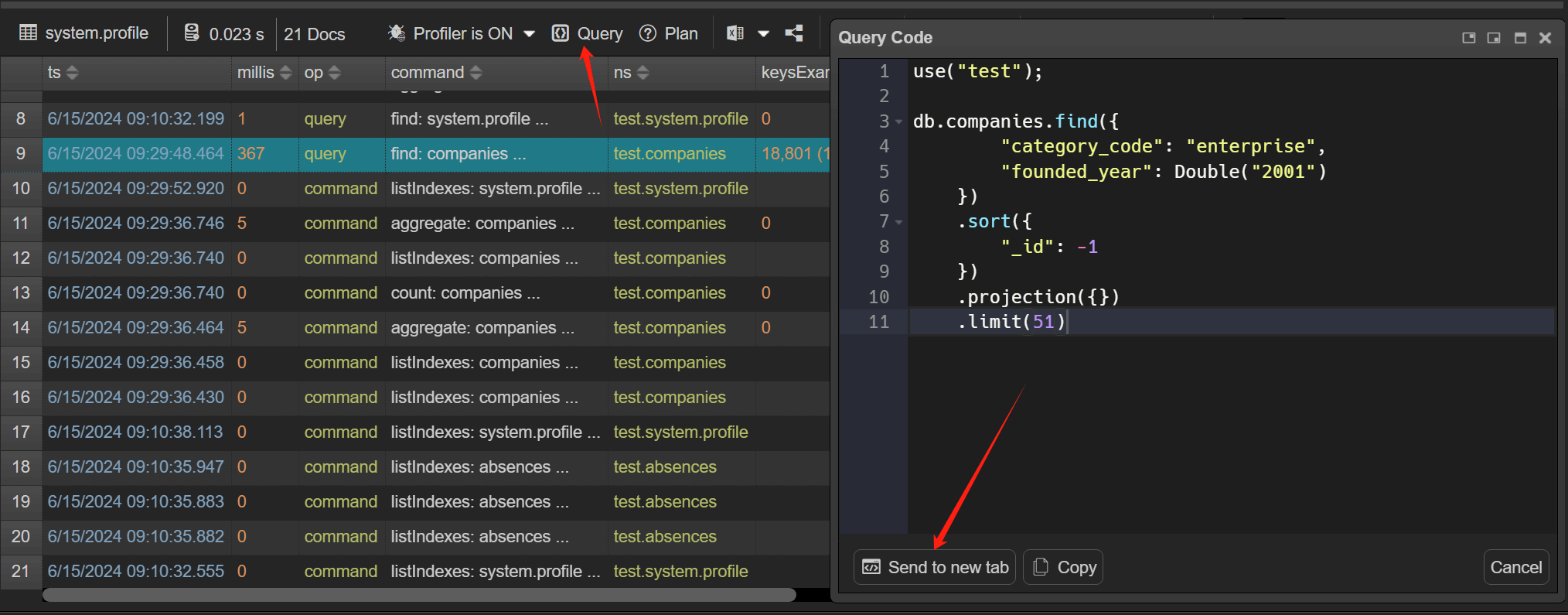
Query code

The "Query Code" viewer displays queries in the Mongo shell language, where you can debug and fix slow queries. Click "Query" button in the toolbar to pop up "Query Code" viewer.

Profiler Query Code

You can debug the code in NoSQLBooster, by clicking "Send to new tab".

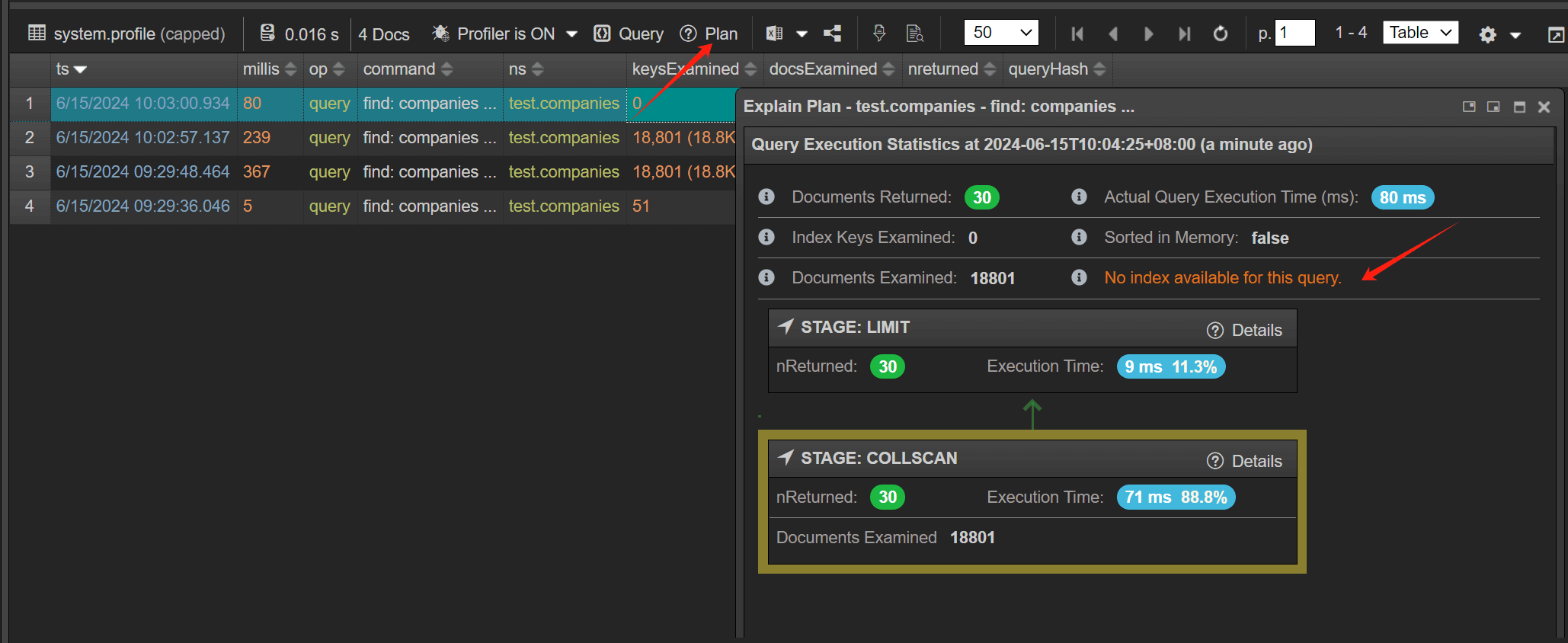
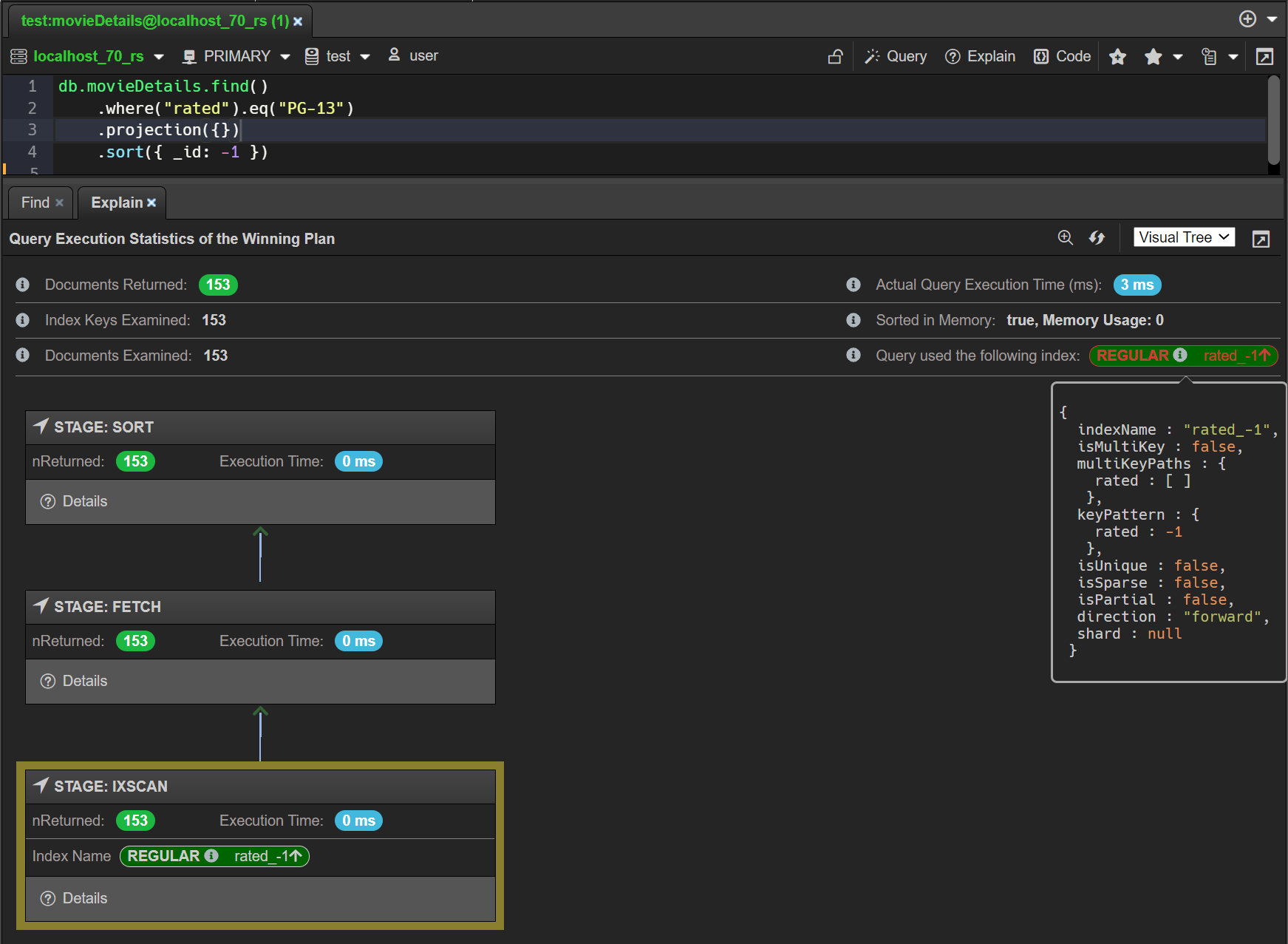
Explain code

To help you better understand the performance of your query, you can view your query's explain plan. On the "Explain Plan" dialog, you can view the explain stages as a visual tree, where each query operation appears as a node on the tree. You can also view the explain details in raw JSON format by clicking the "details" button. Explain plan is useful for checking if a query is using an index.

Profiler explain plan

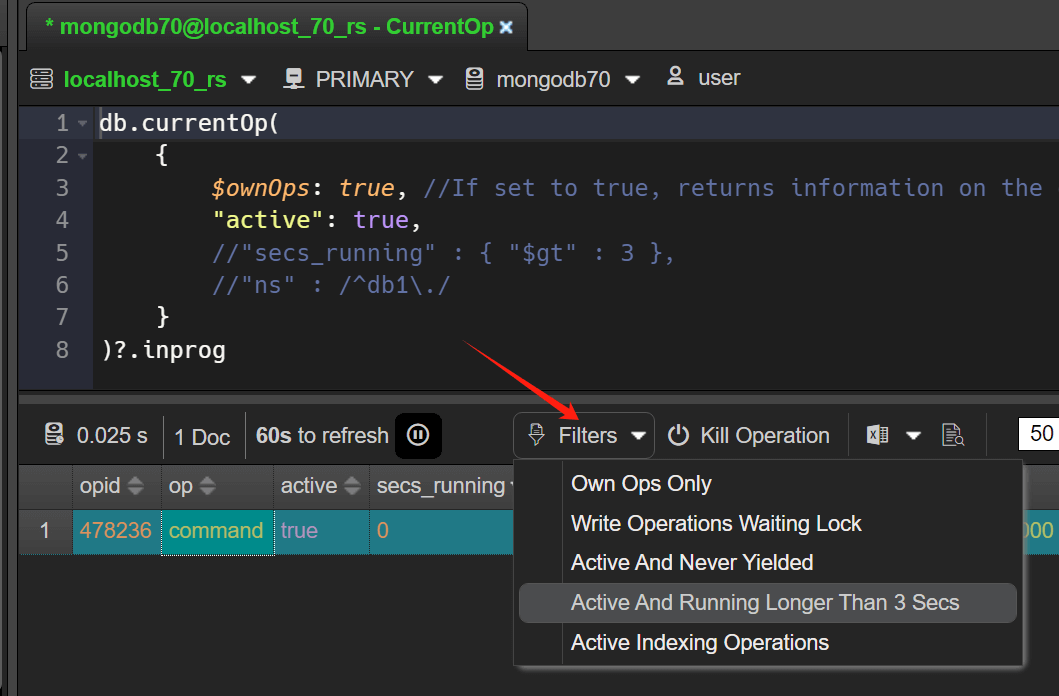
In-progress Operators - Preset filters

We've added some preset filters that let you find slow MongoDB queries more efficiently.

CurrentOp Filters

SQL query improvements

In this release, the free edition removes all restrictions on SQL queries and adds more SQL snippets.

The elemMatch function now supports like operation, and can also use the Regex function.

1
SELECT * FROM TickerNews where results = elemMatch(title LIKE '%stock%', tickers='BYY')

or

1
SELECT * FROM TickerNews where results = elemMatch(title LIKE RegExp('stock','i'), tickers='BYY')

Read More

NoSQLBooster 8.1 Released! official support for MongoDB 7.0

We're so proud to release NoSQLBooster for MongoDB 8.1 today. This version includes official support for MongoDB 7.0, Visual explain for Slot-Based Query Execution along with some useful improvements and bugfix. For more information on MongoDB Server 7.0 , see Release Notes for MongoDB 7.0.
MongoDB 7.0 support

NoSQLBooster for MongoDB 8.1 added support for all the new mongosh methods, aggregation stages and operators of MongoDB 6.1-7.0. Aggregation Pipeline (db.xxx.aggregate().xxxx()) and Operator helper ($.) also add these helper methods.
New Aggregation Operators

MongoDB 6.3 introduces the following aggregation operators:

Name Description NoSQLBooster Helper method
$bitAnd Returns the result of a bitwise and operation on
an array of int or long values.
$.bitAnd()
$bitNot Returns the result of a bitwise not operation on
a single argument or
an array that contains a single int or long value.
$.bitNot()
$bitOr Returns the result of a bitwise or operation on
an array of int or long values.
$.bitOr()
$bitXor Returns the result of a bitwise xor (exclusive or) operation on
an array of int and long values.
$.bitXor()

New MongoDB 7.0 mongosh Methods

Name Description
db.collection.createSearchIndex() Creates an Atlas Search index on a specified collection.
db.collection.dropSearchIndex() Deletes an existing Atlas Search index.
db.collection.getSearchIndexes() Returns information about existing Atlas Search indexes on a specified collection.
db.collection.updateSearchIndex() Updates an existing Atlas Search index.

New MongoDB 7.0 Aggregation Stages.

Name Description NoSQLBooster Helper Method
$listSampledQueries Lists sampled queries for all collections or
a specific collection.
db.coll.aggregate().listSampledQueries();
$.pipelineBuilder.listSampledQueries();
$listSearchIndexes Returns information about existing Atlas Search indexes
on a specified collection.
db.coll.aggregate().listSearchIndexes();
$.pipelineBuilder.listSearchIndexes();

Visual explain for Slot-Based Query Execution

NoSQLBooster 8.1 supports visual the explain results of the slot-based execution engine. Click here to see MongoDB official information on slot-based execution engine.

Visual explain for SBE

Other Improvements

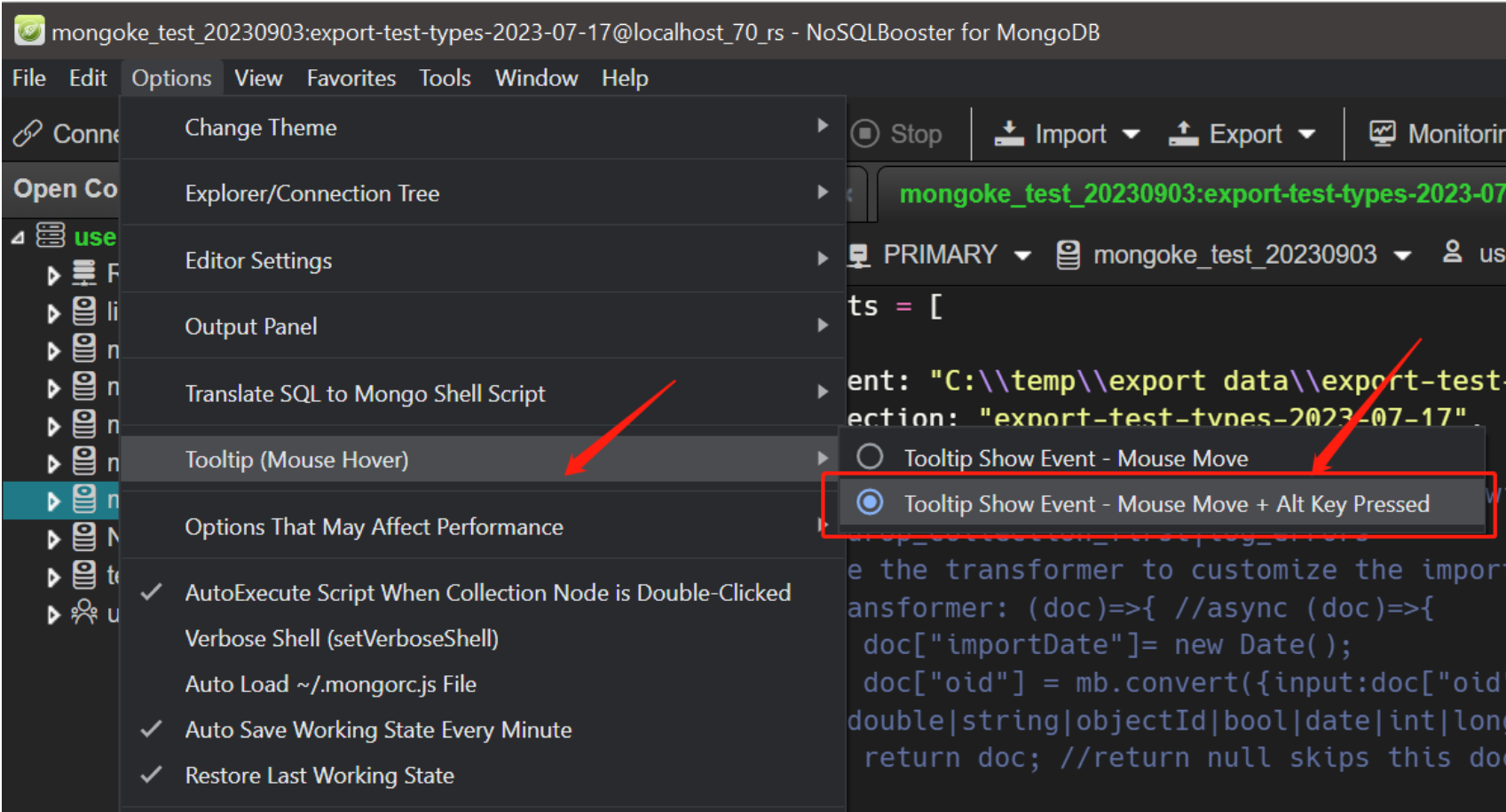
New Tooltip Show Event Option (ATL+MouseMove)

The tooltip message displayed with a delay of 1 second is sometimes quite annoying, and its inappropriate pop-up can sometimes cause unnecessary interference to the input. In 8.1 we added a new tooltip showevent option, you can use Alt+mousemove (hold alt key) to trigger the display of tooltip instead of the original mousemove event. When you press the alt key, the tooltip will be displayed immediately instead of being delayed for a second.

Use Menu -> Options -> Tooltip (Mouse Hover) to turn on this "ALT+MouseMove" option, default value is "Mouse Move".

Menu - Tooltip option

Minor Improvements and Bugfix

  • Fixed, Collection JSON import cause: E11000 duplicate key error when id policy is "overwrite_with_same_id" and the imported _id field is UUID.
  • Improved, Log Viewer - Use EJSON.parse instead of JSON.parse.

Patch Releases

Version 8.1.1

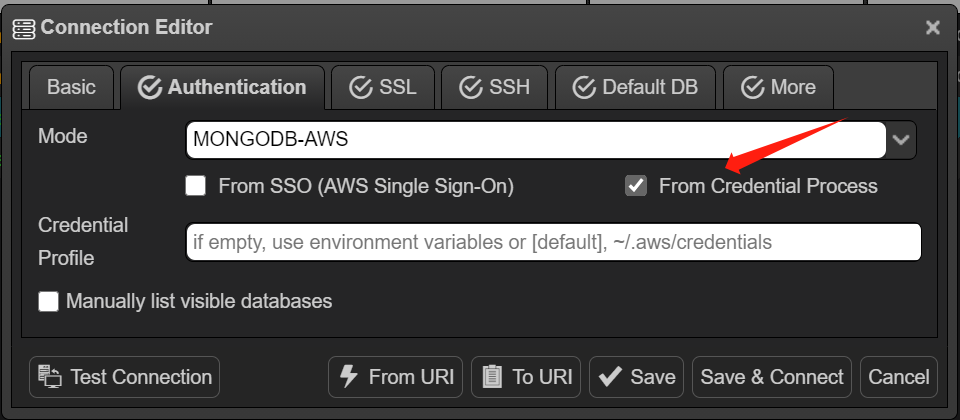
  • Improved, MongoDB AWS Authentication - add a "From Credential Process" option. More about it.
    AWS-Auth - fromProcess
  • Fixed, a mongosh command sh.status. output result compatible issue.
  • Fixed, an export error where the export option did not take effect. The error occurs when the export format is "Simple JSON Text" and the line separator is "\n,".

Version 8.1.2

  • Improved, Add Mongodump to the context menu of the database/collection tree node. Connection Tree -> Database/Collection Node -> Context Menu -> Export Collection -> Mongodump...
  • Improved, Add MongoRestore to the context menu of the database/collection tree node. Connection Tree -> Database/Collection Node -> Context Menu -> Import Collection -> Mongorestore...
  • Improved, Add "Add/Edit User Snippet..." item to the command palette.
  • Fixed, a bug where the tooltip could not pop up when the mouse hovered over the script history menu item.

Version 8.1.3

  • Fixed, a bug where console.log data was out of order when importing JSON file to collection.

Version 8.1.4

  • Fixed, an error where the license information in the status bar was displayed incorrectly.

Version 8.1.5

  • Fixed, an errors array undefined bug that was reported when copying a collection.

Version 8.1.6

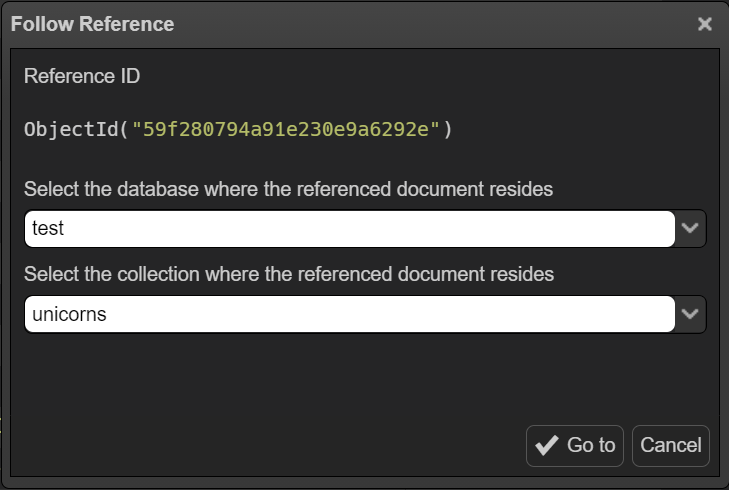
  • Added, Right-click ObjectId/Reference field and choose "Follow Reference" will open a document viewer with document the ObjectID/Reference it points to. The shortcut key is "shift+F7".
    Follow Reference
  • Improved, SQL correlated subqueries to allow one end of the equality operation to be an array type. Use the $cond operator to select $in instead of $eq based on the data type of the field.
  • Fixed, an error where updating data reported a not-primary node error when read preference mode is secondaryPreferred.
  • Fixed, "BSONSymbol" method typing definition issue.

Version 8.1.7

  • Fixed, In some cases, there is an error in importing the external Relational database tables, improperly silencing the error message.
  • Fixed, a bug where non-public schema tables could not be listed when importing external data from PostgreSQL.

Version 8.1.8

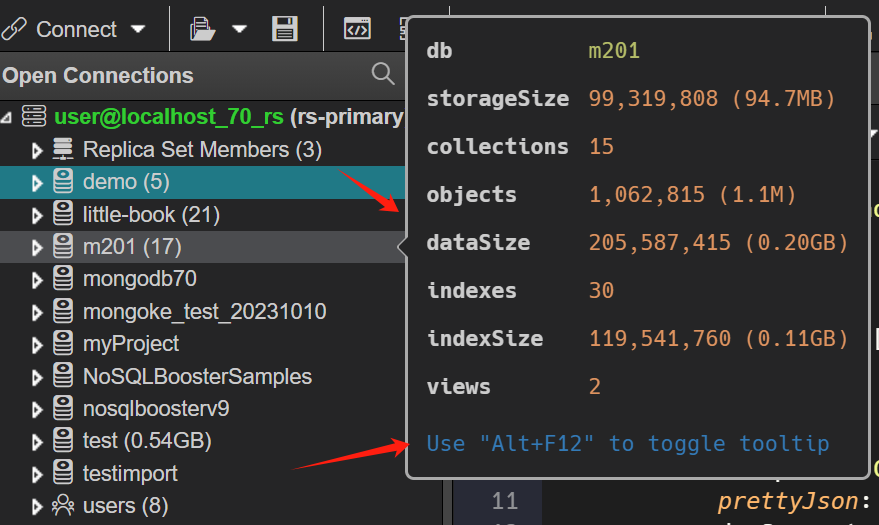
  • Improved, Moved object explorer's tooltip to the right to avoid blocking the object tree. You can now also press Alt+F12 to switch the tooltip(MouseHover) show event to Mouse Move + Alt Key Pressed.
    Object Explore Tooltip
  • Improved, sorts the fields of the index creation dialog and caches the fields to speed up the display of the field list.
  • Improved, SQL - Simplifies the generation of MongoDB shell scripts that project fields embedded in the object array.
  • Improved, SQL - Support statements like select * from collection where "arrayObject" = elemMatch(name LIKE '%abc%', title = RegExp('abc', 'i')), LIKE and RegExp in elemMatch where condition.
  • Fixed, a bug with copy collection that caused an infinite import error when the source and target collection were the same.
  • Fixed, a collection export error. When there is already an active query in the current tab, a collection export error occurs when clicking on Export Collection in the right-click menu of the object explorer.
  • Fixed, a bug that pressing Command+Shift+[ or Command+Shift+] to switch tabs doesn't work under MacOS.
  • Fixed, a bug that clicking on a collection in the search result list of the object tree could not open the collection directly.

Version 8.1.9

  • Improved, to avoid too much invalid logging, only the first command output is printed when the mongosh command is inside a for loop.
  • Improved, in the "Add script to favorites (user snippets)" feature, it is possible to override renamed code snippets.

Version 8.1.10

  • Fixed, a bug in the UI display when the tree view is refreshed
  • Improved, allow connection to MongoDB Server 8.0.

Thank you!

Please visit our feedback page or click the “Feedback” button in the app. Feel free to suggest improvements to our product or service. Users can discuss your suggestion and vote for and against it. We’ll look at it too.

AWS IAM Passwordless Authentication support

In 8.0.12, NoSQLBooster added support for MongoDB-AWS IAM authentication. Now you can connect to MongoDB with AWS IAM (AWS Single Sign-On) Passwordless Authentication.

Configure AWS SSO Authentication

Set up AWS Profile for AWS CLI with AWS SSO configuration

If you want to learn how to use AWS single sign-on (SSO) to set up AWS CLI, you can refer to the following documentation.

Here, we have set up AWS Profile for AWS CLI with AWS SSO configuration with the following configuration of our AWS SSO setup.

The location of the configuration file is ~/.aws/config.

1
2
3
4
5
6
7
8
9
10
11
12

#######################
#### AWS SSO ####
#######################

[profile aws-sso-demo-account]
sso_start_url = https://d-93670bbbbb.awsapps.com/start
sso_region = eu-west-1
sso_account_id = 012345678910
sso_role_name = PowerUserAccess
region = eu-west-1

Set up AWS SSO Authentication in NoSQLBooster

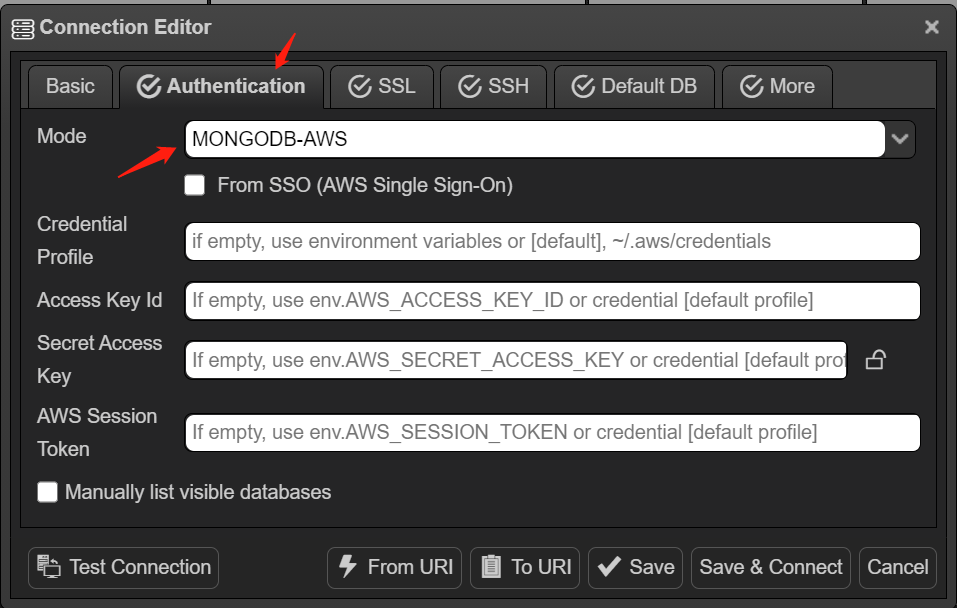
  1. Open the connection configuration editor of NoSQLBooster, switch to the Authentication tab, and use the MongoDB-AWS authentication method.

AWS-Auth interface

  1. Check the "From SSO (AWS Single Sign-on)" checkbox.
  2. Fill in the configured AWS profile "aws-sso-demo-account" in the "Credential Profile" edit box.
  3. Click "Test connection".

These are all the configuration steps.

Thank you!

Please visit our feedback page or click the “Feedback” button in the app. Feel free to suggest improvements to our product or service. Users can discuss your suggestion and vote for and against it. We’ll look at it too.

NoSQLBooster 8.0 Released!

We are pleased to mark another important milestone for NoSQLBooster for MongoDB, the final version of 8.0. This major upgrade includes using mongosh instead of legacy mongo shell as an embedded shell, support for MongoDB 6.0, MongoDB operator helper, aggregation pipeline builder, a separate result tab for each mongosh command, greatly improved data view, one-click filtering/projection, import and export tools, test data generator and more.

If you want to try NoSQLBooster 8.0 out now, you can get it from the following link.

NoSQLBooster 8.0 Download Link

The product will automatically enter the 30-day trial mode after a successful installation. At the end of the 30-day trial period, the product becomes a free edition. The free version is free for personal/commercial use but with limited functions.

The following figure shows the main interface of version 8.0.

Main interface

Let's dive in and get an overview of what's coming in NoSQLBooster 8.0!

Although we are showing screenshots of NoSQLBooster for Windows, all these new features are available for Mac OS X and Linux as well.

Read More

NoSQLBooster 7.1 Released!

We're so proud to release NoSQLBooster for MongoDB 7.1 today. This version includes MongoDB Node.js driver Upgrade from 4.1 to 4.4, Data types compatible with mongosh, MSSQL connection string, More font options, ReplicaSet Member Tags along with some useful improvements and bugfix.

Node.JS Driver Upgrade From 4.1 to 4.4

MongoDB Node.js driver upgrade from 4.1 to 4.4 in NoSQLBooster 7.1. And, we have updated the typing definition of mongoshell methods to synchronize to the latest version of MongoDB. While upgrading to the latest MongoDB Node.js driver, we still maintain support for the old version of MongoDB server. NoSQLBooster supports MongoDB server versions 2.6 to 5.3.

Data Types Compatible With mongosh

NoSQLBooster 7.1 adds Int32(NumberInt), Long(NumberLong), Decimal128(NumberDecimal) data types to be compatible with mongosh.

1
2
3
4
5
6
Int32(1); //= NumberInt(100) in legacy mongoshell

Long("123"); //NumberLong("123") in legacy mongoshell

Decimal128("-1"); //NumberDecimal("-1") in legacy mongoshell

More Fonts and Font Ligatures Support

In 7.1, we have four built-in editor fonts (Hack, Fira Code, JetBrain mono and Source Code Pro) to choose from. Fira Code and JetBrain Mono support font ligatures.

Use the editor's right-click menu to set the font, and you can also switch the editor font through the main menu.
To use it, Click Menu -> Options -> Editor Settings -> Font.

Left: ligatures as rendered in Fira Code. Right: same character sequences without ligatures.

Font Fira Code

Display Tags in the Rs Member Selector

You can directly connect and switch members of the replica set within the script editor. MongoDB Atlas clusters are configured with pre-defined replica set tags for different member types in the cluster. In 7.1, the tags for the member are displayed in the member set selector to make it easier to select a specific member by member type and region. Note: current user need to have permission to execute replSetGetStatus command.

RS Member Selector Tags

Support MSSQL Classic Connection String

When importing data from a MSSQL database, two formats of connection string are supported. Both formats need to start with the string "mssql://"

  • Classic Connection String
1
2
mssql://Server=localhost,1433;Database=database;User Id=username;Password=password;Encrypt=true
mssql://Driver=msnodesqlv8;Server=(local)\INSTANCE;Database=database;UID=DOMAIN\username;PWD=password;Encrypt=true
  • Connection String URI
1
2
mssql://username:password@localhost:1433/database?encrypt=true
mssql://username:password@localhost/INSTANCE/database?encrypt=true&domain=DOMAIN&driver=msnodesqlv8

Other Improvements

Log Windows - Filter Row and Sorting

NoSQLBooster's client-side user query log window is a very useful function for diagnosing query problems. In 7.1, we enhanced the UI function of the log window, adding sorting and filter row.

Log Window with Filter Row

Tooltip - ShowDelay 1s

Displaying tooltips too frequently is really a bit annoying. In 7.1, we increased the display delay of tooltip and menubutton from 100ms to 1000ms, hoping to partially solve this issue.

Read More